Updated . Built against the tool’s current screens and checked step by step. How we check this lesson
Someone hands you a 25-page vendor proposal an hour before the meeting. The partners want three things: what it costs, how long it locks you in, and how to get out. Those answers are in there, but usually in the back, in sections called Price changes, Term and renewal and Ending the agreement. Smallpdf (smallpdf.com) has AI PDF tools that summarize a document and answer questions about it, with page links you can click to check. In this free business-case lesson you summarize a made-up 25-page managed IT proposal, ask about renewal, exit fees and extra costs, check each answer on its page, catch a fee the AI left out of a list, and download the whole conversation as a text file. Every Smallpdf screen is real, from a free account. This is my own lesson, not an official Smallpdf course.
At a glance
| Question | Answer |
|---|---|
| What you build | A business case for anyone handed a long vendor proposal before a meeting: get an AI summary in Smallpdf, ask about renewal, exit fees and extra costs, check each answer on its page and save it all as notes. |
| Tools | Smallpdf |
| Time | About 10 minutes, 23 steps in 7 parts |
| Level | Beginner, no coding needed |
| Cost | Free |
| Ways to learn it | Practice it step by step |
The 7 parts, in short
- A 25-page proposal, 5 minutes: Read the email, Put a price on it, Get the sample PDF, Meet Smallpdf.
- Open the AI summarizer: Open AI PDF, Pick Summarize, Select the PDF.
- Read the summary: Read the summary, Notice what is missing.
- Ask about money and exits: Ask how to get out, Send it, Read the answer, Click p. 18.
- Check it on the page: Check the source, Ask for every extra cost, Spot the gap, Ask a pointed follow-up, and 1 more step.
- Save it and do the math: Click Download, Open the saved notes, Do the year-one math yourself.
- What it saves, what it costs: What this saves you, Check what is free.
Part of: AI for Operations Teams (step 28 of 28)
Part of: AI Apps Worth Knowing (step 40 of 42)
The sample PDF to try it on
A 25-page managed IT services proposal from Northbeam IT Services to Larkspur Accounting Group. Both companies, every name and every number are made up, and the footer on each page says so. It has 22 sections, and the terms that cost money are spread through it, just like a real one.
| What the partners asked | Where it is in the PDF |
|---|---|
| What does it cost each month? | $3,450 for 24 users ($143.75 each), page 14 |
| Any one-time fees? | $4,800 onboarding fee, page 15 |
| What is extra? | Licenses, hardware, projects, long backup retention (page 16); after-hours help at $185 an hour (page 8) |
| Can the price go up? | Up to 6% once every 12 months, page 17 |
| How long are we locked in? | 36 months, renews for 36 more unless notice 90 days before the end, page 18 |
| What does leaving early cost? | 75% of the monthly fees left in the term, page 19 |
Download the sample proposal (PDF, 25 pages) About 3,000 words, so it fits the free plan's AI word limit. Upload it in Smallpdf's Summarize tool, or use your own long PDF.
The business case: a long PDF and a short deadline
Picture Maya Chen, office manager at Larkspur Accounting Group, a made-up 24-person firm. A vendor sends a 25-page proposal for managed IT. The partners meet at 2 PM and want the cost, the lock-in and the way out.
Here is the arithmetic, using example numbers you should replace with your own. Reading a proposal like this closely takes about 45 minutes. A summary, three good questions and a check of each answer on its page takes about 10. At four long documents a month, that is about 2 hours 20 minutes back, or about $105 a month at $45 an hour. The bigger win is not missing the clause that costs thousands.
Who this is for, and what you need
Office managers, operations staff, bookkeepers and owners who get long proposals, policies or contracts and need the key points fast. To follow the practice you need nothing. To do it for real you need a free Smallpdf account and a PDF. We ran every step in a free account on 18 October 2026 with the sample PDF below.
Step 1: open AI PDF and upload the file
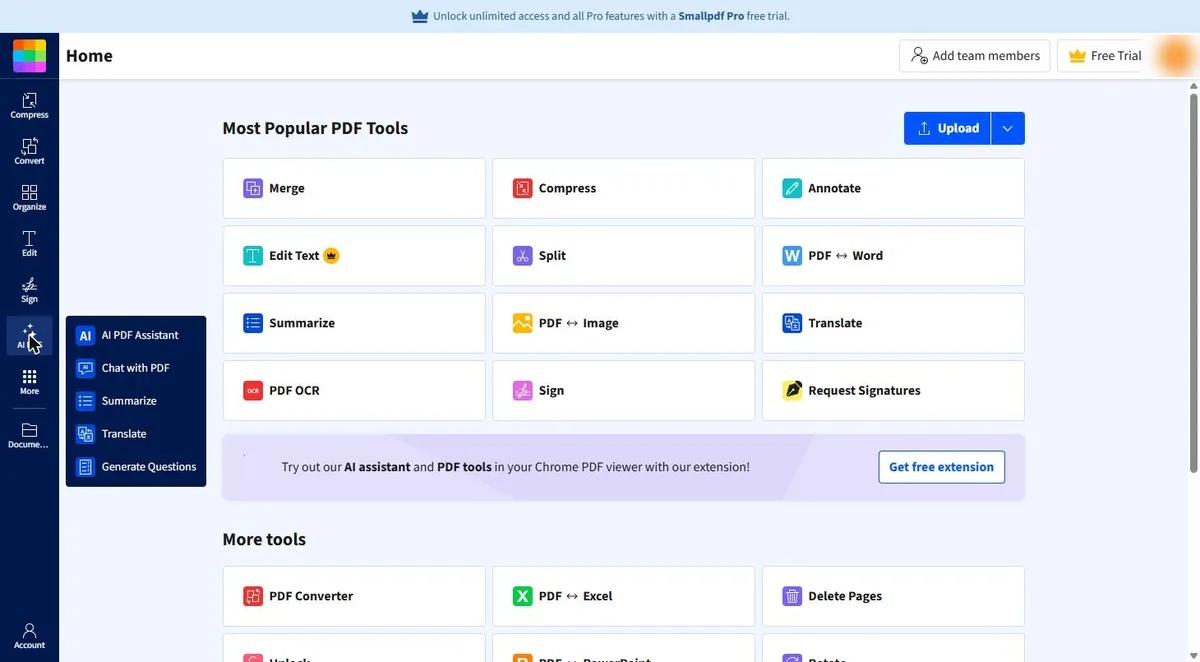
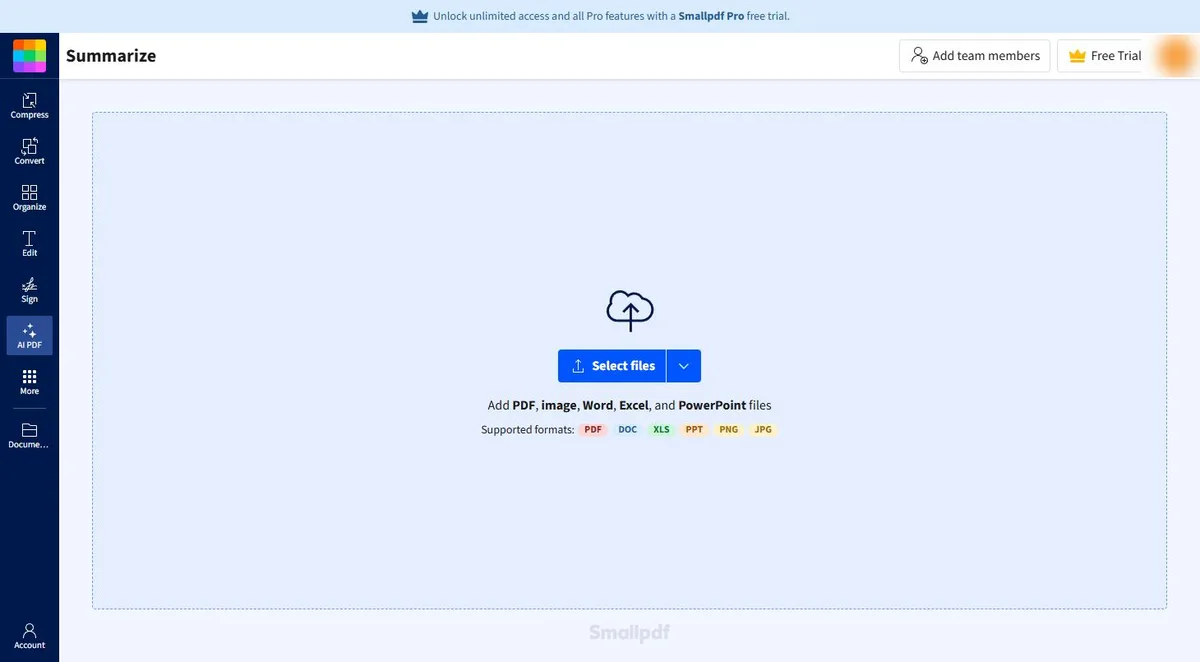
Sign in at smallpdf.com. In the left bar, click AI PDF. The menu lists AI PDF Assistant, Chat with PDF, Summarize, Translate and Generate Questions. Click Summarize, then Select files and pick your PDF. The page says it takes PDF, image, Word, Excel and PowerPoint files.
Step 2: read the summary, and notice what is missing
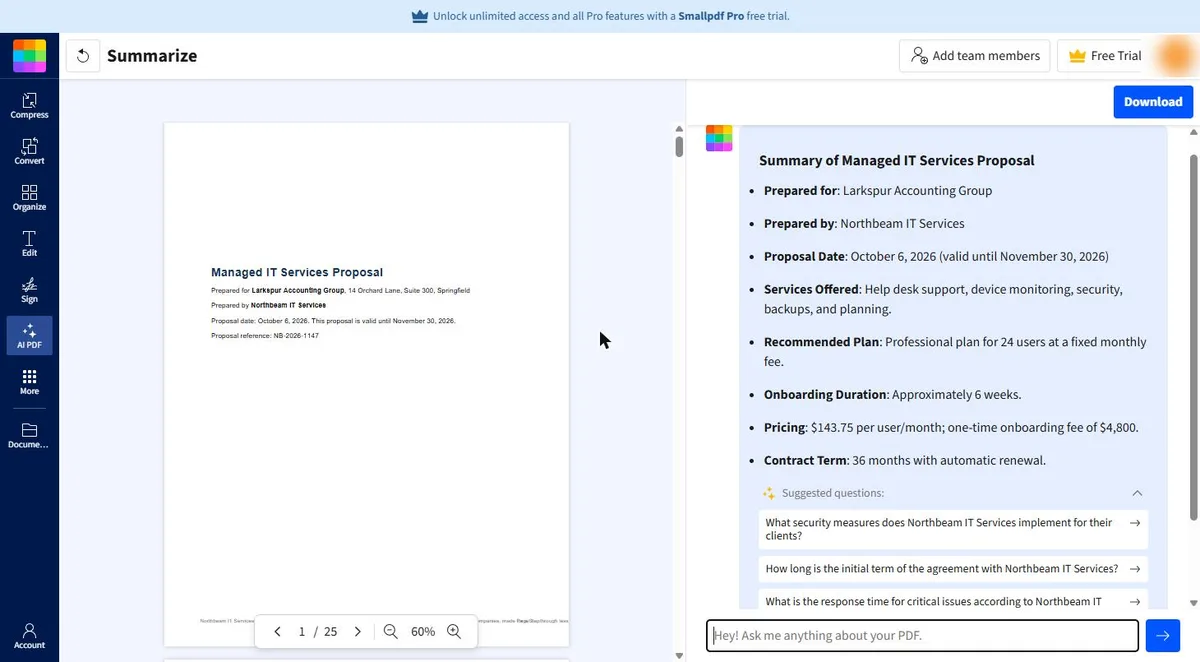
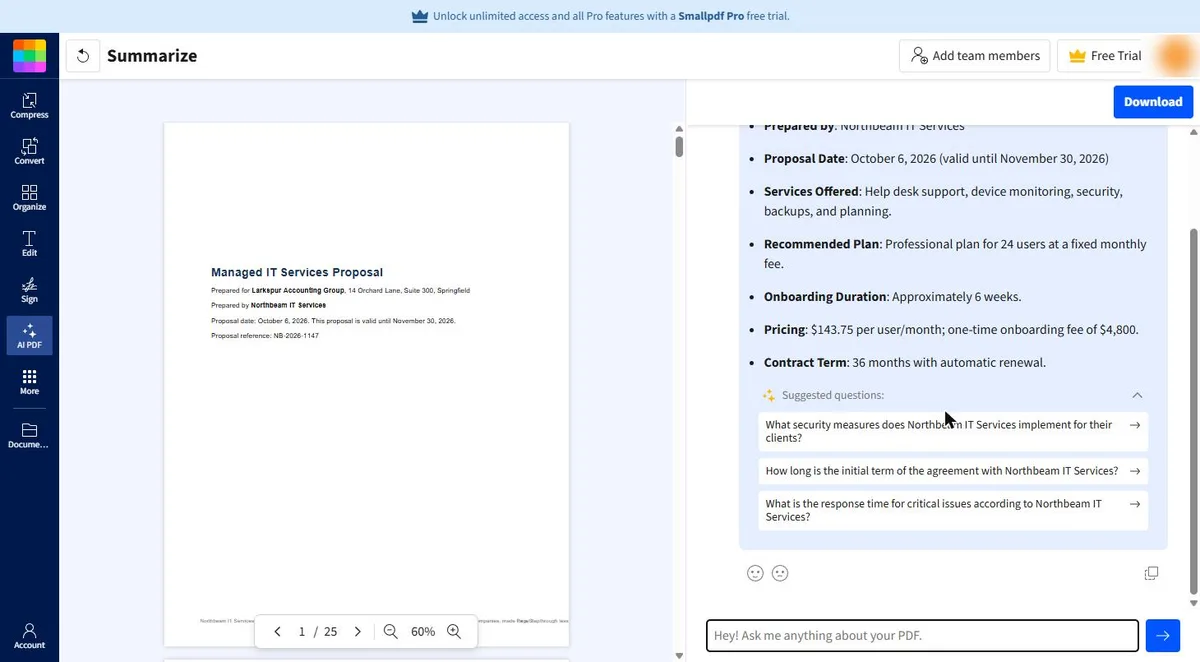
In a few seconds the PDF opens on the left and a summary appears on the right. For the sample it listed who the proposal is for, the services, $143.75 per user a month, a $4,800 one-time onboarding fee and a 36-month term with automatic renewal.
It did not say how to stop the renewal, that the price can rise 6% a year, what leaving early costs, or the after-hours rate. The suggested questions under it were about security and response times. A summary is a first read. The questions that cost money, you ask yourself.
Step 3: ask about money and exits, with page numbers
Type into the Ask me anything about your PDF box. Ask for page numbers every time, so each answer is easy to check. These are the three questions from the lesson:
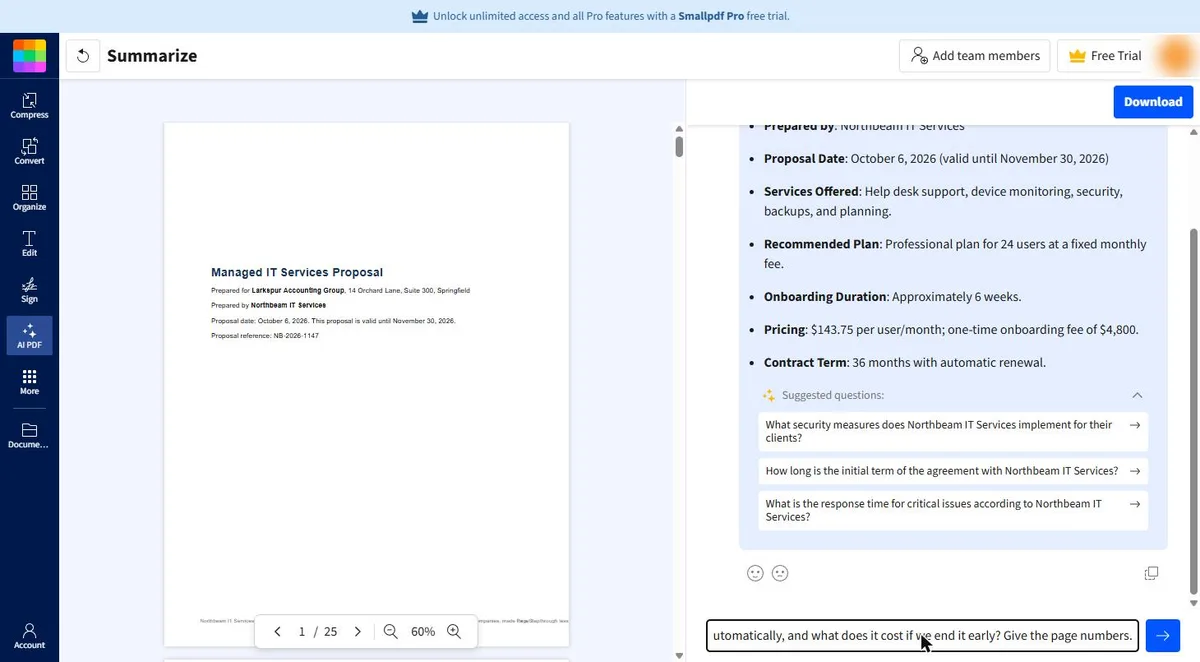
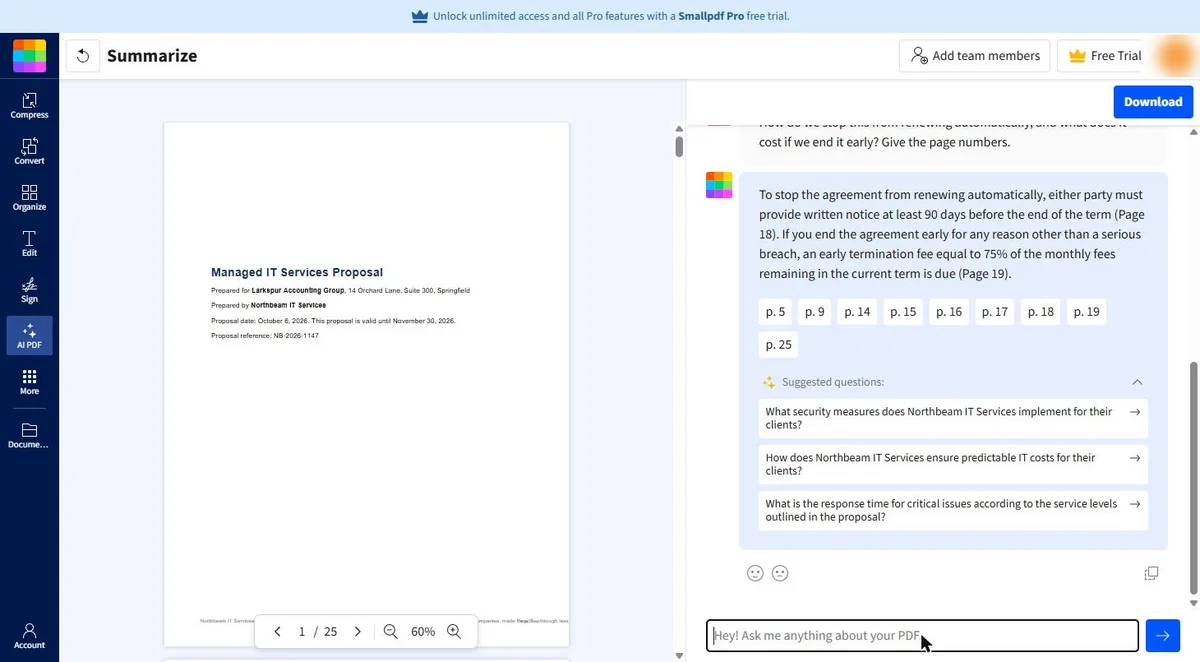
- How do we stop this from renewing automatically, and what does it cost if we end it early? Give the page numbers.
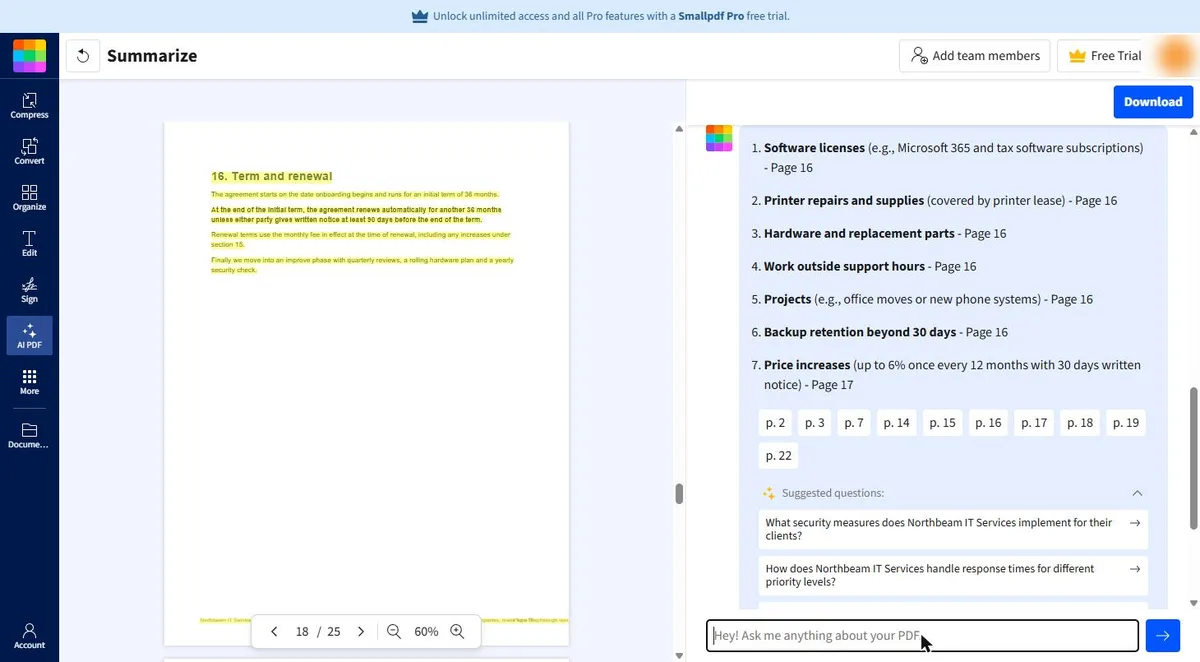
- List every cost that is not in the monthly fee, including price increases. Give the page for each.
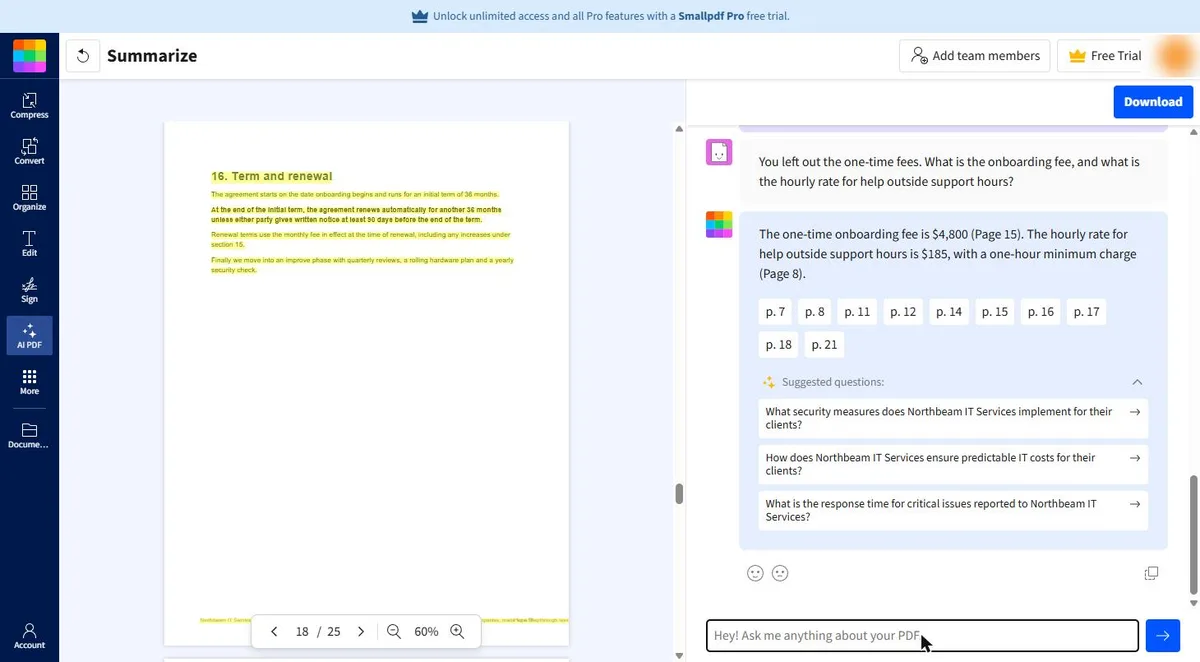
- You left out the one-time fees. What is the onboarding fee, and what is the hourly rate for help outside support hours?
Step 4: check each answer on its page
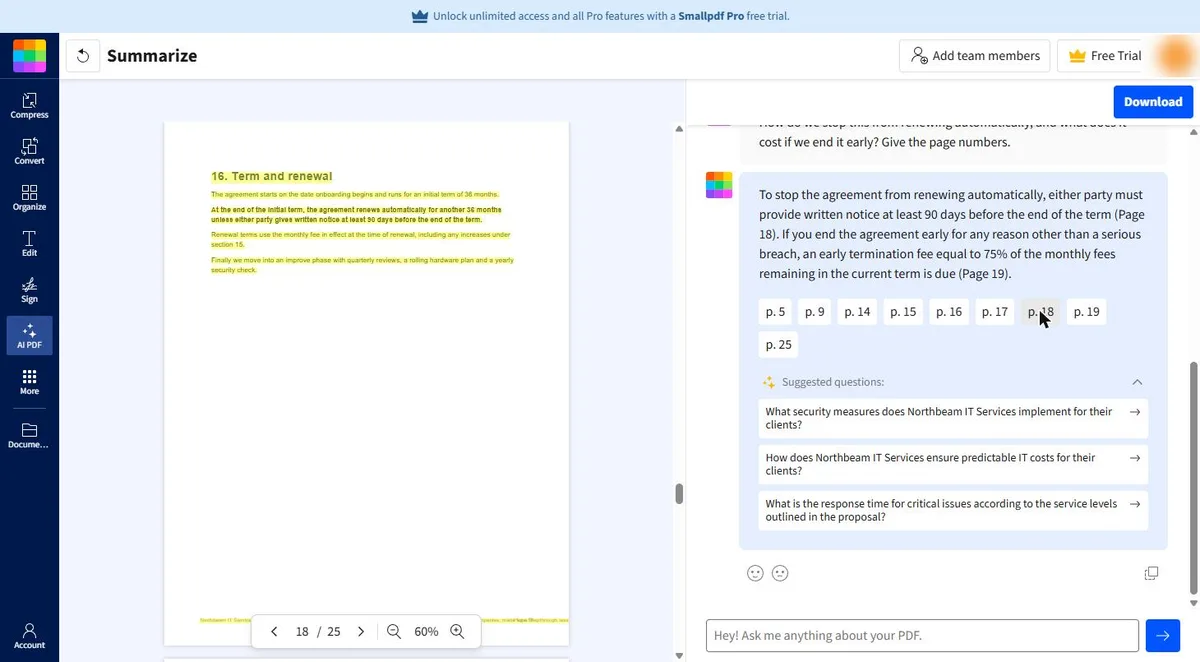
Under each answer Smallpdf shows page chips, such as p. 18. Click one and the PDF jumps to that page with the text it used highlighted. For the renewal question, page 18 read: renews automatically for another 36 months unless either party gives written notice at least 90 days before the end of the term. The answer matched.
The list of extra costs named seven items, including price increases of up to 6% a year, but left out the $4,800 onboarding fee and gave no rate for after-hours work. A pointed follow-up got both: $4,800 on page 15 and $185 an hour with a one-hour minimum on page 8. When an answer leaves something out, say so and ask again.
Step 5: download the notes and do the math yourself
Click Download at the top right. In our free account it saved a text file with the summary and every question and answer, named after the PDF. Paste it into your meeting notes.
Then add up year one by hand, not with the AI: $3,450 a month times 12 is $41,400, plus the $4,800 onboarding fee, so $46,200 before any after-hours work. Put the renewal notice date in the calendar now: 90 days before the end of month 36.
Mistakes to avoid
- Stopping at the summary. It left out the renewal notice, the price increase and the exit fee.
- Asking without page numbers. Without them, checking means rereading.
- Trusting a list because it looks complete. Compare it with what you already know.
- Letting the AI do the money math. Add it up yourself from the numbers on the page.
- Uploading a document that is too long for your plan. The free plan's AI word limit is 25,000 to 35,000 words per document.
Links
- Smallpdf AI PDF Summarizer: the tool this lesson uses: upload a file, get a summary, then chat with it.
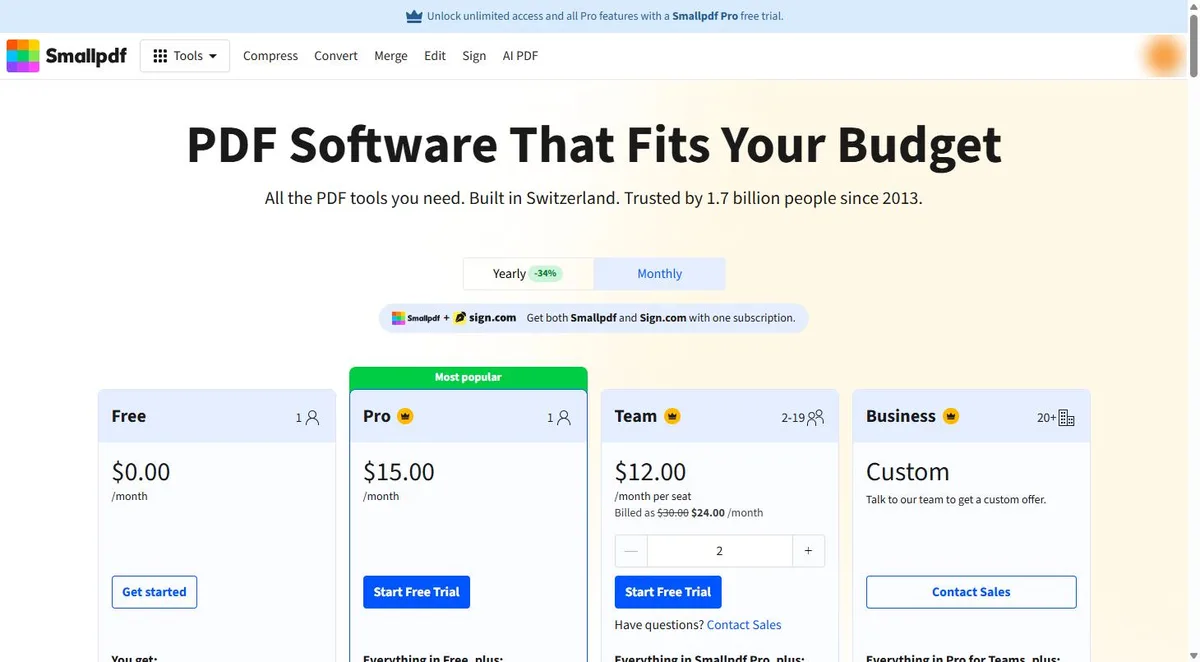
- Smallpdf pricing: current plans. On 18 October 2026: Free $0 with Chat with PDF and AI PDF Summarizer marked Limited and a 25,000 to 35,000 word limit per document; Pro $15 a month, or $10 a month billed as $120 a year, with unlimited AI tools and a 100,000 word limit; a 7-day free trial.
Try it yourself, free
Reading the steps is a start. Doing them is how it sticks. The interactive module walks you through every click in a practice copy of Smallpdf, checks each step, and never touches your real accounts.
Start “Smallpdf: Get the Key Points of a 25-Page PDF in 5 Minutes”Step by step: Smallpdf: Get the Key Points of a 25-Page PDF in 5 Minutes
All 23 steps of the interactive module, in order. In the module you watch each one, then do it yourself in a practice copy that checks your work.
1. A 25-page proposal, 5 minutes
- Read the email. Maya Chen is the office manager at Larkspur Accounting Group, a 24-person firm (made up). A vendor, Northbeam IT Services, just sent a 25 pages managed IT proposal. The partners meet at 2 PM and want three things: what it costs, how long it locks us in, and how to get out. Click the email.
Meet Maya. She runs the office at a small accounting firm. A vendor just sent a twenty-five page proposal. The partners meet at two. They want to know what it costs, how long it locks them in, and how to get out.
- Put a price on it. Reading a proposal like this closely takes Maya about 45 minutes. With an AI summary and three good questions, it is about 10 minutes, checking included. She gets 4 long documents a month, so that is about 2 hours 20 minutes a month. At $45 an hour, that is about $105 a month. These are example numbers, so swap in your own. Click the total.
Reading it closely takes about forty-five minutes. With an A I summary and three good questions, it's about ten, checking included. Four long documents a month, and that's over two hours back. Use your own numbers here.
- Get the sample PDF. The proposal is a 25-page PDF: pricing, support hours, renewal and what happens if you leave, spread across 22 sections. Download it from the card if you want to follow along in your own Smallpdf account. The companies and numbers in it are made up. Click the PDF card.
Here's the proposal. Twenty-five pages, twenty-two sections. You can download it from this card, and try it in your own Smallpdf account.
- Meet Smallpdf. Smallpdf (smallpdf.com) is a set of online PDF tools: compress, convert, merge, edit and sign, plus AI PDF tools that summarize a document and answer questions about it. The plan: get a summary, ask about the money and the exits, check each answer on the page, and save the whole thing. The Smallpdf screens ahead are real, from a free account. Click the Smallpdf card.
Smallpdf is a set of online P D F tools. It also has A I tools that summarize a document, and answer your questions about it. The screens ahead are real, from a free account.
2. Open the AI summarizer
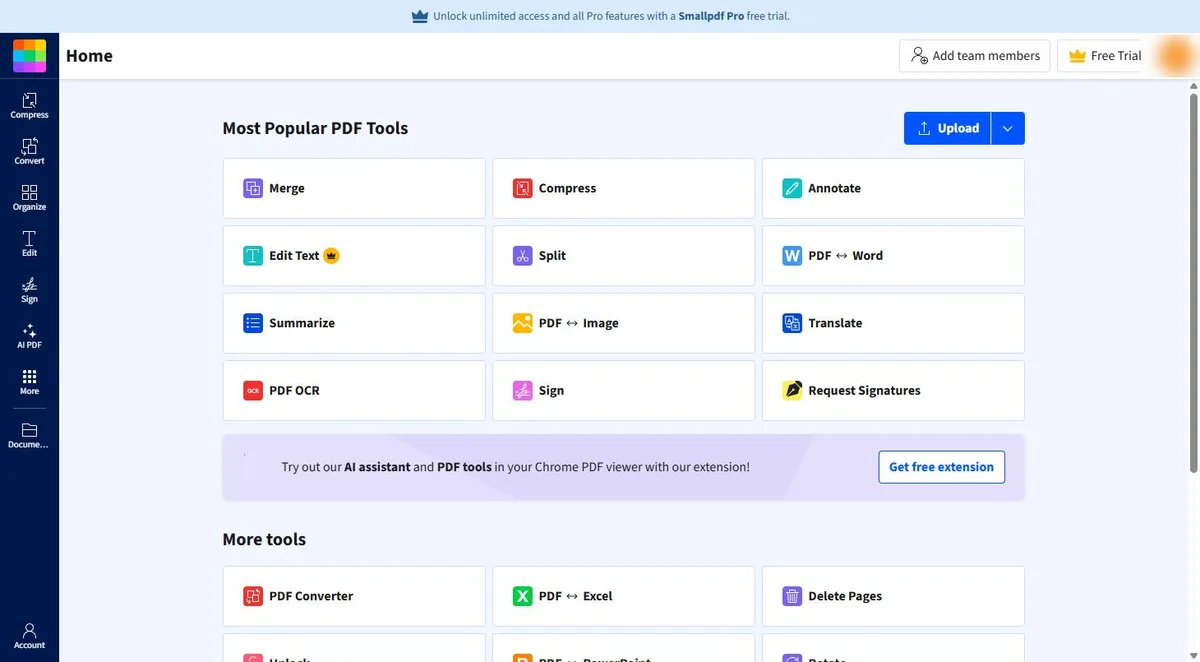
- Open AI PDF. Sign in at smallpdf.com. The left bar has Compress, Convert, Organize, Edit, Sign, AI PDF and More. Click AI PDF.
Sign in to Smallpdf. On the left bar, click A I P D F.
- Pick Summarize. The menu lists AI PDF Assistant, Chat with PDF, Summarize, Translate and Generate Questions. Summarize gives you a summary first and a chat box under it, so you get both. Click Summarize.
The menu shows the A I tools. Summarize gives you a summary, and a chat box under it. So you get both.
- Select the PDF. Click Select files and pick northbeam-it-proposal-sample.pdf, or drag it onto the page. The page says it takes PDF, image, Word, Excel and PowerPoint files. Click Select files.
Or drag it onto the page.
3. Read the summary
- Read the summary. In a few seconds the PDF opens on the left and a Summary of Managed IT Services Proposal appears on the right: who it is for, the plan, $143.75 per user a month, a $4,800 onboarding fee and a 36-month term with automatic renewal. That last line matters most. Click Contract Term.
In a few seconds, the summary appears. The price per user, the onboarding fee, and a thirty-six month term that renews on its own. That last line matters most.
- Notice what is missing. Read it again. It says the contract renews automatically, but not how to stop it. It does not mention the price increases, the fee for leaving early or the after-hours rate. The Suggested questions are about security and response times. A summary is a starting point, so you ask the questions that cost money yourself. Click Suggested questions.
Now read it again. It says the contract renews on its own. But not how to stop it. Nothing about price increases, or the fee for leaving early. A summary is a starting point. The money questions, you ask yourself.
4. Ask about money and exits
- Ask how to get out. Click the Ask me anything about your PDF box and type: *How do we stop this from renewing automatically, and what does it cost if we end it early? Give the page numbers.* Asking for page numbers makes each answer easy to check. Click the box.
Ask for the page numbers too. That makes every answer easy to check.
- Send it. Click the arrow to send, or press Enter.
- Read the answer. The answer: give written notice at least 90 days before the end of the term (page 18), and leaving early for any reason other than a serious breach costs 75% of the monthly fees left in the term (page 19). On a 36-month deal, that is real money. Click the answer.
Here's the answer. Give notice ninety days before the term ends. And leaving early costs seventy-five percent of the fees left. On a three-year deal, that's real money.
- Click p. 18. Under the answer are page chips: p. 5, p. 9, p. 14 and more. They are the pages the answer drew on. Click p. 18.
Under the answer are page chips. They show the pages it used.
5. Check it on the page
- Check the source. The PDF on the left jumps to page 18, 16. Term and renewal, with the text highlighted. It reads: *renews automatically for another 36 months unless either party gives written notice at least 90 days before the end of the term.* The answer matches the page. Click the highlighted text.
The P D F jumps to page eighteen, with the text highlighted. Renews for another thirty-six months, unless you give ninety days notice. The answer matches the page.
- Ask for every extra cost. Now the money outside the monthly fee. Click the box and type: *List every cost that is not in the monthly fee, including price increases. Give the page for each.* Then send it. Click the box.
Now the money outside the monthly fee. Ask for every extra cost, with the page for each.
- Spot the gap. It lists seven items, from software licenses to price increases of up to 6% a year (page 17). Good, but check it against what you already know. The summary said there is a $4,800 onboarding fee, and that is not on this list. Item 4 says work outside support hours but gives no rate. Click the list.
It lists seven extra costs. Including price increases, up to six percent a year. But wait. The summary mentioned a four thousand eight hundred dollar onboarding fee. It's not on this list. And there's no rate for after-hours help.
- Ask a pointed follow-up. When an answer leaves something out, say so. Click the box and type: *You left out the one-time fees. What is the onboarding fee, and what is the hourly rate for help outside support hours?* Then send it. Click the box.
When an answer leaves something out, say so. Ask for the onboarding fee, and the after-hours rate.
- Read the follow-up. Now you have it: the onboarding fee is $4,800 (page 15) and help outside support hours is $185 an hour with a one-hour minimum (page 8). Both match the PDF. Click the answer.
Now you have it. Four thousand eight hundred dollars to start. And a hundred eighty-five dollars an hour after hours. Both match the P D F.
6. Save it and do the math
- Click Download. Click Download at the top right. On our free account it saved the whole thing, the summary and every question and answer, as a text file named northbeam-it-proposal-sample_summarize.txt. Click Download.
It saves the summary and every question and answer, as a text file.
- Open the saved notes. This is the downloaded file, word for word. Paste it into your meeting notes or an email to the partners. Click the file.
Here's the file, word for word.
- Do the year-one math yourself. Do the arithmetic yourself, not the AI. The monthly fee is $3,450 (page 14), so 12 months is $41,400. Add the $4,800 onboarding fee and year one is $46,200, before any after-hours work. Then note the dates: renewal notice 90 days before month 36, and a 6% increase is possible after month 12. Click the year-one total.
Do the math yourself, not the A I. Three thousand four hundred fifty a month, times twelve. Plus the onboarding fee. That's forty-six thousand two hundred dollars in year one.
7. What it saves, what it costs
- What this saves you. Click What this saves you.
- Check what is free. From smallpdf.com/pricing, read 18 October 2026: Free is $0 and lists Chat with PDF and AI PDF Summarizer as Limited, with a 25,000 to 35,000 word limit per document and a 50 MB file limit for the AI tools. Pro is $15 a month, or $10 a month billed as $120 a year, with unlimited AI tools and a 100,000 word limit, and there is a 7-day free trial. Our 3,000-word sample worked on the free plan. Click the Free plan.
Here's the cost, as of October eighteenth. The free plan includes the A I summarizer and chat, with limits. Up to about twenty-five thousand words per document. Pro is fifteen dollars a month, or ten a month billed yearly, with a seven-day free trial.
Screenshots
Frequently asked questions
- Is this an official Smallpdf course?
- No. This is my own lesson. Smallpdf is a separate, third-party product from smallpdf.com. The screens in the lesson are real, captured in a free account on 18 October 2026.
- Is Smallpdf's AI PDF Summarizer free?
- Smallpdf's pricing page, read 18 October 2026, lists Chat with PDF and AI PDF Summarizer on the Free plan as Limited, with a 25,000 to 35,000 word limit per document and a 50 MB file limit. Pro is $15 a month, or $10 a month billed as $120 a year, with unlimited AI tools and a 100,000 word limit. There is a 7-day free trial. Our 25-page, 3,000-word sample worked on the free plan.
- Can I check where an answer came from?
- Yes. Each answer shows page chips. Click one and the PDF jumps to that page with the text highlighted.
- Can I save the summary?
- Yes. Download saved the summary and every question and answer as a .txt file in our free account.
- Will the AI catch every important clause?
- Not always. In our run the summary left out the renewal notice and the exit fee, and one list left out the onboarding fee until we asked. Ask about money and exits yourself, check each answer on its page, and do the math by hand.
Terms in this lesson
Plain-English definitions, each with an example from a free lesson.