What is intent classification?
Quick answer
Intent classification is sorting a message by what the sender wants: book a service, ask about a bill, report a problem. An AI model reads the words, picks one intent from a fixed list, and a workflow uses that label to decide what happens next, such as which folder, person or reply it goes to.
Last updated
Take the free module →Module 10 of the free AI for Customer Support course, about 18 minutes. No account needed.
Updated · By Robert Breen
Why it matters for a small business
People ask for the same thing in a hundred ways. "Can you quote me?", "What do you charge?" and "Are you taking new clients?" share one intent, though they share almost no words, so keyword rules miss a lot. A language model reads meaning, which makes it good at this.
It is also the safest kind of AI step to put in an automation. The model's whole job is to choose from a short list you wrote, so the next step can rely on the answer. Chatbots and voice menus have done intent detection for years; modern models just need a clear description of each intent instead of hundreds of training examples.
In a real lesson: Gmail AI Triage: Auto-Label Every Email and Draft Replies
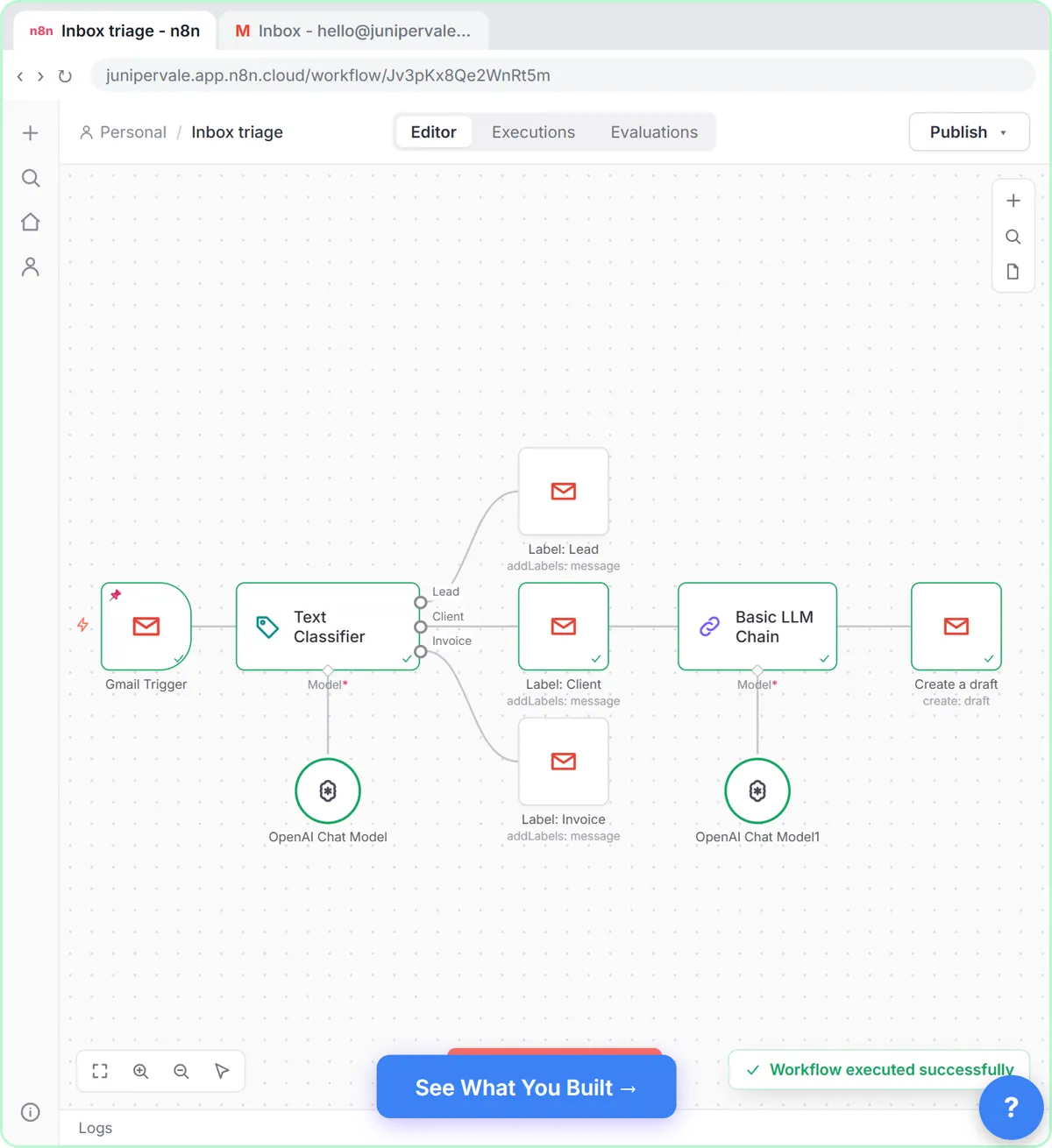
In Gmail AI Triage, Sam at Juniper & Vale Marketing adds a Text Classifier with three categories: Lead, described as someone new asking about services, prices or availability; Client, an existing client writing about their own project; and Invoice. Each output is wired to its Gmail label, and Client emails also get a drafted reply.
The categories are intents: what the sender wants from Sam. Priya Nair's email is labeled Client, and the newsletter fits no label, so it stays as it is. In Sort Every Client Inquiry, the same idea runs through a prompt: GPT-5-MINI labels Priya Shah's inquiry Payroll and urgent, and an If node routes it.
Try this lesson free or read the step-by-step guide.
Common confusions
Intent vs topic
Topic is what a message is about, such as payroll. Intent is what the sender wants done, such as an urgent callback about payroll.
Intent classification vs sentiment analysis
Sentiment is how the sender feels. Intent is what they want. One angry email can carry a refund intent or a cancel intent.
Tips
- Keep the list short, three to six intents, and describe each in one plain sentence.
- Decide what happens to messages that fit no intent before you go live.
- Check the labels on real messages for a week and sharpen any description that misfires.
Related terms
More n8n and automation terms
Where you use it: free lessons
- Gmail AI Triage: Auto-Label Every Email and Draft Replies (n8n, 18 min)
- AI Workflow Automation for Beginners: Sort Every Client Inquiry and Draft the Reply using n8n (n8n, 12 min)
Frequently asked questions
- Is intent classification the same as text classification?
- It is one kind of text classification, where the labels are what the sender wants rather than, say, the language or the topic.
- How many intents should I use?
- As few as your routing needs. Each extra intent is another chance for two labels to overlap.
- Do I need training data for intent detection?
- Not with today's language models. A clear name and description for each intent usually works, then you test on real messages.