What is Google DeepMind?
Quick answer
Google DeepMind is Google's main AI research lab. It builds the Gemini family of models that power the Gemini app, Gemini in Gmail and Docs, and Google's developer API, along with image, video and science models. It was formed in 2023 by merging DeepMind with Google Brain.
Last updated
Updated · By Robert Breen
Why it matters for a small business
You rarely buy anything from Google DeepMind directly. Its models reach you through Google products: the Gemini app, Gemini inside Google Workspace, AI answers in Google Search and the Gemini API for developers. As of October 2026, Google lists Gemini 3.1 Pro as the main model in the Gemini app, with faster, cheaper Flash models for everyday use and a Deep Think reasoning mode on its top consumer plan. Consumer plans run from free to Google AI Pro at $19.99 a month, and Google AI Ultra above that.
Who it suits: teams already on Gmail, Google Docs, Sheets and Meet, because Gemini works inside those apps on Workspace plans. The data stance depends on the account. Google's Gemini Apps privacy hub says personal Gemini activity can be used to improve Google's models, with some human review, unless you turn off Keep Activity. Google's Workspace documentation says it does not use Workspace customers' data to train models without permission. Use the Workspace account your company manages for client work.
In a real lesson: Gemini in Gmail: Summarize a Thread and Draft the Reply
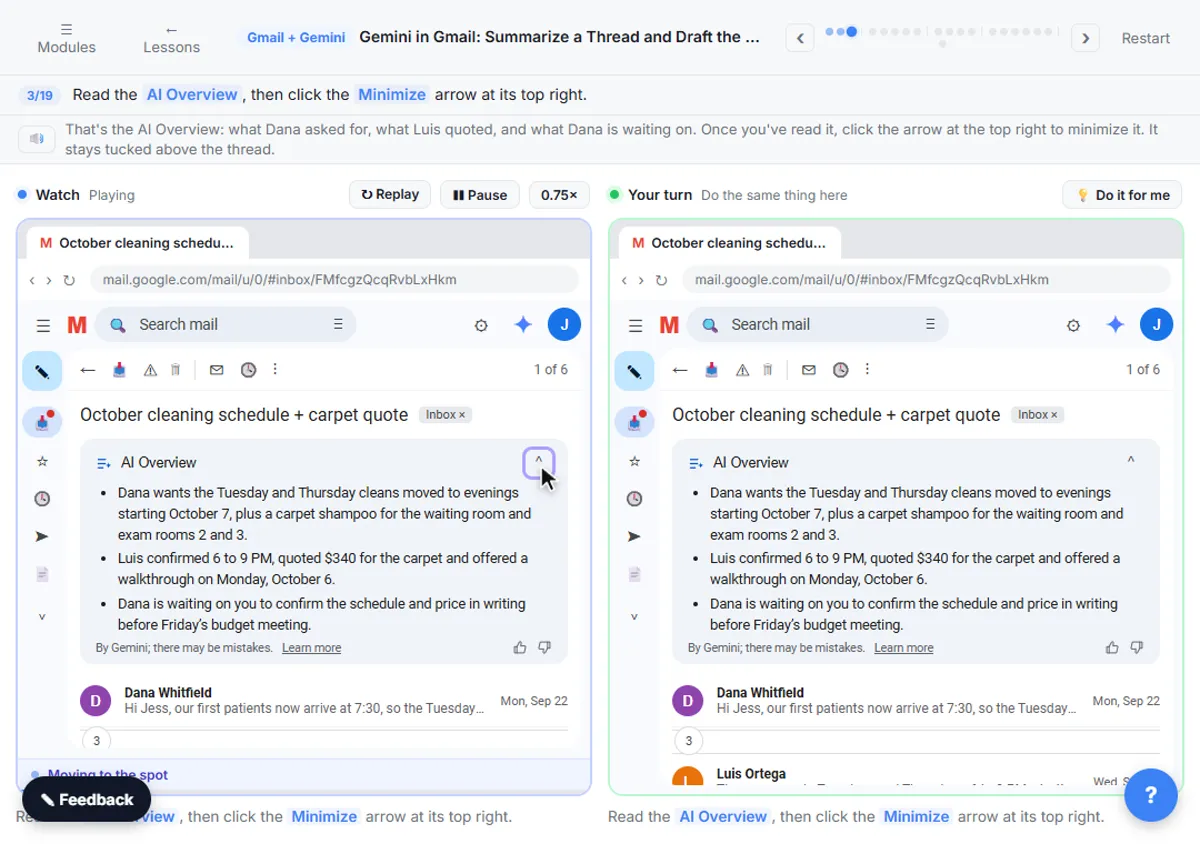
The Gemini in Gmail lesson is DeepMind's work in the place most offices meet it. You open a six-message thread, October cleaning schedule + carpet quote, and click Summarize this email to get an AI Overview of it.
Then you click Ask Gemini and ask, "What does Dana still need from me, and by when?" Under the last message, you click Reply, use the Describe your message bar to write the draft, add details, and click Polish. The last step is the one that matters for any model: check the names, dates and price against the thread before you click Send.
Try this lesson free or read the step-by-step guide.
Common confusions
Google DeepMind vs Gemini
Google DeepMind is the lab. Gemini is the model family it builds and the name of Google's assistant app. When people say "Gemini," they usually mean the app.
Google DeepMind vs Google Workspace
Workspace is Google's paid suite of business apps. Gemini features in Workspace run on DeepMind's models, under Workspace's business data terms.
Tips
- On Workspace, try Gemini in Gmail before buying a separate assistant.
- On a personal account, review the Keep Activity setting before pasting work material.
- For developer use, Google AI Studio is the quickest way to test Gemini models.
Related terms
More AI assistants terms
Where you use it: free lessons
- Gemini in Gmail: Summarize a Thread and Draft the Reply (Gmail and Gemini, 7 min)
- NotebookLM (Now Gemini Notebook): Cited Answers and a Briefing from Your Docs (Gemini Notebook, 7 min)
- ChatGPT Projects vs Gemini Gems vs Gemini Notebook: Which to Use (ChatGPT and Gemini, 9 min)
More free tutorials
Frequently asked questions
- Is Google DeepMind the same as Google AI?
- Not exactly. "Google AI" is a broad label for Google's AI products and research. Google DeepMind is the specific lab inside Google that builds the Gemini models.
- How do I try Google DeepMind's models?
- Open gemini.google.com or the Gemini app with a Google account for the free plan. On a Google Workspace account, look for Gemini in Gmail and Docs. Developers can try the models in Google AI Studio.
- Does Gemini in Workspace train on my company's email?
- Google's Workspace documentation says it does not use customer data to train its models without permission, and that content is not reviewed by people for that purpose. Check your admin's settings for your exact plan.