What is AI Photo Generator Studio?
Quick answer
AI Photo Generator Studio (aiphotogenerator.studio) is a browser tool that makes realistic photos from a text prompt or changes a photo you upload. You pick from several image models from companies such as Google, OpenAI and ByteDance, and ready-made tools set it up for headshots, product photos, posters and more.
Last updated
Take the free module →Module 7 of the free AI for Marketing Teams course, about 8 minutes. No account needed.
Updated · By Robert Breen
Why it matters for a small business
Small businesses need pictures all the time: a headshot for the team page, a product shot for a listing, a poster for an event. This tool puts several AI image generation models behind one box, so you can try one, compare it with another, and keep the one that fits. It says the credit cost shows before you generate, and failed runs refund their credits.
It does three jobs in the same place. Text to image makes a new picture from a description. Image to image turns a sketch or a phone photo into a finished, studio-style shot. Photo editing changes one thing, such as a background or an item of clothing, and its site advises you to describe only the change and make one change per request.
Its content policy rules out nude or sexual images, intimate images of real people and putting a real person into an image without their consent. It says uploads and prompts are checked before an image is made, and there is a page to report abuse. Its site says results download without a watermark and can be used in commercial projects.
In a real lesson: VisualGPT: Product Photos, Listing Images and Ads from One Phone Photo
The VisualGPT lesson does not use this tool. In it, Fernway, a made-up shop, uploads a phone photo of its mug and turns it into a lifestyle product shot, then a set of listing images, then a new ad in the style of its best past ad.
AI Photo Generator Studio covers the first of those steps. Fernway could upload the same phone photo, ask for the mug on a plain white background for a store listing, and then check that the logo, shape and color still match the real mug before the picture goes anywhere.
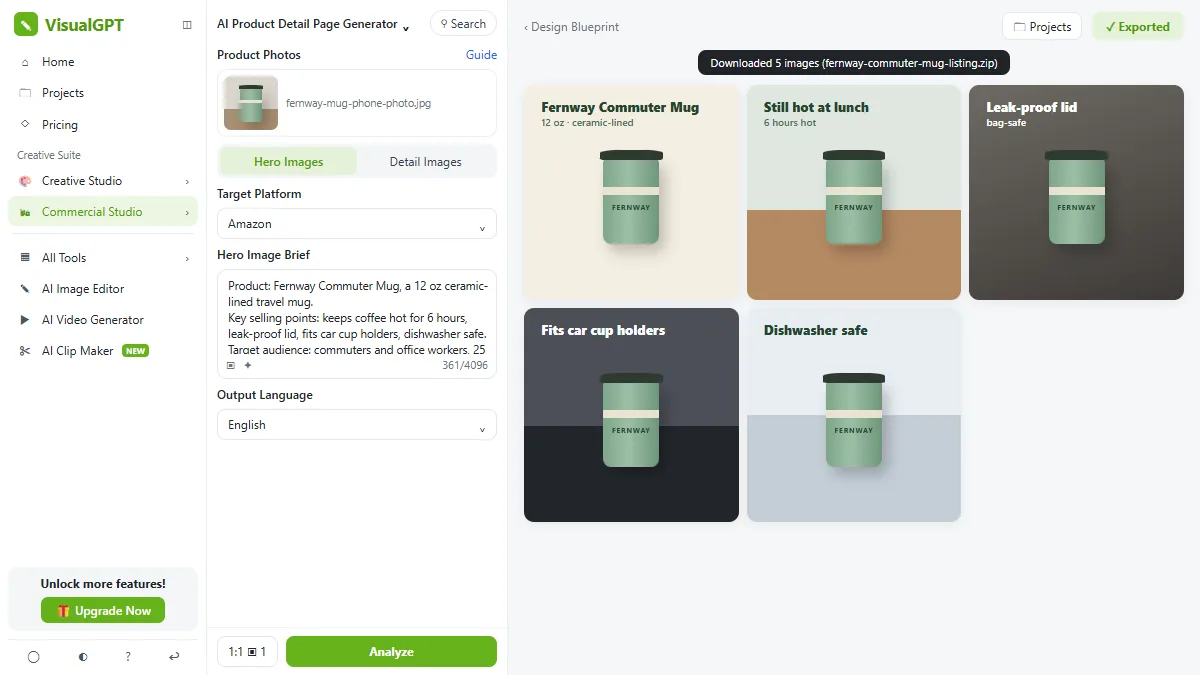
Try this lesson free or read the step-by-step guide.
Common confusions
Text to image vs photo editing
Text to image makes a new picture from words. Photo editing starts from your photo and changes one part, so the rest, such as a face or a product, should stay as it was.
An edited photo vs a deepfake
Changing the background of your own product photo is ordinary editing. Putting a real person into a scene they were never in, without consent, is a deepfake, and the tool's policy does not allow it.
Tips
- Describe the light and the setting, like you would brief a photographer.
- For edits, name only the change and keep it to one change per request.
- Pick a model that spells words well when the picture has text, such as a poster or a sign.
- Compare a product picture with the real product before you use it in a listing or an ad.
Related terms
More Web apps terms
Where you use it: free lessons
- VisualGPT: Product Photos, Listing Images and Ads from One Phone Photo (VisualGPT, 8 min)
- Make Images with ChatGPT for Your Business (ChatGPT, 7 min)
AI tools that use it
Frequently asked questions
- Is AI Photo Generator Studio free?
- Its site says you can try it with no sign-up, that one model is free, and that signing in gives free credits every day. Paid credits cover the other models. Check its pricing page for the details.
- Do the images have a watermark?
- No. The site says every result downloads without a watermark.
- Can I use the images for my business?
- Its site says you may use the images in commercial projects. Still check that a product picture matches the real product.