How do I check if a total is over $1,000?
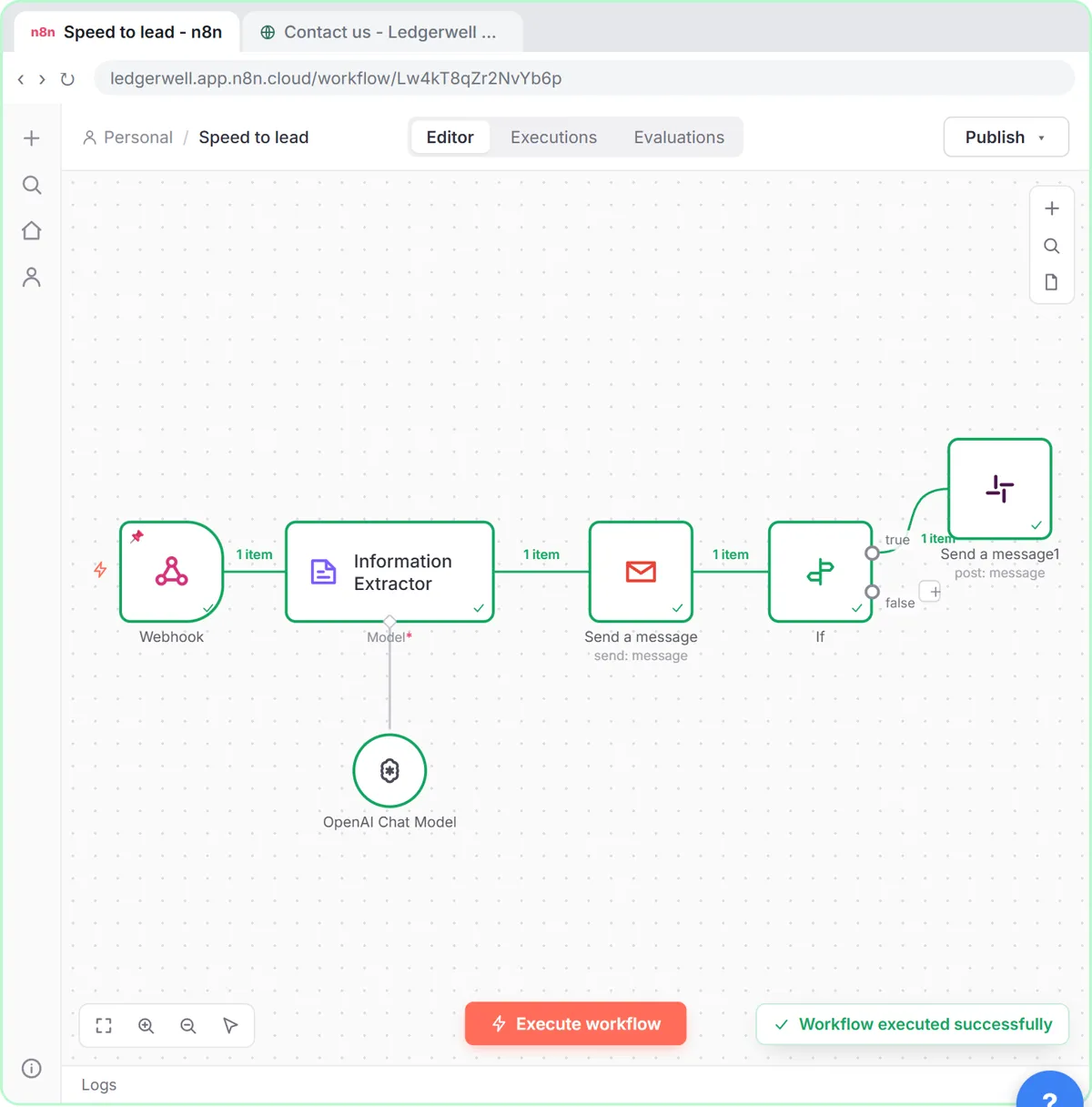
- Add an If node after the step that has the total.
- In value1, paste
{{ $('Information Extractor').item.json.output.total }}. - Open the comparison (it says is equal to) and under Number choose is greater than.
- In value2, type
1000. No dollar sign, no comma.
Items above 1000 go to the true output, the rest to false. In the lesson only the true branch has a next step: the approval email. The glossary explains true and false branches.
How do I check a lead score?
The speed-to-lead lesson does the same with a 1-10 score: value1 {{ $('Information Extractor').item.json.output.score }}, operator Number: is greater than or equal to, value2 8. Hot leads go down the true branch to a Slack alert.
Which number operators are there?
| Operator | True when value1 is... | Example |
|---|---|---|
| is equal to | the same number | quantity = 0 |
| is not equal to | any other number | status code is not 200 |
| is greater than | larger | total > 1000 |
| is less than | smaller | score < 5 |
| is greater than or equal to | larger or the same | score >= 8 |
| is less than or equal to | smaller or the same | days left <= 3 |
| exists / does not exist | present or missing | a total was found at all |
"Wrong type: '1,240.00' is a string but was expecting a number"
The If node got text, not a number. Common causes: a sheet column formatted as currency, an AI answer with a $ sign, or a webhook that sends every value as text.
Fixes, best first:
- Get a real number at the source. The invoice lesson's extractor prompt asks for "the final amount due, as a number with no $ sign", and its JSON example uses
250.75, not"$250.75". - Convert in the expression:
{{ Number($json.Total.replace(/[$,]/g, '')) }}. - Let the If node convert: turn on its option to convert types where required (loose type validation).
Why does "is greater than" give the wrong answer?
If both values are treated as text, "999" is "greater" than "1000" because 9 comes after 1. Make sure you picked the operator under Number, not String.
Try it free, step by step
Invoices from Your Inbox to Google Sheets, with Approval. Build an n8n workflow that reads each vendor invoice PDF from Gmail with AI, logs the vendor, invoice number and total in Google Sheets, and emails the owner an Approve button for anything over… You do every step yourself in a practice copy of n8n, it checks your work as you go, and “Do it for me” finishes any step you get stuck on. Free, and nothing touches your real accounts.
Start the free lessonShould I use If, Filter or Switch?
- If: two paths, both may continue (approval vs log only).
- Filter: keep only matches, drop the rest.
- Switch: three or more paths, such as amount bands. n8n If vs Switch compares them.
Key takeaways
- Choose the operator under Number, and type value2 as a plain number.
- Map the number from the node that made it, often the Information Extractor.
- "Wrong type ... is a string" means text arrived; fix the source or convert.
- Ask AI extractors for numbers without $ signs or commas.
Frequently asked questions
- How do I compare numbers in n8n?
Use an If or Filter node, choose a Number operator such as is greater than, and enter a plain number as value2.
- Why does my n8n If node say wrong type?
The value is a string, not a number. Convert it with Number() in the expression, or turn on the If node's type conversion option.
- Can I compare against a value from another node?
Yes. value2 can be an expression too, like a limit stored in a settings sheet.
- Which course is this from?
AI for Finance Teams and AI for Sales Teams. Also see the If node glossary entry.