Signatoro (signatoro.com) is an email signature platform for people and AI agents. You build one signature (name, title, company, phone, links, photo or logo), save it, and use the same signature in your email app, your team's inboxes and every automation or AI agent that sends email for you, through Signatoro's API. You can see it in action in the free lesson Zapier: ChatGPT Drafts Every Reply, Signatoro Signs It, the first module of the free Signatoro Jump Start.
This page is for office managers, front-desk teams and small-business owners who send email from more than one place (Gmail, Outlook, Zapier, Make, n8n, an AI assistant) and want every message signed the same, correct way. It is my own explainer, not an official Signatoro guide. The facts come from signatoro.com, Signatoro's docs and a real Signatoro account, all checked in October 2026.
What problem does Signatoro solve?
Your signature lives in your email app's settings. Email sent any other way does not get it. When Zapier, Make or n8n sends through the Gmail API, the signature saved in Gmail's settings is not added. When an AI assistant writes a reply, it either signs with "The team", which reads like a form letter, or makes up a name, title and phone number, which is worse.
Then someone's title or number changes, and the old one lives on in five places: the email app, three automations and a prompt. Signatoro keeps the signature in one place and lets every tool fetch the current version when it sends.
How does Signatoro work?
Four ideas explain what you see in Signatoro.
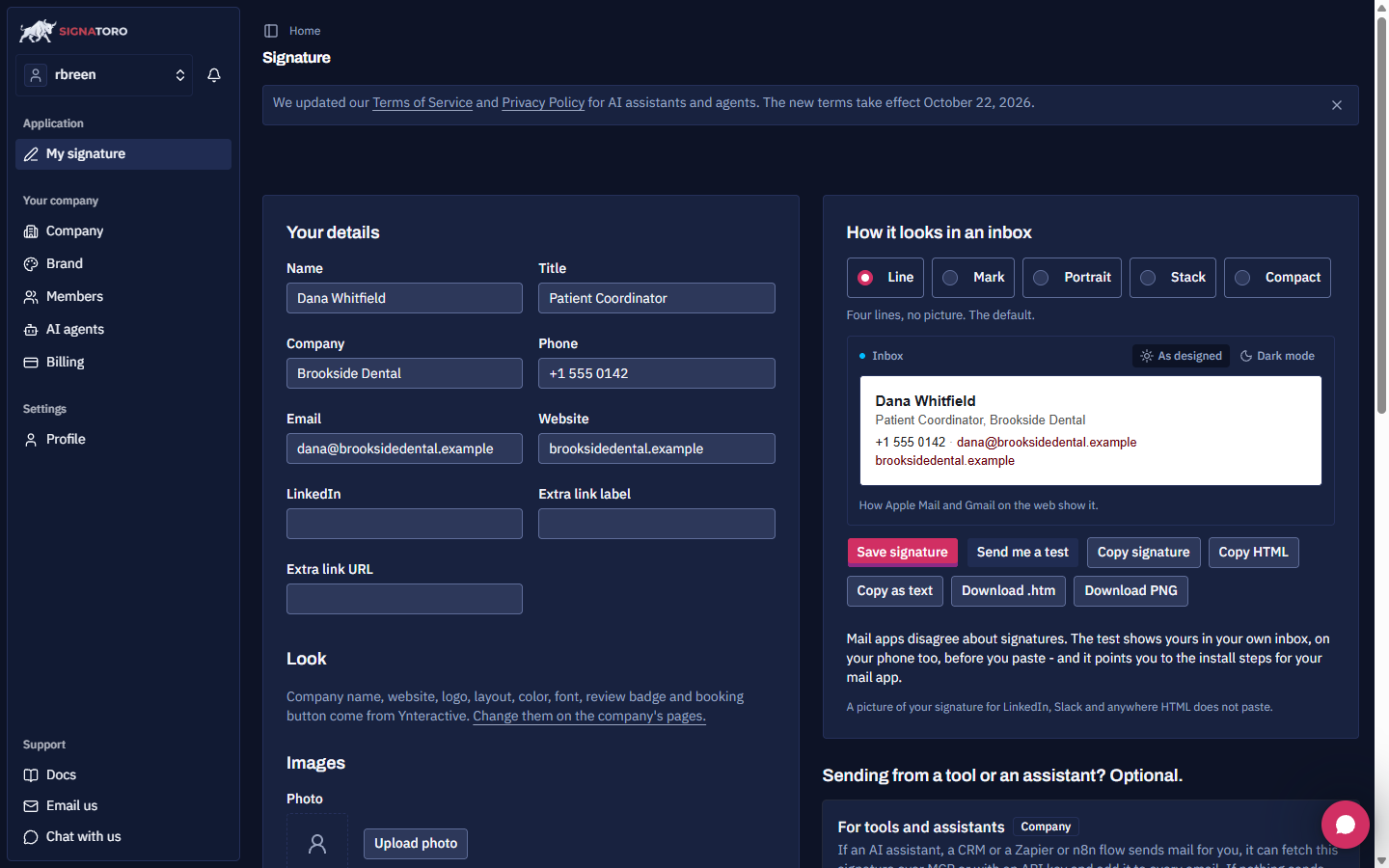
The builder. You fill in Your details (name, title, company, phone, email, website, LinkedIn and an extra link), pick an accent color and a sans-serif or serif font, and choose one of five layouts: Line, Mark, Portrait, Stack or Compact. You can add a photo and a logo, preview the signature in Apple Mail and Gmail on the web, including dark mode, and send yourself a test email.
Install in email apps. Signatoro gives you the signature to paste into Gmail, Outlook, Apple Mail, Mail on iPhone and iPad, Zoho Mail and other mail apps, as HTML or plain text or an .htm file.
The API. Under For tools and assistants on the signature page, Generate API key creates a key. A tool then sends a GET request to https://signatoro.com/api/v1/signature with the key as a bearer token in the Authorization header, and gets back html, text and sender. You put html after an HTML email body, or text after a plain-text one.
Apps and agents. Signatoro has a Zapier app (invite-only while it is in beta) with a Get Signature step, documented steps for Make and n8n, an MCP server and a CLI. Its site lists AI assistants and agents it works with, including Claude, ChatGPT, Gemini, Copilot and coding agents such as Claude Code and Cursor.
Why should the signature not come from the AI?
Because the model only knows what is in the prompt, and a signature is a fact, not writing. Signatoro's own docs say it plainly: do not let the model write the signature; insert it from a fixed source. The pattern in both free lessons is the same:
- The AI writes only the message, ending with a short closing line and no name.
- A separate step fetches the sender's saved signature from Signatoro.
- The workflow puts the signature after the AI's message and sends it, or saves it as a draft for a person to check.
When the sender's title or number changes, they update it on Signatoro, and the next email has it, with nothing to edit in the workflow or the prompt.
How does it work in Zapier, Make and n8n?
Zapier. Add Signatoro (1.0.0) as a step and choose Get Signature. It fetches the saved signature and adds it after your email body, so there is no HTTP step to set up. The Zapier lesson builds a four-step Zap: Gmail New Email, ChatGPT Conversation, Signatoro Get Signature and Gmail Create Draft Reply. If you also pick a Gmail signature in that step, the reply is signed twice, so leave it empty.
Make. Add an HTTP Make a request module with Authentication type set to API key, the key entered as Bearer and your key, placement In the header and parameter name Authorization, and turn on Parse response. Then map html into Gmail's Signature content. The Make lesson does this inside a Make scenario that replies to patient requests, and Signatoro shared a tested blueprint you can import.
n8n. Add an HTTP Request node (GET) with a Bearer Auth credential before the Gmail, Send Email or Microsoft Outlook node, set the email type to HTML, and map html after the message text.
What do businesses use Signatoro for?
- AI-drafted replies that are signed correctly. A dental practice drafts warm replies to patient emails with ChatGPT and signs each with the coordinator's real signature. This is the free Zapier lesson.
- Automated emails that look like they came from a person. Form replies, booking confirmations and follow-ups sent by Make or n8n carry the sender's own signature. See the free Make lesson.
- One brand signature across a company. Teams share one signature design, so every employee and every agent signs the same way.
- Disclosure and compliance. Signatoro's site has a disclaimer kit and guides on AI email disclosure, CAN-SPAM, GDPR and UK company requirements.
What should you watch out for?
- Keep the API key in the tool's connection. Never put it in a prompt, a note or a shared file. In Make, set Allowed service origins to https://signatoro.com so the key is only sent there.
- Save a signature first. An HTTP 404 no_signature error means there is no saved signature on Signatoro yet.
- Do not sign twice. If a step already adds your email app's signature, leave that setting empty.
- Keep a person in the loop for AI replies. Saving a draft reply, as the Zapier lesson does, lets someone check the message before it goes out.
Is Signatoro free?
Signatoro has a forever-free plan that includes the API, with a monthly request limit, and a Company plan for teams. Check signatoro.com for current plans and limits. This page does not list prices because they change.
How do you start learning Signatoro?
Start with the free Signatoro Jump Start:
- Zapier: ChatGPT Drafts Every Reply, Signatoro Signs It: save a signature, generate a key, and build a Zap that drafts a signed reply in the patient's Gmail thread.
- Add AI to Make: ChatGPT Writes a Personal Reply, Gmail Sends It: ChatGPT writes the reply, an HTTP module fetches the Signatoro signature, Gmail sends both.
More Signatoro modules will be added to the Jump Start as they are built and tested in the real apps.
Key takeaways
- Signatoro keeps one email signature in one place for people, teams and AI agents.
- Tools fetch the current signature with one API call and get html and text back.
- Zapier has a Signatoro Get Signature step; Make and n8n use an HTTP request with a bearer token.
- Let the AI write the message and Signatoro supply the signature, never the other way round.
- Update the signature once on Signatoro and every tool uses the new version on the next send.
Frequently asked questions
- Why doesn't my automation add my Gmail signature?
Zapier, Make and n8n send through the Gmail API, and the signature in Gmail's settings is only added to messages written in Gmail itself. Fetch the signature from Signatoro in the workflow instead.
- Where do I find Signatoro in Zapier?
Search for Signatoro in the app picker. While it is in beta it shows as Signatoro (1.0.0), Invite Only, and you see it after you accept Signatoro's invite.
- Which email apps does Signatoro support?
Its install guides cover Gmail, Outlook, Apple Mail, Mail on iPhone and iPad and Zoho Mail, plus many other mail apps listed on signatoro.com.
- Is this an official Signatoro course?
No. Signatoro is a Stepthrough partner, and this is my own explainer and lessons. Signatoro's founder tested the Make steps and shared the blueprint.
Sources
- Signatoro home page (read October 20, 2026)
- Signatoro docs: Add your email signature to emails n8n, Zapier and Make send (read October 20, 2026)
- A real Signatoro account and the Signatoro Zapier app (1.0.0), used to build the linked lessons on October 19 and 20, 2026