Flova vs DomoAI: which AI video tool for a small business promo?
Quick answer
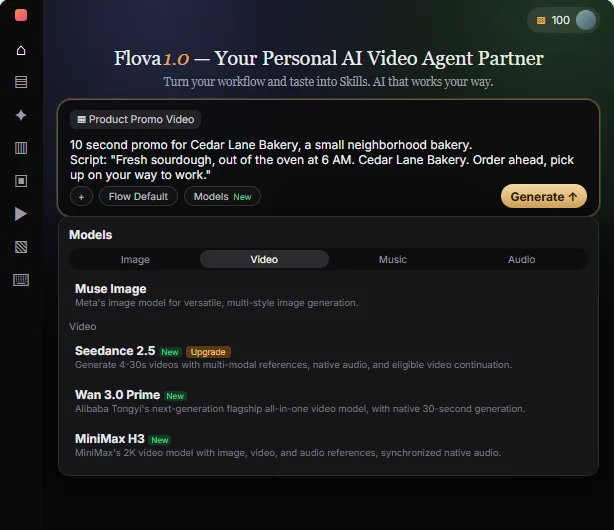
Choose Flova when you are starting from a script and want an AI video agent to plan the whole video: it writes a storyboard, then makes images, video and sound from a chat. Choose DomoAI when you already have a good photo and want to turn it into a short clip, using its Image to Video tool. Both are separate third-party products with their own accounts, credits and plans, as of October 2026.
Last updated
This page is for marketing and office staff who need a short promo for Instagram or TikTok without a film crew. The Flova promo video lesson and the DomoAI image to video lesson each walk through a free practice copy.
How do they compare at a glance?
| Flova | DomoAI | |
|---|---|---|
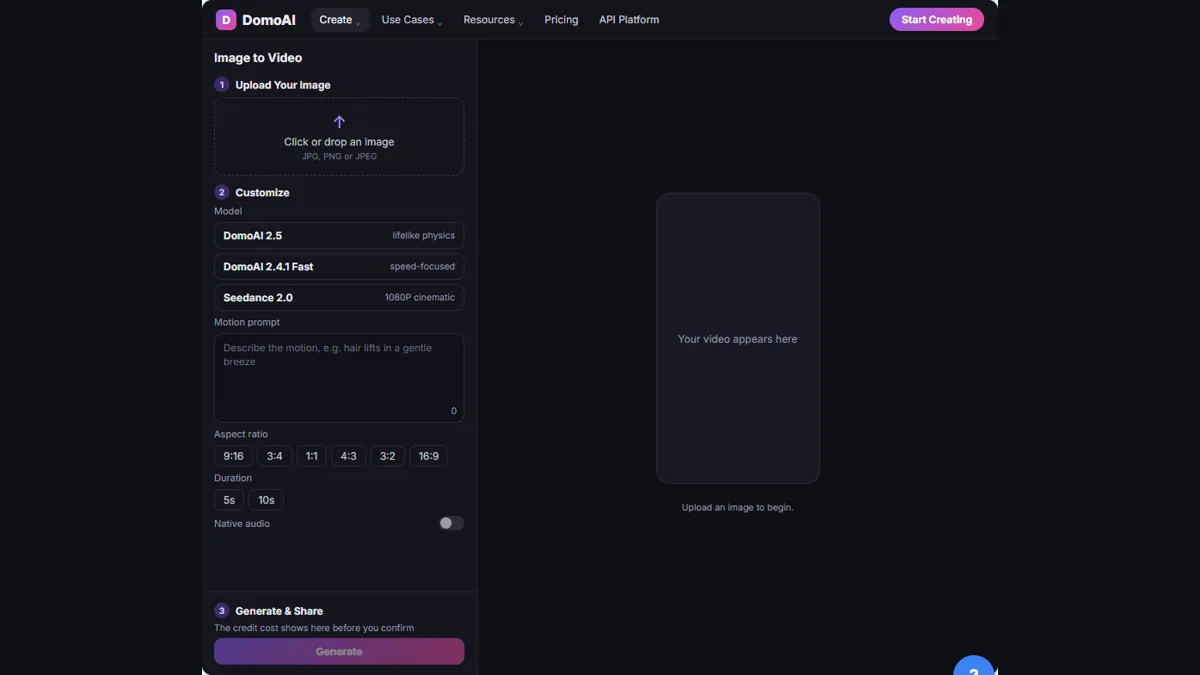
| What it is | An AI video agent: you describe a video in a chat and it writes a storyboard, then makes images, video and sound | An AI video platform; its Image to Video tool animates one still picture |
| What you start with | A script and a brief: length, exact words, look and shape | One product photo |
| How you steer it | Chat requests, plus a skill such as Product Promo Video | A motion prompt, a model such as DomoAI 2.5, a size such as 9:16 and a length such as 5s |
| Plan before you spend | Ask for the storyboard and the credit estimate first; the lesson's estimate priced images but not the video | Check the credit cost shown before you confirm Generate |
| Compare options | Make one reference image, read the prompt behind it and ask for one change | Click Generate another version and compare Version 1 with Version 2 |
| Getting the result out | Export menu: Video (greyed out until a video exists), PR File, All Files and a Watermark-free export switch; Flova's docs list watermark-free export as a paid-membership benefit | Download the version you like best |
| Plans and credits | Own account, credits and plans; Flova's docs list a Free tier, and watermark-free export, the commercial license and some models (such as Seedance 2.0) as paid-membership benefits | Own account, credits and plans; DomoAI's pricing page lists watermark-free output on every paid plan and lists no free tier |
What is the difference between Flova and DomoAI?
Flova plans and builds a video from a conversation. DomoAI animates a picture you give it. In the Flova lesson, you pick the Product Promo Video skill, paste a ten-second bakery script and ask for the storyboard before anything is made. In the DomoAI lesson, you upload a candle photo and describe the motion.
One tool starts from words and decides on shots. The other starts from an image and decides how it moves.
Which one is better when I only have a script?
Flova suits a script with no footage, because its job is to turn the script into shots. The lesson has you paste the exact words so the AI cannot rewrite them, then read the Key Elements, the three Shots and the Audio Layers against the script.
DomoAI needs a picture to begin with, so with only a script you would first have to create or find an image.
Which one is better when I only have a product photo?
DomoAI is the more direct route. You open Create, then Image to Video under Generate Video, upload the photo, choose DomoAI 2.5, 9:16 and 5s, and write a motion prompt that says what moves and what must stay the same.
Flova can also make a reference image and fix it with a plain-words edit, but its strength in the lesson is planning the whole video.
How do I avoid wasting credits with either tool?
Look at the cost before you commit, and test small. In Flova, ask for the storyboard and the credit estimate first, then make one image before a video. In DomoAI, check the credit cost shown before you click Generate, keep the clip short and compare two versions.
DomoAI also has a Video Upscaler tool, so it makes sense to fix the motion first and polish after. Neither lesson quotes prices, so check flova.ai and domoai.app/pricing for current plans.
What should I check before posting an AI video?
Watch the whole clip. Check that the product, label and colors still match the real item, that nothing odd appeared, and that every word and claim is true for your business. Also check the terms for commercial use on your plan. DomoAI's pricing page lists watermark-free output on its paid plans, and Flova's docs list watermark-free export and a commercial license as paid-membership benefits, so a free-plan export may carry a watermark or lack a commercial license. Check what your own plan includes before you post.
Who is each one for?
Flova
For a marketer or office manager who has a script and needs the shots planned, with a say in the cost before anything is made. Start with the Flova lesson.
DomoAI
For anyone with a strong product photo who wants a short vertical clip with one clear action. Start with the DomoAI lesson.
Which of these tools have a free Stepthrough lesson?
- Flova: free lesson: Flova: Plan a Promo Video from a Script Before You Spend a Credit
- DomoAI: free lesson: DomoAI: Turn a Product Photo into a Short Video for Social
Practice it free, step by step
Flova: Plan a Promo Video from a Script Before You Spend a Credit. Give Flova's AI video agent a ten-second script for a small business, check its storyboard and credit estimate first, then make and fix one reference image. You do every step yourself in a practice copy of Flova, it checks your work as you go, and “Do it for me” finishes any step you get stuck on. Free, and nothing touches your real accounts.
Start the free lessonKey takeaways
- Flova is an AI video agent that plans a storyboard from your script and then makes images, video and sound.
- DomoAI's Image to Video tool animates one product photo into a short clip using a motion prompt.
- Both use credits, so check the cost before you generate and test with one small piece first.
- Always watch the whole clip and check the product and claims before posting.
Frequently asked questions
Do Flova and DomoAI have free plans?
Both are separate products with their own accounts, credits and plans. Flova's docs list a Free tier (720P video, no watermark-free export, no commercial license). DomoAI's homepage mentions a free plan with starting credits, but its pricing page lists only paid plans. Both say prices and plans can change, so check flova.ai and domoai.app/pricing.
Can I use either for Instagram Reels and TikTok?
The DomoAI lesson chooses the 9:16 vertical size for Instagram Reels and TikTok. The Flova lesson makes a ten-second promo for Instagram.
Which one should I try first?
Try DomoAI if you have a photo and want a quick clip. Try Flova if you have a script and want to see a plan and credit estimate first.
Where do these prices and features come from?
Every price and feature on this page was checked against the vendor's own page, as of October 2026. No numbers here are estimates or third-party figures. The example businesses in the Stepthrough lessons are made up.