What is an AI video agent?
Quick answer
An AI video agent is a chat-based tool that plans and makes a video for you. You describe the video, it writes a storyboard, then it makes images, video and sound, and you steer it with plain-language requests.
Last updated
Updated · By Robert Breen
Why it matters for a small business
Traditional video needs a camera, a crew and editing time. An AI video agent such as Flova (flova.ai) works from a conversation. You pick a skill, such as Product Promo Video, give the length, the exact script, the look and the shape, and it starts a project with a chat on the right.
Because it is an agent, you can direct it in steps: plan first, make one picture, fix the picture, then decide on the video. Its Models menu lists Image, Video, Music and Audio models, and some carry an Upgrade tag on the free plan. Flova is a separate product with its own account, credits and plans.
Before anything goes out, check every word, the product and the claims against the real business.
In a real lesson: Flova: Plan a Promo Video from a Script Before You Spend a Credit
In the lesson, Dana at Cedar Lane Bakery gives Flova a ten-second script. After the storyboard, she asks for a reference image of just the sourdough with the cheaper model, and tells Flova to stop for her review.
She clicks Prompt under the picture to read what Flova asked the image model, then asks for one small change and says what stays the same. Two versions now sit under the sourdough element, and she previews the new one.
She never clicks Generate for the video itself in this lesson, because the video is the expensive part. The lesson ends with the Export menu, where Video is greyed out until a video exists.
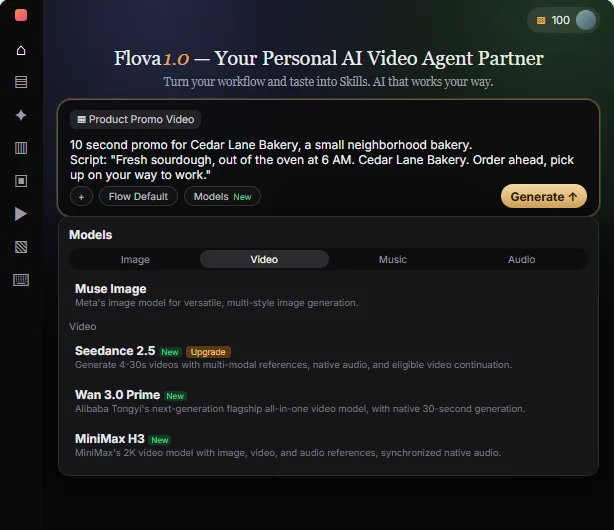
Try this lesson free or read the step-by-step guide.
Common confusions
Video agent vs video editor
An editor cuts footage you already have. An agent creates the images, video and sound from your instructions.
Agent vs one-click generator
A generator gives one result. An agent works in steps you can check, which is how you control cost.
Tips
- Start from a skill instead of a blank prompt.
- Make one image before you make a video.
- Check flova.ai for current prices and commercial-use terms.
Related terms
More AI agents terms
Where you use it: free lessons
Prompt templates that use it
Frequently asked questions
- What can I export from Flova?
- The Export menu lists Video, which stays grey until a video exists, plus PR File, All Files and a Watermark-free export switch.
- Is Flova free?
- It has its own account, credits and plans. Check flova.ai for current pricing.
- Do I need a camera?
- No, but the output still needs checking against your real product.