Why not put the API key in the URL?
Keys in the URL end up in logs, browser history and screenshots. Many APIs, Litescrape among them, want the key in a header instead. A credential also means the key isn't visible in the workflow when you share or export it. The glossary entries on API keys and bearer tokens explain both.
How do I set up Bearer Auth?
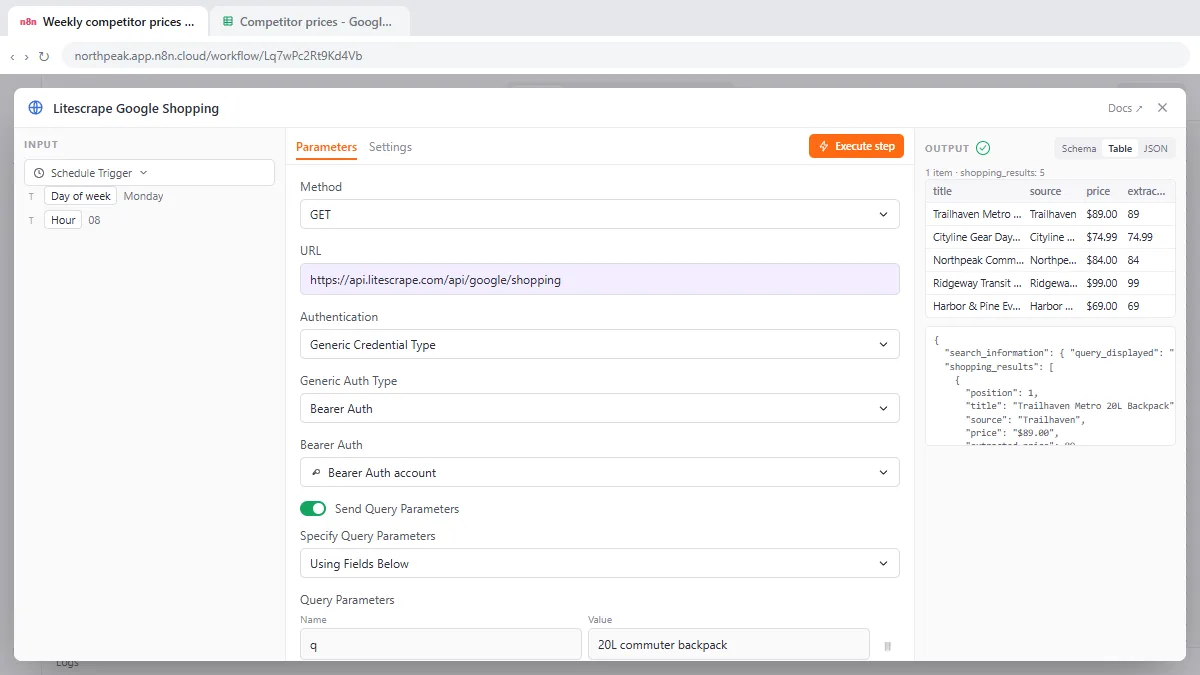
From the lesson, where Northpeak Packs (made up) checks competitor prices every Monday:
- Double-click the HTTP Request node.
- Replace the old address in URL with the new endpoint.
- Under Query Parameters (turn on Send Query Parameters if you don't see them), delete parameters the new API doesn't need. Here: engine, because the URL already says Google Shopping, and api_key, because the key moves to a header.
- Scroll up to Authentication and choose Generic Credential Type.
- Open Generic Auth Type and choose Bearer Auth.
- Open the Bearer Auth credential drop-down and click + Create new credential.
- Paste the key into Bearer Token and click Save.
- Click Execute step to send one test request.
Which auth type do I need?
Read the API's docs for the header it expects.
| API docs say | Generic Auth Type |
|---|---|
Authorization: Bearer YOUR_KEY | Bearer Auth |
A custom header like X-API-Key: YOUR_KEY | Header Auth |
?api_key=YOUR_KEY in the URL | Query Auth |
| Username and password | Basic Auth |
| "Connect your account" with a login screen | OAuth2 API |
The list in n8n also has Custom Auth, Digest Auth and OAuth1 API for rarer cases.
What should the response look like?
In the lesson, results come back in shopping_results, with title, source, price and extracted_price, the same field names the next nodes already use, so nothing downstream changes. When you swap one API for another, compare field names before you run the whole workflow.
Try it free, step by step
Litescrape in n8n: Swap SerpApi for a Cheaper Search API. Switch a weekly n8n competitor-price workflow from SerpApi to Litescrape's Google Shopping API: change the HTTP Request URL, move the key into a Bearer Auth credential, test it and check the sheet. You do every step yourself in a practice copy of n8n, it checks your work as you go, and “Do it for me” finishes any step you get stuck on. Free, and nothing touches your real accounts.
Start the free lessonWhy do I get 401 Unauthorized?
- The key is wrong, expired or has no credit left.
- The auth type doesn't match what the API expects (Bearer vs Header Auth).
- The old
api_keyquery parameter is still there and conflicts. - There's a stray space before or after the key.
Other codes are in HTTP Status Codes in n8n.
How do I keep a weekly API call cheap?
Free tiers are small (the lesson's key comes with 5 free calls). Test with Execute step once, not on a loop, and pin the response while you build the rest of the workflow so you don't spend calls. The query parameter and rate limit entries cover the rest.
Key takeaways
- Use Generic Credential Type > Bearer Auth when an API wants Authorization: Bearer.
- Remove api_key from query parameters once the key is in a credential.
- Match the auth type to the API's docs: Bearer, Header, Query or Basic.
- Compare response field names when you swap APIs.
Frequently asked questions
- How do I add a bearer token in n8n?
In the HTTP Request node, set Authentication to Generic Credential Type, choose Bearer Auth, create a credential and paste the token.
- What is the difference between Bearer Auth and Header Auth in n8n?
Bearer Auth always sends Authorization: Bearer plus your token. Header Auth sends any header name and value you choose, such as X-API-Key.
- Is my API key visible in the workflow?
Not when it's stored in a credential. The workflow only references the credential.
- Which course is this in?
The free n8n Jump Start course.