Why this matters
A customer calls in Spanish and your team reads English. The recording sits until someone who speaks Spanish has time, and until then nobody knows what was promised or by when.
HappyScribe turns the recording into text in both languages, side by side, and answers questions about it. Our 83-second test call finished in about a minute. It got the numbers right and one important word wrong, so this lesson builds in the check.
Practice
Do every step yourself in a practice copy of the real tool. It checks your work, and “Do it for me” finishes any step you get stuck on.
What you’ll build
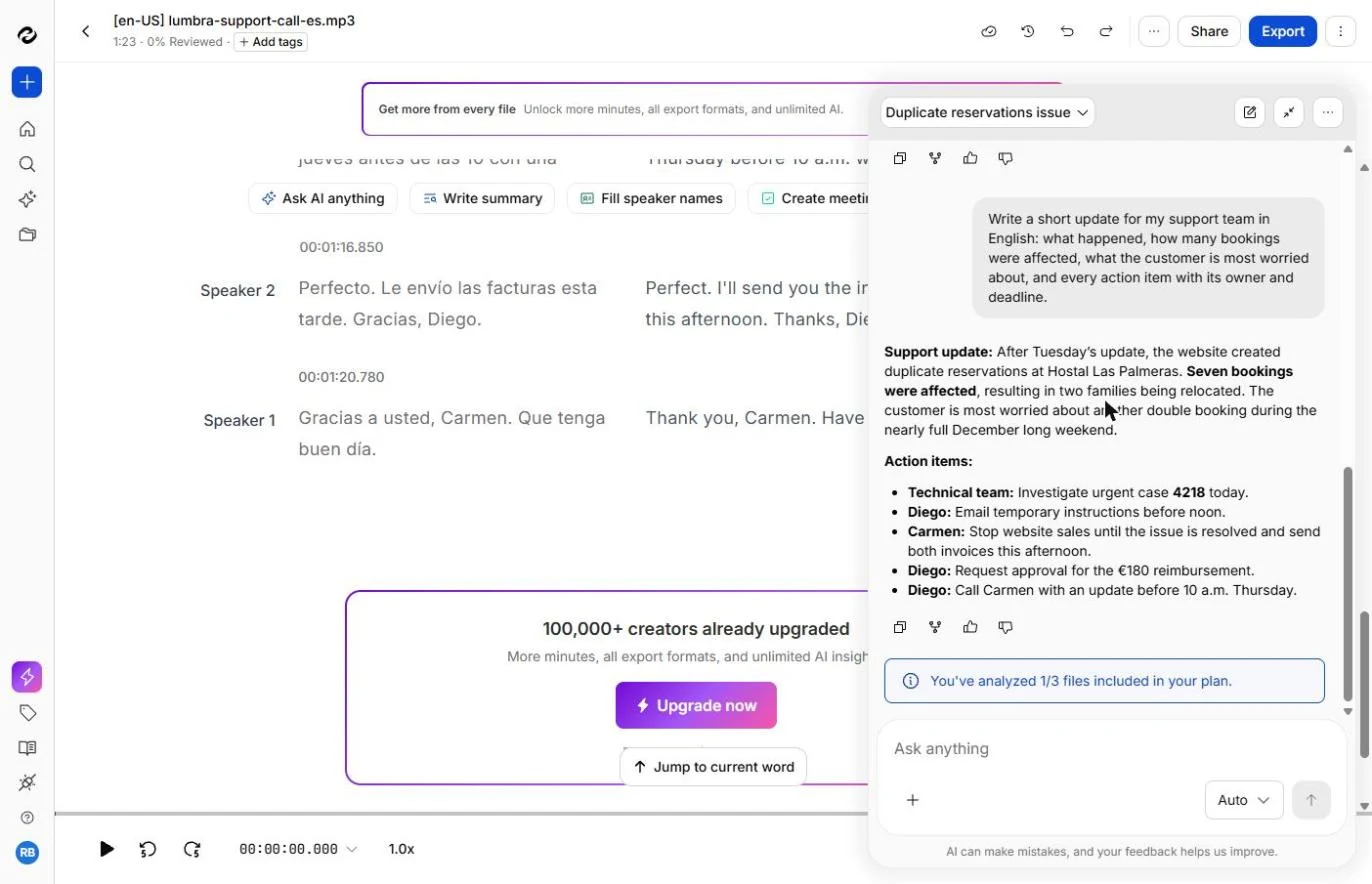
You are the support manager at a made-up booking software company. You transcribe and translate a Spanish customer call, then turn it into notes and a team update with owners and deadlines.
Then you check the update against the Spanish, and catch what the AI got wrong. The screens are real screenshots from a Free plan account, captured November 2026.
What you need
- Nothing to start the practiceThe lesson is a practice copy. The call and everyone in it are made up.
- A HappyScribe account, to do it for realWe used the Free plan: 10 minutes of AI transcription, one free translation on your first file, and AI Chat on 3 files a month. Check the current plans.
- A short call you are allowed to uploadUse our sample, or a real call if your company allows it. Check your policy on recordings and on AI first.
Concepts
Set the language yourself
Our upload page started with the source language on English (US), for a Spanish file. HappyScribe warned about the mismatch and kept Continue off until we fixed it or ticked a box to go on anyway.
The warning is useful. Fix the language rather than ticking the box, and pick the country closest to your caller. English only appears if you also set a target language.
Summaries report. Questions find what matters.
Write summary and Create meeting notes both got our facts right, and neither mentioned the customer’s biggest worry: a nearly full December long weekend.
When we asked for what the customer was most worried about, plus owners and deadlines, it was there. Say who the update is for, and what it must hold.
Check the translation where it counts
The Spanish said las reservas se duplican, bookings are being duplicated. The English transcript said reservations have doubled, which sounds like good news. A second run of the same request also said Support where the first said Diego.
Numbers, times and names are quick to match even with little Spanish. For anything you will promise a customer, ask a Spanish speaker to read it.
Do it for real
Now repeat it in your own account. Tick each step as you go.
Downloads
- Sample support call in Spanish (.mp3)The made-up 83-second call from the lesson, with two speakers. It uses about a minute and a half of your free minutes.
- Spanish script of the call (.txt)What was really said, so you can check the transcript and your summary.
Quick check
3 questions to check you’ve got it.
1. The upload page warns that your language does not match the file. What should you do?
- Change Source language to the language spoken
- Tick the box and continue anyway
- Set Target language and ignore the warning
Show the answer
Change Source language to the language spoken. Source language is the language on the recording. In our run it defaulted to English (US) for a Spanish file.
2. The English transcript says reservations have doubled. The Spanish says las reservas se duplican. What does your update say?
- Bookings were duplicated
- Bookings have doubled
- Leave it out
Show the answer
Bookings were duplicated. Se duplican means they are being duplicated here. Doubled sounds like growth, which is the opposite of the problem.
3. Diego said he will ask his supervisor to approve the refund. What goes in the update?
- Diego will request approval and call Thursday before 10
- The refund is approved
- Carmen will get 180 euros on Thursday
Show the answer
Diego will request approval and call Thursday before 10. He promised to ask and to call back with an answer. The refund itself has not been approved.