Why this matters
A small software company ships a feature every two weeks, and the release note goes out as text. For days afterwards, support answers the same ticket: how do I turn this on? Each reply costs ten minutes, and the customer still has not seen the setting.
Clueso turns a short screen recording plus the release note into a narrated customer how-to video and a step-by-step article, in one project. In our run it also scripted only half the clicks on its own, mislabelled a step in its plan, took about 28 minutes to build, and left the article on the old version until we asked, so this lesson builds in the checks.
Practice
Do every step yourself in a practice copy of the real tool. It checks your work, and “Do it for me” finishes any step you get stuck on.
What you’ll build
You lead support at Bookline, a made-up 15-person scheduling-software company. You upload a 22-second recording of the new Waitlist auto-fill setting, give Clueso the release note and a clear brief, read the plan it writes, fix the one step it got wrong, then take the finished video, catch that the article was not rebuilt, and fix it from the same project.
The screens are real screenshots from Clueso, captured November 2026. Nothing was published to a help center.
What you need
- Nothing to start the practiceThe lesson is a practice copy of the real Clueso screens.
- A Clueso account, to do it for realClueso has a free plan. Our run used 69 credits to write the plan, 444 to build the video and 126 to rewrite the article, so check what your plan includes.
- A release note and a short recording of the settingRecord only the clicks a customer makes, 20 to 30 seconds. The note gives Clueso the order and the details the recording cannot show.
Concepts
The release note is the brief
From the recording alone, Clueso wrote a script that stopped at "Right now, it's switched off": it saw Settings and the Waitlist tab, but not the toggle, the offer window or Save. Clicks tell it where; the note tells it what and why.
A good prompt says what to make, who it is for, the order to follow, the voice and the brand, and then includes the note itself. With that, every step in the plan matched the release.
Read the plan before it builds
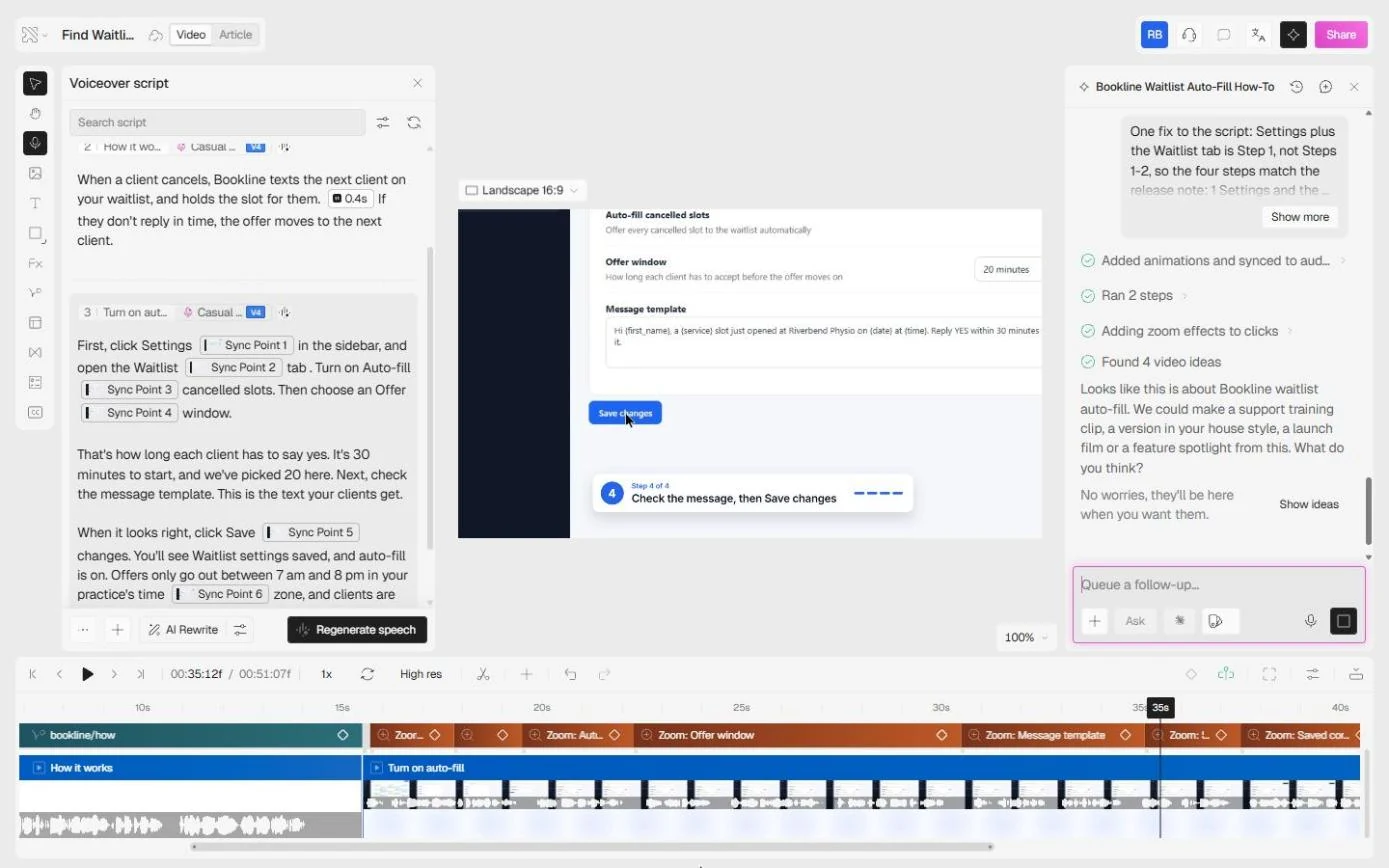
Clueso shows a plan and script and asks you to approve it before spending the build time. Ours labelled the first scene Steps 1–2 and the next one Step 2, so a customer following along would count five steps for a four-step note.
One line in the follow-up box fixed it. Clueso updated its brief, reported that one of its own steps failed ("Couldn't finish this step"), then carried on. The build took about 28 minutes, so a fix after the build would have cost another 28.
The article does not rebuild itself
The finished video is three scenes, Intro, How it works and Turn on auto-fill, with a voiceover, music, a backdrop and a zoom on each click. It runs 51 seconds and ends on the saved screen with the two notes from the release. Clueso also checked every cut and flagged a mismatch in our own recording: the offer window said 20 minutes while the message template still said 30.
The article in the same project was still the first version, written from the clicks: it started at the calendar and ended at the toggle. One request in Ask AI to improve your article rewrote it to the four steps from the note and pulled four new screenshots. Read both against the note, then put the share link in the release email and the ticket macro.
Do it for real
Now repeat it in your own account. Tick each step as you go.
Quick check
3 questions to check you’ve got it.
1. Clueso scripted your clicks but stopped at the toggle. What do you give it next?
- The release note, with a clear brief
- A longer recording
- Nothing, approve the plan
Show the answer
The release note, with a clear brief. Clicks show where; the note says what, in what order and why. With the note, every step in the plan matched the release.
2. The plan labels the first scene Steps 1–2 and the next one Step 2. When do you fix it?
- Before you approve the plan
- After the video is built
- In the article only
Show the answer
Before you approve the plan. A fix in the plan is one line. The build took about 25 minutes, so a fix after it costs another 25.
3. The video is rebuilt with your fix. Is the article in the same project up to date?
- Not necessarily: open it and read it against the note
- Yes, it is rebuilt with the video
- Only if you export it
Show the answer
Not necessarily: open it and read it against the note. In our run the article was still the first version, written from the clicks. One request in Ask AI to improve your article fixed it, but only because we read it.