Why this matters
Recruiters and HR coordinators lose hours to scheduling phone screens: three or four emails to agree a time, a Google Meet link pasted by hand, and the first five minutes of every call spent on experience, notice period and salary.
Yoya puts one link in front of the calendar. The candidate answers your screening questions in a chat and picks a time your Google Calendar shows as free. Every booking gets its own Google Meet link and a calendar invitation, and you get a brief before you say hello.
Practice
Do every step yourself in a practice copy of the real tool. It checks your work, and “Do it for me” finishes any step you get stuck on.
What you’ll build
You are Maya, a made-up talent coordinator hiring a Customer Success Manager. You make a Yoya booking link on Google Meet, set the host name, let candidates join without waiting, write screening questions with guardrails, and ask for a LinkedIn profile.
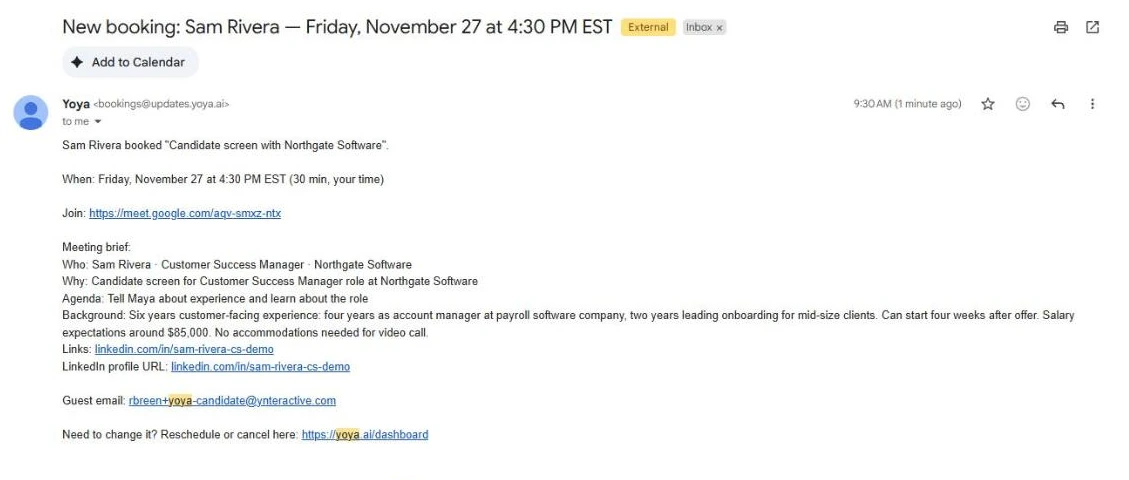
Then you book a screen as the candidate. You see a busy time crossed out, the Google Meet link on the confirmation, the Google Calendar invitation and the brief Maya gets, and you catch the one line the brief got wrong. The screens are real screenshots from my own Yoya account, captured November 2026.
What you need
- Nothing to start the practiceThe lesson is a practice copy. The people and the company are made up.
- A Yoya account, to do it for realThe free plan has one booking link and 10 bookings a month; Google Calendar and Meet work on every plan. Custom host names need Business. Plans change; check the site.
- Google Calendar connected in YoyaSettings, Connections, Google Calendar. Google asks you to allow calendar access. That is what hides your busy times and creates the Meet links.
- Your own email address as the test candidateYou need a real inbox to see the confirmation and the calendar invitation. A plus address on your own inbox works.
Concepts
Google Meet needs a connected calendar
The Google Meet option only works once Google Calendar is connected under Settings, Connections. Then Yoya does two jobs: it hides times you are already busy (our noon meeting showed crossed out), and it creates a fresh Meet link for every booking, sent from your Google account.
Candidates are not signed in to your company account, so turn on Let guests join Meet without waiting, or you will be admitting them by hand. Anyone with that link can join, so it should only go to the candidate.
Screening questions, guardrails and fit rules
What should Yoya find out from guests? is your phone-screen checklist: role, experience, start date, salary expectations, accommodations. Add a line on what it must never promise (an interview, an offer, a salary) and which personal topics are off limits.
Who isn’t a fit? is checked before any times are offered. Use it for vendors and agencies, not to filter candidates; that decision stays with a person. Required guest details, such as a LinkedIn profile, are facts a candidate must give before confirming.
A brief is a summary, so check it
In our run the brief kept the six years, the four weeks’ notice, the $85,000 and the LinkedIn link, but its first line called the candidate a Customer Success Manager at Northgate Software. That is the job he applied for, not where he works.
The transcript keeps the whole chat on the booking. Read it before any hiring decision.
Do it for real
Now repeat it in your own account. Tick each step as you go.
Quick check
3 questions to check you’ve got it.
1. What has to be in place before Yoya can add a Google Meet link?
- Google Calendar connected under Settings, Connections
- A Zoom account
- A Business plan
Show the answer
Google Calendar connected under Settings, Connections. The connected Google Calendar creates the Meet link and the invitation, and lets Yoya see when you are busy.
2. Why turn on Let guests join Meet without waiting for candidate screens?
- Candidates are not signed in to your company Google account
- It records the call
- It makes the link private
Show the answer
Candidates are not signed in to your company Google account. Without it, every candidate waits for you to admit them. Anyone with the link can join, so send it only to the candidate.
3. The brief says the candidate works at your company. What do you do?
- Check the Transcript on the booking
- Trust the brief
- Cancel the booking
Show the answer
Check the Transcript on the booking. A brief is an AI summary. The transcript has the whole chat; in our run it showed that was the job he applied for.
Airia: Test Your HR Agent Before Rollout with an Evaluation
For intro calls with clients rather than candidates, see the first Yoya lesson: a consultant’s booking page that hands you a brief before every call.
Start module 26 →