Why this matters
At a firm with staff in several states, someone in HR is supposed to keep up with each state's minimum wage. The check happens when there is time, and a change spotted after payroll means corrections and back pay.
A Strawberry routine reads one official page on a schedule, compares it with last week and tells you what changed. With one line in the instructions it stops at an approval card before it saves anything, so a person checks the figures first.
Practice
Do every step yourself in a practice copy of the real tool. It checks your work, and “Do it for me” finishes any step you get stuck on.
What you’ll build
You help Priya Nair, HR manager at Linden Row Design, a made-up 48-person design firm with staff in Pennsylvania, New Jersey and New York.
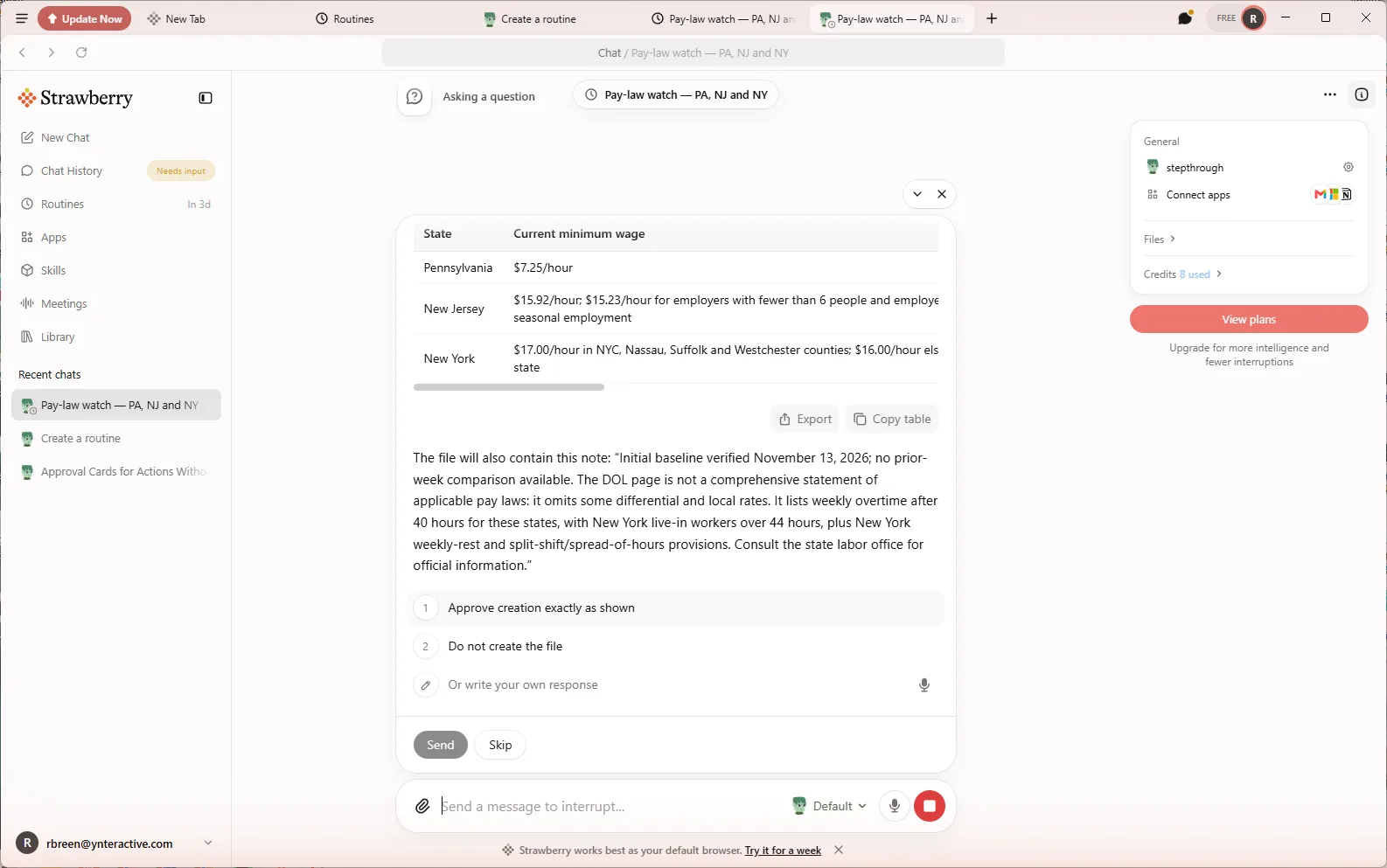
You set up a Monday 8:00 routine with Create with companion, run it, read a first run that could not save, add one rule to the instructions, run it again, and approve the baseline on the approval card.
What you need
- Nothing to start the practiceThe lesson is a practice copy of the real Strawberry screens. Linden Row Design and Priya are made up, and nothing is read or saved.
- Strawberry, to do it for realA desktop browser for macOS and Windows with built-in AI companions. We used the Free plan; setup and two runs used about a dozen AI credits.
- The states you employ inAnd the page you trust for them. The lesson uses the U.S. Department of Labor's state minimum wage page.
Concepts
A routine is a chat that starts itself
A Strawberry routine is a trigger, instructions and a companion. When the trigger fires, Strawberry opens a real chat and the companion does the work. Each run is listed under Run History on the routine's page.
Strawberry must be open and signed in for a run to happen. A run that comes due while it is closed waits until you open it.
Read the first run, then tune
Our first run read the live page but could not save: companion database tools were not available on the Free plan, so it said so and wrote nothing. That is what you want from an agent that runs alone.
The fix was one paragraph on the routine page: keep the table in a Library file, show the exact rows and ask before writing. Then Save changes.
The approval card is where you stay in control
When the instructions say ask me first, the run stops in the chat with the exact change, numbered choices, Send and Skip, and Chat History shows Needs input.
Check each figure against the source link before you approve. The DOL page is a summary; your state labor office is the official source.
Do it for real
Now repeat it in your own account. Tick each step as you go.
Quick check
3 questions to check you’ve got it.
1. The first run says database tools were unavailable and nothing was saved. What do you do?
- Delete the routine
- Add a rule to the instructions that says where to keep the table, then run it again
- Tell it to save anywhere it can without asking
Show the answer
Add a rule to the instructions that says where to keep the table, then run it again. The run stopped honestly. One more rule, keeping the approval gate, fixes it.
2. The approval card shows three rows and a source link. What should you check before you click Send?
- Nothing, the routine already checked
- Each figure against the source page
- Only that the file name is right
Show the answer
Each figure against the source page. Pay data feeds payroll. The card is there so a person checks the figures before anything is saved.
3. It is Monday at 8:00 and your laptop is shut. What happens to the routine?
- It runs in the cloud anyway
- The run waits until you open Strawberry
- It is skipped for good
Show the answer
The run waits until you open Strawberry. Strawberry has to be open and signed in for a run; a missed run waits until you reopen it.