Why this matters
A small professional-services firm runs a paid campaign a few times a year, and every click lands on a website nobody has checked closely in months. An expired certificate, missing security headers, a page Google cannot read, a site AI assistants cannot describe, or a slow page on a phone quietly wastes the budget.
Sitelemetry runs those checks in one place: security, technical SEO, AI visibility, accessibility and performance, each with the evidence behind every finding and a fix. In about 15 minutes you get a fix list for your web developer before a cent of ad spend, and you record the settings you keep on purpose.
Practice
Do every step yourself in a practice copy of the real tool. It checks your work, and “Do it for me” finishes any step you get stuck on.
What you’ll build
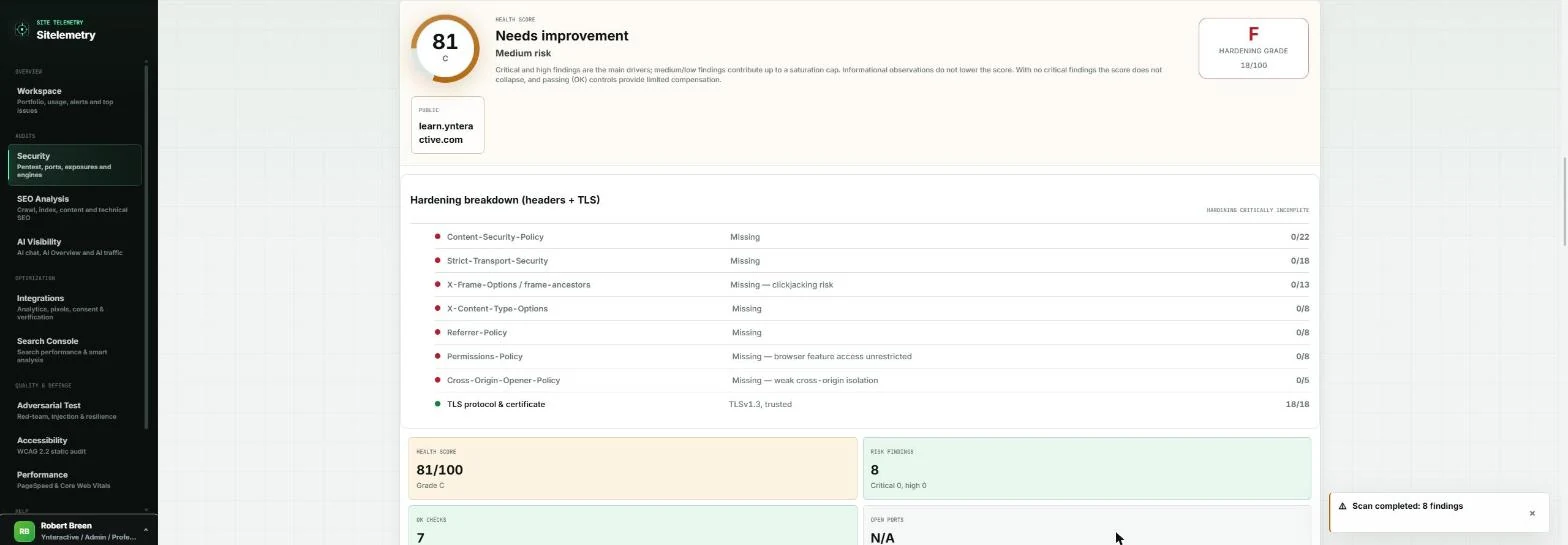
You run marketing at a made-up 14-person employee-benefits consultancy with a $4,000 open-enrollment campaign starting Monday. You verify the website in Sitelemetry, run a Passive security scan, read the evidence and the fix for a missing header, and mark a deliberate setting as an accepted risk.
Then you crawl 15 pages for SEO, check whether AI assistants can answer your buyers' questions from your pages, run the accessibility and mobile speed checks, and copy one AI fix prompt for your developer. Sitelemetry only audits sites you own, so the screens are real screenshots of our own site, learn.ynteractive.com, captured November 2026 on the Professional plan.
What you need
- Nothing to start the practiceThe lesson is a practice copy of real Sitelemetry screens. The consultancy is made up.
- A Sitelemetry account, to do it for realThe Free plan includes 10 of Sitelemetry's 27 security checks: seven run on any public site, and three more (HTTP methods, exposure and API exposure) run once the site is verified. SEO, AI visibility, accessibility and performance audits are on paid plans. Check the current plans first.
- A site you own, and your web developerProtected checks need the site verified with a DNS TXT record or an HTTP file your developer publishes. Only audit sites you own or are authorized to test.
- Prefer to start free?Our free starter lesson runs Sitelemetry's no-account Launch Readiness Score on a college admissions site.
Concepts
Verification unlocks the deeper checks
Sitelemetry verifies the exact hostname you type, so a subdomain such as learn.yoursite.com works on its own. Pick a DNS TXT record or an HTTP file at /.well-known/sitelemetry-verification.txt that holds the code. Our file was live a few minutes after our developer published it, and Verify HTTP passed on the first try.
Verification turns on the protected security engines. Before the first protected scan, Sitelemetry asks you to confirm you own the target or are authorized to test it, and that you will stay in scope. That step is intentional.
Passive first, active later
The Passive profile keeps seven checks that only read public settings: DNS, email DNS, WHOIS, the TLS certificate, HTTP headers, HTTPS downgrade risk and the technology fingerprint. Standard adds active engines that send real test traffic; on the Professional plan those are port probes and an SQL injection canary. Injection canaries, ZAP and WPScan are Enterprise-only.
In launch week, run Passive. Plan active scans with your web developer for a quiet day.
Triage: fix, accept or dismiss
Every finding has a Status: Open, Accepted risk, False positive or Fixed. Our site allows other sites to frame its lessons on purpose, so "Clickjacking protection missing" is an accepted risk for us; the HSTS header is a real fix.
Recording the decision means your developer sees only real work, and the next audit does not reopen the same debate.
AI visibility is readiness, not a live AI test
Sitelemetry scores whether your pages can be an answer source: a clear brand, pages that answer each buyer question, structured data and an llms.txt file. The page itself says the score is produced without querying a live LLM or Google result.
Use it to make sure every question your buyers ask has a page with a clear answer. To write those pages, see Get your firm found by ChatGPT and AI search.
Do it for real
Now repeat it in your own account. Tick each step as you go.
Quick check
3 questions to check you’ve got it.
1. It is the week before a paid campaign. Which security profile should you run on the live site?
- Passive
- All
- Deep
Show the answer
Passive. Passive only reads public settings. Active engines send test traffic that can trip a firewall or slow the site in the week you need it most.
2. A finding is a setting you keep on purpose, such as letting partner sites frame your pages. What do you do?
- Set its Status to Accepted risk
- Ignore it and leave it Open
- Delete the site and verify it again
Show the answer
Set its Status to Accepted risk. Accepted risk records the decision, so your developer sees only the real fixes.
3. Your AI visibility score is 99. What does that tell you?
- Your pages are ready to be cited for the questions you entered
- ChatGPT cites you today
- Your Google ranking will rise
Show the answer
Your pages are ready to be cited for the questions you entered. Sitelemetry scores readiness from your pages without querying a live LLM or Google result.