Why this matters
Client vendor forms, grant applications and public-sector buyers now ask a plain question: is your website accessible, and can you show it? Most small teams have no answer, and a full audit takes weeks to book.
Sitelemetry's Accessibility view runs a static WCAG 2.2 check on one page in about ten seconds. It says what passed, what failed and, just as useful, what it could not test, then writes an AI fix prompt you can hand to whoever maintains the site.
Practice
Do every step yourself in a practice copy of the real tool. It checks your work, and “Do it for me” finishes any step you get stuck on.
What you’ll build
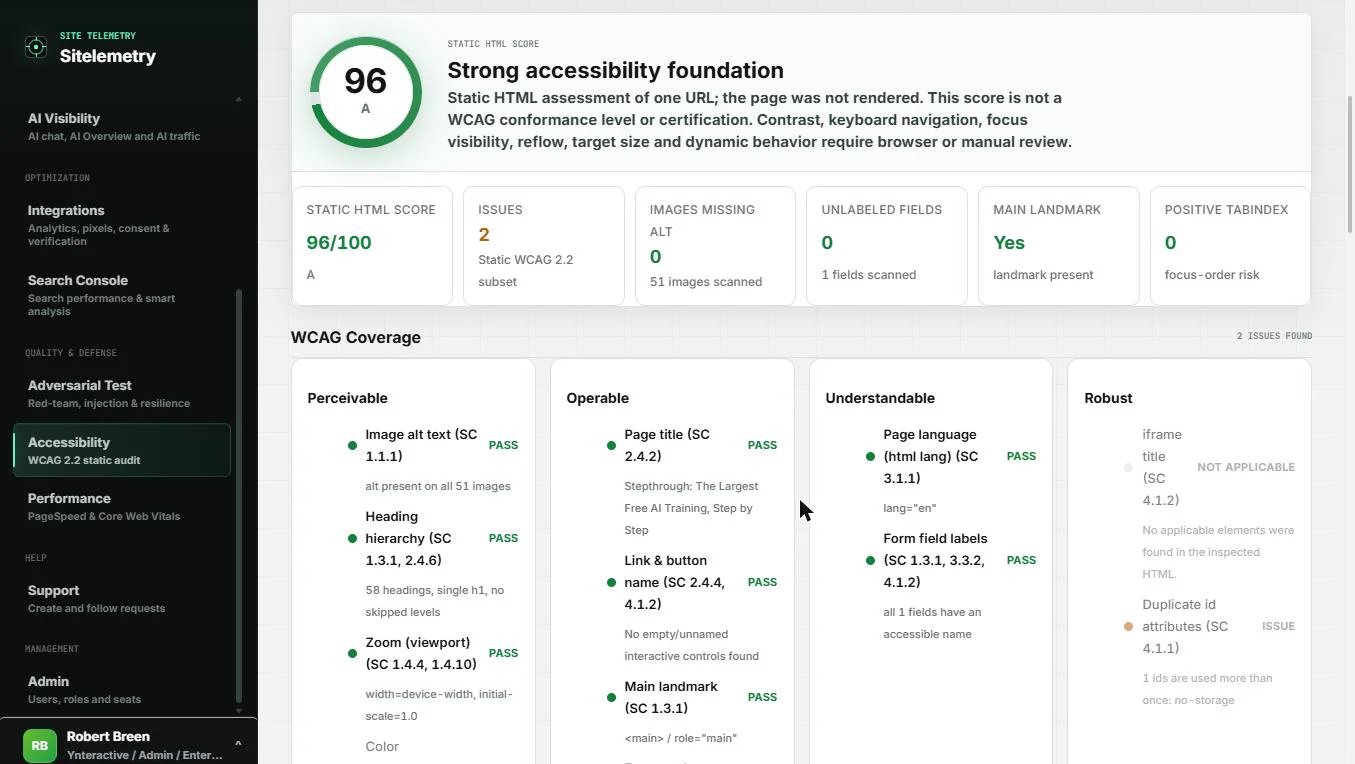
You are a made-up operations coordinator answering a client's vendor form. You run the check on a page you own, read the score and its limits, find the two issues and copy the AI Fix Prompt.
The screens are real screenshots from my own Sitelemetry account, captured November 2026. The page scanned is our own site, which scored 96 out of 100 with two minor issues.
What you need
- Nothing to start the practiceThe lesson is a practice copy and runs no scan.
- A Sitelemetry account, to do it for realAccessibility is on the paid plans. Check the current plans first.
- A page you own or are allowed to testScan your own site, not a competitor's or a client's without their say-so.
Concepts
Static means it read the code, not the screen
The check looks at the page's HTML: alt text, page language, form labels, heading order, landmarks and zoom. It does not render the page, so color contrast, keyboard navigation, focus visibility, reflow and target size are not judged.
Sitelemetry says so under the score: it is not a WCAG conformance level or certification.
Read the status of every check
WCAG Coverage marks each check Pass, Issue, Not applicable or Manual review. Manual review is your to-do list for a person with a browser.
On our page, 12 checks passed, 2 were not applicable, 2 needed manual review and 2 were issues: no skip-to-content link, and one duplicated id.
Hand over a prompt, not a screenshot
AI Fix Prompt writes one instruction with the site, the score and every finding with its evidence, impact and suggested fix. Copy it for your developer, or open it in ChatGPT or Claude.
Rerun the check after the fix so your evidence shows the new result.
Do it for real
Now repeat it in your own account. Tick each step as you go.
Quick check
3 questions to check you’ve got it.
1. The page scores 96. What can you tell the client?
- A static check of one page scored 96; contrast and keyboard checks still need a manual review
- The website is WCAG certified
- The whole site is fully accessible
Show the answer
A static check of one page scored 96; contrast and keyboard checks still need a manual review. Sitelemetry states the score is not a conformance level or certification, and it only read one page's HTML.
2. A check is marked Manual review. What does that mean?
- The tool could not judge it, so a person needs to check it in a browser
- It passed
- It does not apply to your site
Show the answer
The tool could not judge it, so a person needs to check it in a browser. Color contrast, for example, needs the page rendered. Treat Manual review as work still to do.
3. You are not a developer. What is the fastest way to get the two issues fixed?
- Copy the AI Fix Prompt and send it to whoever maintains the site
- Edit the HTML yourself
- Ignore them because they are minor
Show the answer
Copy the AI Fix Prompt and send it to whoever maintains the site. The prompt carries each finding's evidence, impact and suggested fix, so the developer or an AI assistant can act on it directly.