What is Mixo?
Quick answer
Mixo (mixo.io) is an AI website builder for small businesses. You describe your business or idea in one sentence, it generates a website with the words, images and a sign-up or contact form, and you edit it in a simple editor and publish it. Sign-ups land on your Mixo dashboard, where you can export them as a CSV.
Last updated
Take the free module →Module 37 of the free AI Apps Worth Knowing course, about 12 minutes. No account needed.
Updated · By Robert Breen
Why it matters for a small business
Mixo makes a website cheap and fast enough to use as a test. A firm thinking about a new service can put up a one-page site with a sign-up box the same day, share the link and count how many people leave their email before spending weeks building the service.
Mixo's help center says the free plan lets you create, edit and publish a one-page site on a Mixo address, such as yoursite.mixo.io, with hosting, SSL and Mixo branding. Paid plans add a custom domain, more pages and removing the branding.
In a real lesson: Mixo: Launch a Landing Page and Collect Early Sign-ups
In the Mixo lesson, Lakeshore Ledger, a made-up bookkeeping firm, tests a monthly Cash-Flow Check-in service. The owner types one sentence into Mixo, clicks Generate Site, then in the editor rewrites the Title to "Know your cash for the next 13 weeks", ticks Show Signup Form and labels the button "Join the early list".
After Save and Publish, each sign-up appears under Recent Subscribers on the dashboard, and Download CSV exports the list so she can reply to each person.
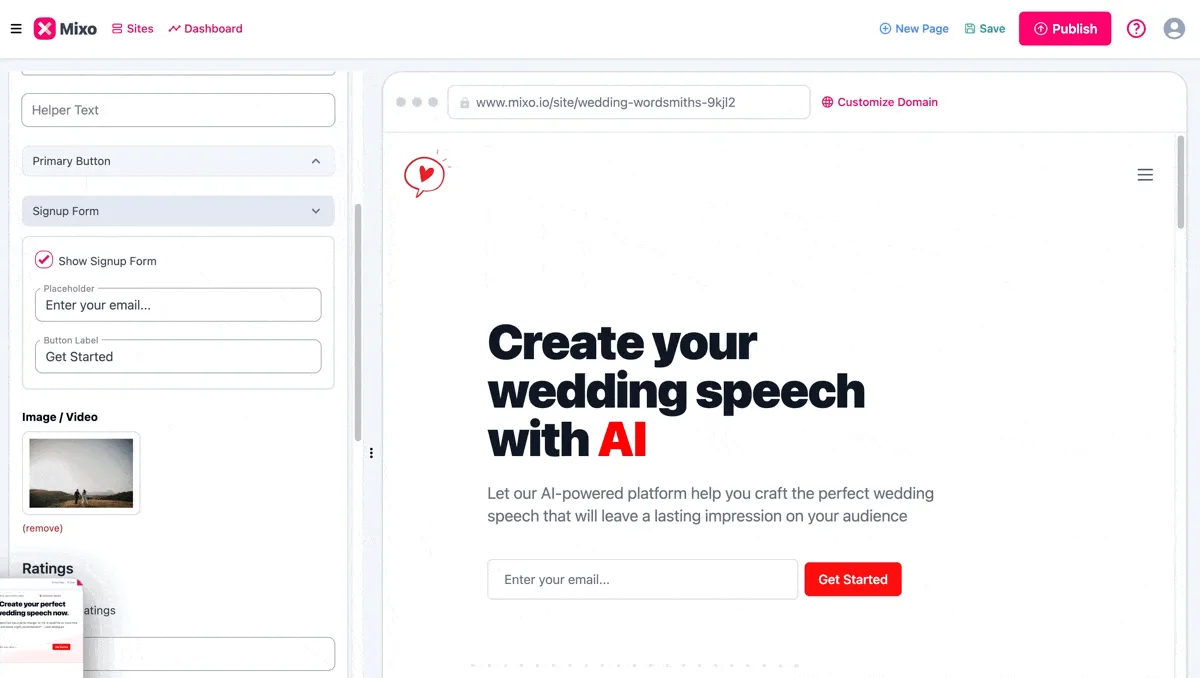
Try this lesson free or read the step-by-step guide.
Common confusions
Mixo vs Lovable
Mixo builds a business website from a sentence and you edit its sections. Lovable writes app code from a description, so it can build forms and tools with custom behavior.
Save vs Publish in Mixo
Save keeps your changes in your account. Publish puts them live. Changes made later only go live when you publish again.
Tips
- Write the idea as one specific sentence: the service, the customer and who runs it.
- Rewrite the headline the AI gives you so it says what the customer gets.
- Set a sign-up goal and a deadline before you share the link.
Related terms
More Web apps terms
Where you use it: free lessons
- Mixo: Launch a Landing Page and Collect Early Sign-ups (Mixo, 12 min)
AI tools that use it
Frequently asked questions
- Is Mixo free?
- Mixo's help center says there is a free plan for creating, editing and publishing a one-page site on a Mixo subdomain with Mixo branding. Check mixo.io/pricing for paid plans.
- Do I need to code to use Mixo?
- No. You describe the idea in a sentence and edit the text, images and colors in the Mixo editor.
- Where do Mixo sign-ups go?
- To your site's Mixo dashboard, under Recent Subscribers, with an email notification for each one. You can download them as a CSV.