What is Jyro AI?
Quick answer
Jyro AI (jyroai.com) is an AI video and music studio. From a one-line prompt it writes a screenplay with scenes and narration, then makes the visuals and voiceover. In Script mode you paste your own script and skip the AI writing. It can also make songs with lyrics, and a music video from a finished song.
Last updated
Take the free module →Module 6 of the free AI Video & Visuals for Business course, about 7 minutes. No account needed.
Updated · By Robert Breen
Why it matters for a small business
Short videos for social media take a script, pictures, a voice and editing, and most small teams do not have time for all four every week. Jyro puts them in one place. Its pages describe a flow where you pick a mode, give a focused prompt, review the screenplay with its scenes, narration and title, and then render the video.
The review step is the useful part for a business. You see the script and scenes before the video is made, and you can edit a scene in the Video Editor afterwards. Jyro lists 18 visual styles, voiceovers in 30+ languages and voice cloning. A Brand Kit keeps your brand settings for each video, and Character DNA saves a reusable character with its look and voice, which Jyro says needs a paid plan.
The music side starts a song from a few words, a full idea or a recording you own. When the song is ready, Jyro can build a music video whose visuals follow it while the song audio stays the same. Finished videos can be downloaded or posted to a connected social account.
In a real lesson: Flova: Plan a Promo Video from a Script Before You Spend a Credit
The Flova lesson does not use Jyro. In it, Dana at Cedar Lane Bakery, a made-up business, gives an AI video agent a ten-second promo script, reads the planned shots before anything is generated, and asks for one reference image of the sourdough so she can check it first.
Jyro covers the same job with its Script mode: Dana could paste the exact script so the AI does not rewrite it, read the screenplay and scenes, change any scene that does not match the bakery, and only then render the video and download it for the owner to approve.
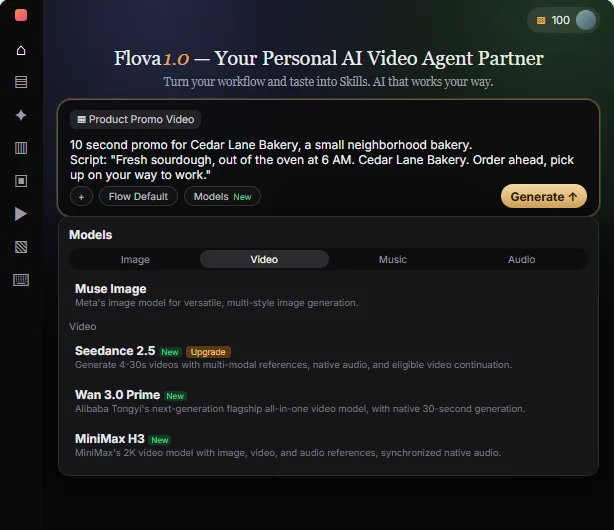
Try this lesson free or read the step-by-step guide.
Common confusions
Prompt mode vs Script mode
With a one-line prompt, Jyro writes the script for you. In Script mode you paste your own, finished script, which is the safer choice when the words must be exact.
Voice cloning vs a stock voice
Voice cloning makes a voice that sounds like a real person, so only clone a voice you have permission to use. A stock text-to-speech voice needs no permission.
Tips
- Paste your own script when the wording matters, such as a price, an offer or a legal line.
- Read the screenplay before rendering. Fixing a scene there is quicker than redoing a video.
- Set up the Brand Kit once so every video starts with your look.
- Download and review the video before it is posted anywhere.
Related terms
More Web apps terms
Where you use it: free lessons
- Flova: Plan a Promo Video from a Script Before You Spend a Credit (Flova, 7 min)
- Turn a Product Update into an Explainer Video using Renderforest (Renderforest, 9 min)
AI tools that use it
Frequently asked questions
- Is Jyro AI free?
- Jyro says there is a free plan with no credit card and free coins on signup. Some features, such as Character DNA characters, need a paid plan. Check jyroai.com for the current plans.
- Can I use my own script in Jyro?
- Yes. Switch to Script mode and paste your full script to skip the AI writing step.
- Can Jyro make music?
- Yes. It makes songs with lyrics from a few words, an idea or a recording you own, and can turn a finished song into a music video.