Updated . Built against the tool’s current screens and checked step by step. How we check this lesson
Managed IT firms, agencies, bookkeepers and other service businesses rarely lose a client in the middle of a contract. They lose them at the end, when the contract runs out and nobody called. The fix is a business habit: every contract gets a check-in call 90 days before it ends, a renewal quote at 60 and a signed renewal by 30. In this free business-case lesson you price what a missed renewal costs, then build one Capsule CRM track that counts back from a contract's end date, add it to a new renewal and an existing one, and pull up the renewal call list. Everything in it worked on Capsule's free plan.
At a glance
| Question | Answer |
|---|---|
| What you build | A business case for a managed IT or services firm: price what a missed renewal costs, then build a Capsule CRM track that sets a call 90 days before each contract ends, a quote at 60 and a signature by 30, add it to new and existing contracts, and pull up the renewal call list. |
| Tools | Capsule CRM |
| Time | About 20 minutes, 57 steps in 6 parts |
| Level | Beginner, no coding needed |
| Cost | Free |
| Ways to learn it | Practice it step by step |
The 6 parts, in short
- What a missed renewal costs: Count the missed renewals, Put a price on it, Meet Capsule.
- Build the renewal track once: Open your account menu, Open Account Settings, Open Tracks, Choose Opportunities, and 6 more steps.
- Add the 90, 60 and 30 day tasks: Add the first task, The 90-day call, 90 days before, Open Category, and 11 more steps.
- Put a contract on the pipeline: Go to the pipeline, Add an opportunity, Name it, Who is it for?, and 10 more steps.
- Every renewal gets its dates: Open the renewal, Read the dates, Back to the pipeline, Open Cedar Row Law, and 8 more steps.
- What this saves you: The next call, What this saves you, Next: Transpond.
Start here first: Never Lose a Client Follow-up using Capsule CRM (module 1 of AI Automation for Sales)
Part of: AI Apps Worth Knowing (step 2 of 123)
The business case: what a missed renewal costs a service firm
Picture Maya, the office manager at Northpoint IT, a made-up 12-person managed IT services firm with 34 support contracts. Each contract has an end date in a spreadsheet column, and nobody reads that column until a client calls. Last year three renewals were missed. One client renewed after six weeks out of contract. Two moved to another provider.
Here is the arithmetic, using example numbers you should replace with your own. At an average of $1,850 a month, each contract is worth $22,200 a year, so the two clients who left took $44,400 of yearly revenue with them. Keeping a client you already have is cheaper than winning a new one, and the firm did nothing wrong except forget to call.
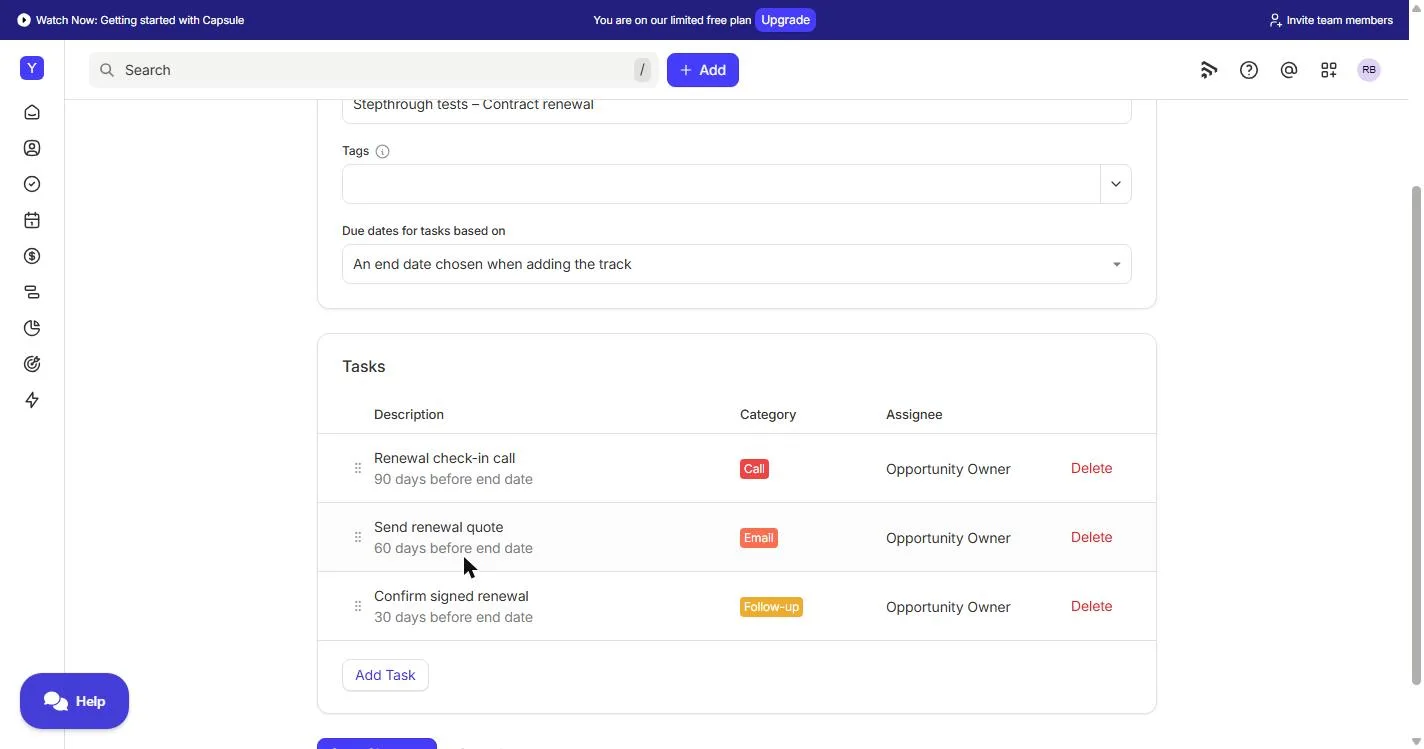
The fix is a fixed rhythm for every contract: a check-in call 90 days before the end date, while there is time to fix a complaint; a renewal quote at 60 days; and a signed renewal by 30. The hard part is not the calls. It is making sure they happen for every contract, every time, without someone working out dates from a spreadsheet.
Who this is for, and what it costs to start
Office managers, account managers and owners at managed IT providers, agencies, bookkeeping firms, cleaning and facilities companies, and any business that sells yearly or monthly service contracts. You do not need any sales or technical background.
Everything in this lesson worked on Capsule's free plan in our test in November 2026: opportunity tracks, end-date due dates, monthly values and the Tasks filter. The free plan covers 250 contacts, 2 users and 1 sales pipeline, and the account we used also showed a limit of 50 opportunities, so a firm with many contracts may need a paid plan. A separate Renewals pipeline would need multiple pipelines, which are on Growth and above, so the lesson keeps renewals in the one Sales Pipeline. The Starter, Growth and Advanced plans have a 14-day free trial with no card.
How a track that counts back from an end date works
A track is a saved list of tasks. When you add it to a contact, opportunity or project, Capsule creates the tasks for you. Each track counts either forward from the day you add it (The start date of the track) or back from a date you choose when you add it (An end date chosen when adding the track). Renewals need the second one.
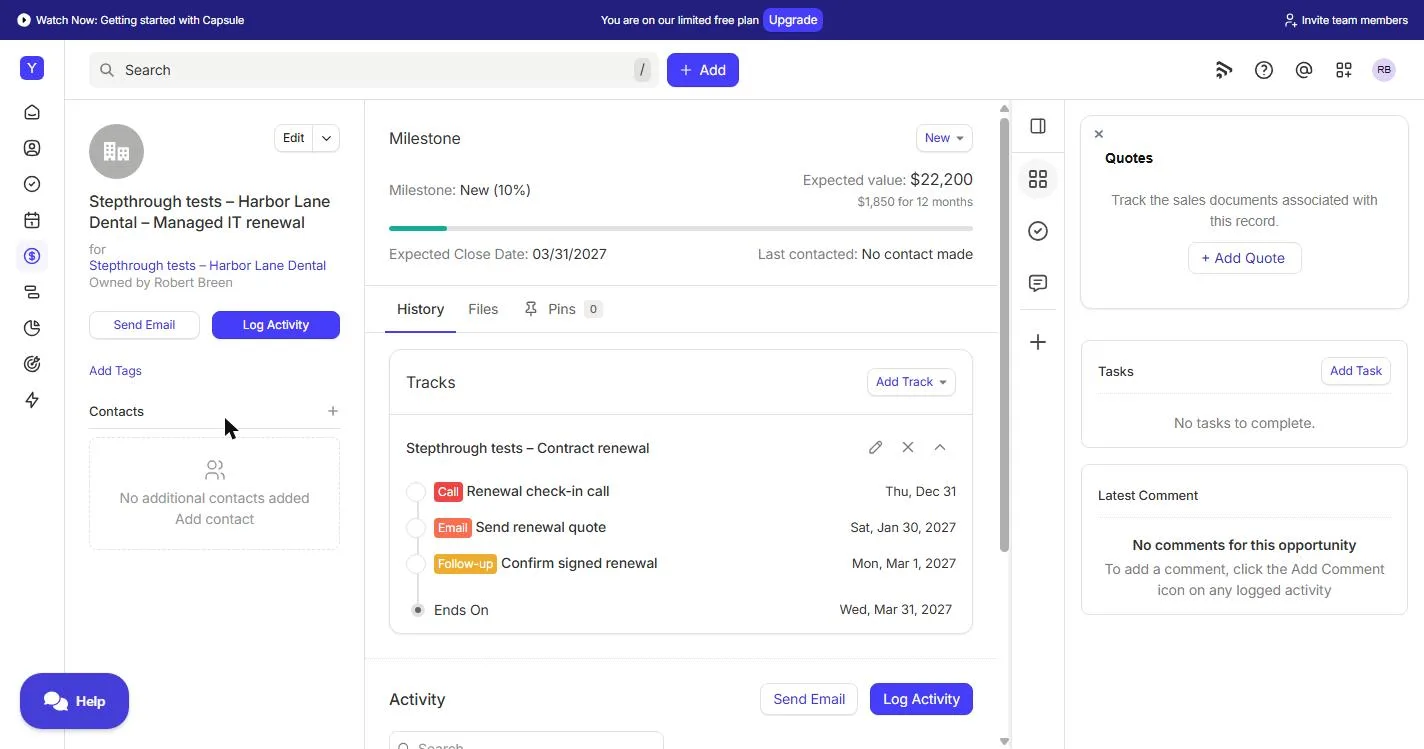
In the lesson, a contract ending on 31 March 2027 got its call on Thursday 31 December, its quote on Saturday 30 January and its signature date on Monday 1 March. A contract ending on 31 May 2027 got 2 March, 1 April and 1 May. Those are the dates our real Capsule account showed, worked out by Capsule, not by hand. Some of them fall on a weekend, so move a task to the Friday before if your team does not work weekends.
Why the value is per month, for 12 months
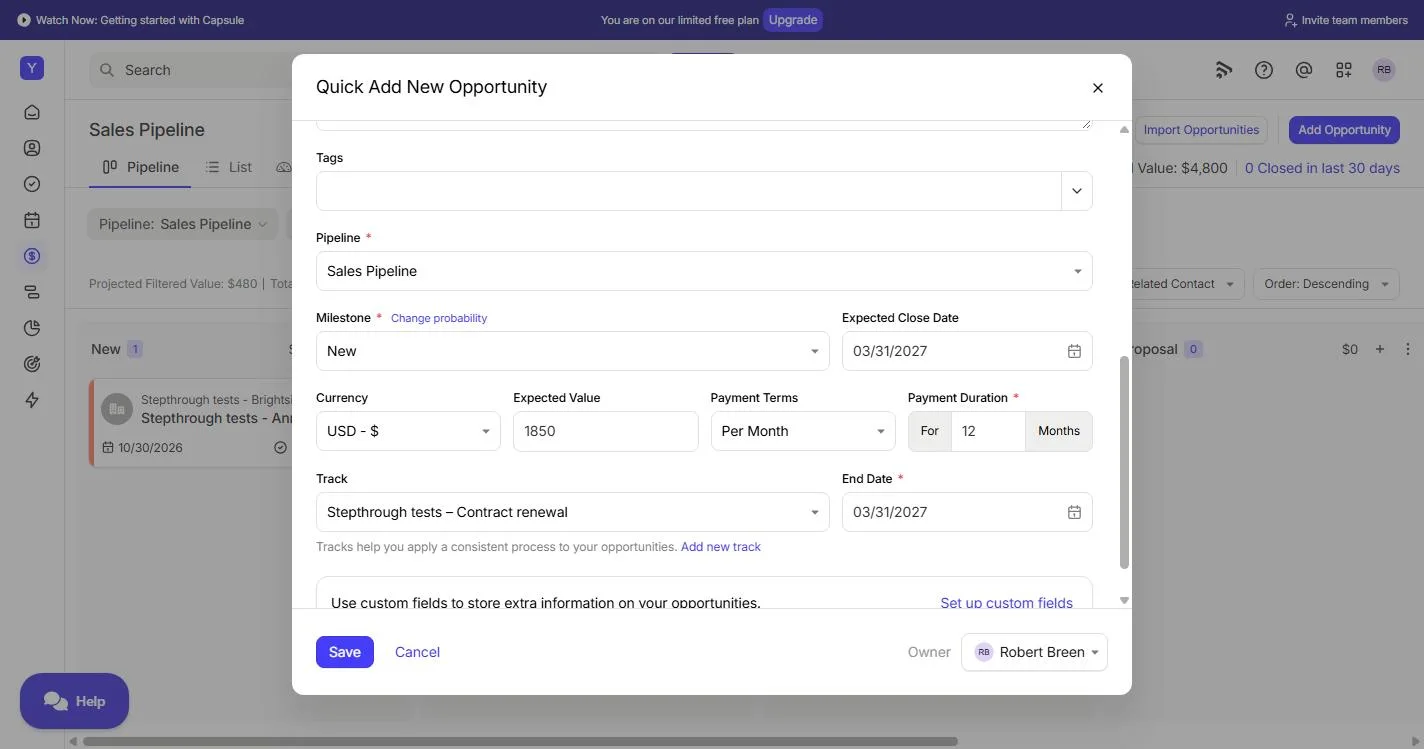
A support contract is paid monthly, so the lesson sets Payment Terms to Per Month and Payment Duration to 12 months. Capsule then shows the renewal's expected value as $22,200, which is $1,850 for 12 months, and the pipeline card shows $1,850 with a repeat sign. That way the renewals worth the most stand out, and the pipeline total reflects a year of revenue, not one month.
Where Capsule's AI fits (not taught in this lesson)
- AI Email Assist is on every Capsule plan, including Free, and the number of assists grows with your plan. It can help draft the renewal quote email at the 60-day task. Read every draft before it goes out.
- AI Meeting Prep, AI Summaries and AI Business and Contact Enrichment are on Growth and above, so they are not used here. On those plans, Meeting Prep could help before the 90-day check-in call.
- To work with Capsule from Claude or other AI tools, Capsule offers the Capsule MCP, currently in Beta. It is beyond this lesson.
What this saves you
- Missed renewals: every contract gets a call, a quote and a signature date, with an owner. In the example, the two clients who left were worth $44,400 a year.
- Working out dates: Capsule counts back from each end date, so adding the track to a contract takes a few clicks.
- Holiday cover: the renewal steps live in Capsule, not in one person's head, so they run the same when the office manager is away.
- What it does not do: it does not hold the conversation, and it does not fix the complaint a client raises at the 90-day call. It makes sure the call happens in time to fix it.
What we checked in a real Capsule account
We ran every step of this lesson in a real Capsule Free-plan account in November 2026: the track with an end-date setting, the three tasks, a new opportunity with a monthly value and the track, adding the track to an existing opportunity, and the Tasks filter. The screenshots on this page are from that account, and the practice screens match what we saw. One thing to know: on a new, unsaved track Capsule lets you add one task, then says Please save the Track before adding a Task, so the lesson saves the track first.
Next business case: stay in touch with Transpond
Renewals go better when clients hear from you between them: a security tip, a maintenance window notice, a short quarterly newsletter. Transpond is Capsule's marketing add-on, from $11/month, activated from inside your Capsule account, and it uses the same contacts.
Links
- Capsule CRM (affiliate link): the CRM this lesson teaches. It has a free plan, and the Starter, Growth and Advanced plans have a 14-day free trial with no card.
- Capsule pricing: current plans and limits, including the number of contacts, users, pipelines and opportunities on each.
- Tracks (Capsule help): Capsule's own guide to tracks for contacts, opportunities and projects.
- Never Lose a Client Follow-up using Capsule CRM: the first Capsule lesson: contacts, the pipeline, an opportunity, a follow-up task and the forecast.
Disclosure: links marked "affiliate link" are partner links. If you sign up through one, Stepthrough may earn a commission at no extra cost to you. The lesson is free either way and does not depend on it.
Try it yourself, free
Reading the steps is a start. Doing them is how it sticks. The interactive module walks you through every click in a practice copy of Capsule CRM, checks each step, and never touches your real accounts.
Start “Capsule CRM: Never Miss a Contract Renewal”Step by step: Capsule CRM: Never Miss a Contract Renewal
All 57 steps of the interactive module, in order. In the module you watch each one, then do it yourself in a practice copy that checks your work.
1. What a missed renewal costs
- Count the missed renewals. Maya Okafor is the office manager at Northpoint IT, a 12-person managed IT services firm. Its 34 support contracts each have an end date in a spreadsheet column, and nobody looks at that column until a client calls. Last year 3 renewals were missed. Click that row.
Maya is the office manager at a twelve person managed I T firm. They look after thirty four clients on yearly support contracts. The end dates live in a spreadsheet column, and nobody looks at it until a client calls. Last year, three renewals were missed.
- Put a price on it. Two of those three clients moved to another provider. At an average of $1,850 a month, each lost contract is $22,200 a year, so that is $44,400 of yearly revenue gone. These numbers are an example, so swap in your own. Click the total.
Two of those three clients moved to another provider. At an average of eighteen fifty a month, each lost contract is twenty two thousand two hundred dollars a year. That is forty four thousand dollars of revenue, gone. These are example numbers, so use your own.
- Meet Capsule. The fix is a call 90 days out, a quote at 60 and a signed renewal by 30, for every contract, without anyone remembering. In Capsule CRM, a Track is a saved list of tasks you add to a record in one click, and it worked on the free plan we tested. Click the Capsule card.
The fix is simple. A call ninety days before the end date, a quote at sixty, and a signed renewal by thirty. For every contract, without anyone having to remember. In Capsule, a Track is a saved list of tasks you add to a record in one click. And it worked on the free plan we tested.
2. Build the renewal track once
- Open your account menu. You build the track once, in Account Settings. Click your picture at the top right.
You build the track once, in account settings.
- Open Account Settings. Click Account Settings.
- Open Tracks. Account Settings is a grid of cards. Click Tracks.
- Choose Opportunities. Tracks can run on contacts, opportunities or projects. A renewal is money you expect to win, so it is an opportunity. Click the Opportunities tab.
Tracks can run on contacts, opportunities or projects. A renewal is money you expect to win, so it lives on an opportunity.
- Add a track. Click Add Opportunity Track.
- Name the track. Type Contract renewal in Name.
Name it. Contract renewal.
- Count back from the end date. This setting matters most. Due dates for tasks based on starts at The start date of the track. Renewals count back from the day a contract ends, so click the box to change it.
This is the setting that matters. Due dates can count forward from the day you add the track, or back from an end date. Renewals count back from the day the contract ends.
- Pick the end date. Pick An end date chosen when adding the track. Each time you add the track, Capsule asks for the end date and works out every due date from it.
Pick, an end date chosen when adding the track. Now each time you add it, Capsule asks for the contract end date, and works out every due date for you.
- Save the track first. Save the track before you add tasks. On a new track Capsule lets you add one task, then says Please save the Track before adding a Task, so saving first is simpler. Scroll down and click Save.
One quirk. Capsule wants the track saved before you add more than one task. So save it first.
- Open the track. It is saved, with An end date chosen when adding the track. Click Contract renewal to open it again.
It is saved.
3. Add the 90, 60 and 30 day tasks
- Add the first task. Click Add Task.
- The 90-day call. Type Renewal check-in call in Description.
The first task is the check in call.
- 90 days before. In Due, type 90. The other two boxes already say Days and Before end date.
Due ninety days before. The other boxes already say days, and before end date.
- Open Category. Click Category. It starts at None.
- Choose Call. Pick Call. Later you can filter your task list down to just the calls.
Pick Call. Later you can filter your list down to just the calls.
- Save the task. Assignee says Opportunity Owner, so whoever owns each renewal gets its tasks. Click Save.
The assignee is the opportunity owner, so whoever owns each renewal gets its tasks.
- Add the second task. It shows as 90 days before end date. Click Add Task again.
It shows ninety days before end date.
- The 60-day quote. Type Send renewal quote.
Sixty days out, the quote goes over.
- 60 days before. Type 60 in Due.
- Save it. Category is optional, so leave it, or pick Email if you like. Click Save.
The category is optional.
- Add the last task. Click Add Task.
And the last one.
- The 30-day check. Type Confirm signed renewal.
Thirty days out, make sure it is signed.
- 30 days before. Type 30 in Due.
- Save it. Click Save.
- Save the track. Three tasks, at 90, 60 and 30 days before the end date. Scroll down and click Save Changes. You only build this once.
Three tasks. Ninety, sixty and thirty days before the end date. You only build this once.
4. Put a contract on the pipeline
- Go to the pipeline. Now put a contract on it. Harbor Lane Dental’s support contract ends on 31 March 2027. Click Sales Pipeline in the menu.
Now a real contract. Harbor Lane Dental’s support contract ends on the thirty first of March.
- Add an opportunity. A renewal is an opportunity, with a value and a date. Click Add Opportunity.
A renewal is an opportunity, with a value and a date.
- Name it. Type Harbor Lane Dental – Managed IT renewal as the Opportunity Name.
Name it after the client and the contract.
- Who is it for?. In Opportunity Relates To, type Harbor Lane Dental.
Every opportunity belongs to a contact.
- Add the client as an organization. The client is not in Capsule yet, so pick Add “Harbor Lane Dental” as a new organization. Capsule creates the organization for you.
They are not in Capsule yet. Pick, add as a new organization. Capsule creates the company for you, right here.
- The contract end date. Scroll down. In Expected Close Date, type the end date in your account’s date format, or pick it from the calendar. Here that is 03/31/2027.
The expected close date is the day the contract ends. The thirty first of March, twenty twenty seven.
- The monthly fee. Type 1850 in Expected Value: the monthly fee.
The value is the monthly fee. Eighteen fifty.
- Open Payment Terms. Payment Terms says Fixed. A support contract is paid monthly, so click it.
Payment terms says Fixed. A support contract is paid every month, so click it.
- Per Month. Scroll the list and pick Per Month. A Payment Duration box appears.
Pick, per month. A payment duration box appears.
- For 12 months. Type 12 in Payment Duration. Capsule now values the renewal at a full year.
Now Capsule values the renewal at a full year.
- Open Track. Below that is Track. Click Select....
Below that is Track.
- Pick your track. Pick Contract renewal. An End Date box appears beside it.
- Same end date. Type the contract end date again in End Date: 03/31/2027. This is the date the track counts back from.
This is the date the track counts back from.
- Save. Click Save.
5. Every renewal gets its dates
- Open the renewal. The card shows $1,850 with a repeat sign (a monthly value), the end date, and 3 tasks. Click the Harbor Lane Dental card.
The card shows eighteen fifty a month, the end date, and three tasks already.
- Read the dates. Expected value is $22,200: $1,850 for 12 months. Under Tracks, Capsule worked out every date from the end date: the call on Thu, Dec 31, the quote on Sat, Jan 30, 2027, the signed renewal by Mon, Mar 1, 2027, and Ends On Wed, Mar 31, 2027. Click Ends On.
The value is twenty two thousand two hundred, a full year. And under Tracks, Capsule worked out every date for you. The call on the thirty first of December. The quote at the end of January. The signature by the first of March.
- Back to the pipeline. Contracts you already have work the same way. Maya added Cedar Row Law last week, before the track existed. Click Sales Pipeline.
Contracts that are already in Capsule work too. Maya added Cedar Row Law last week, before the track existed.
- Open Cedar Row Law. Click the Cedar Row Law card.
- Add Track. Its Tracks box is empty. Click Add Track.
Its tracks box is empty.
- Pick the track. Pick Contract renewal.
- Its end date. Their contract ends on 31 May 2027. Type 05/31/2027 in End date.
Their contract ends on the thirty first of May.
- Save. Click Save.
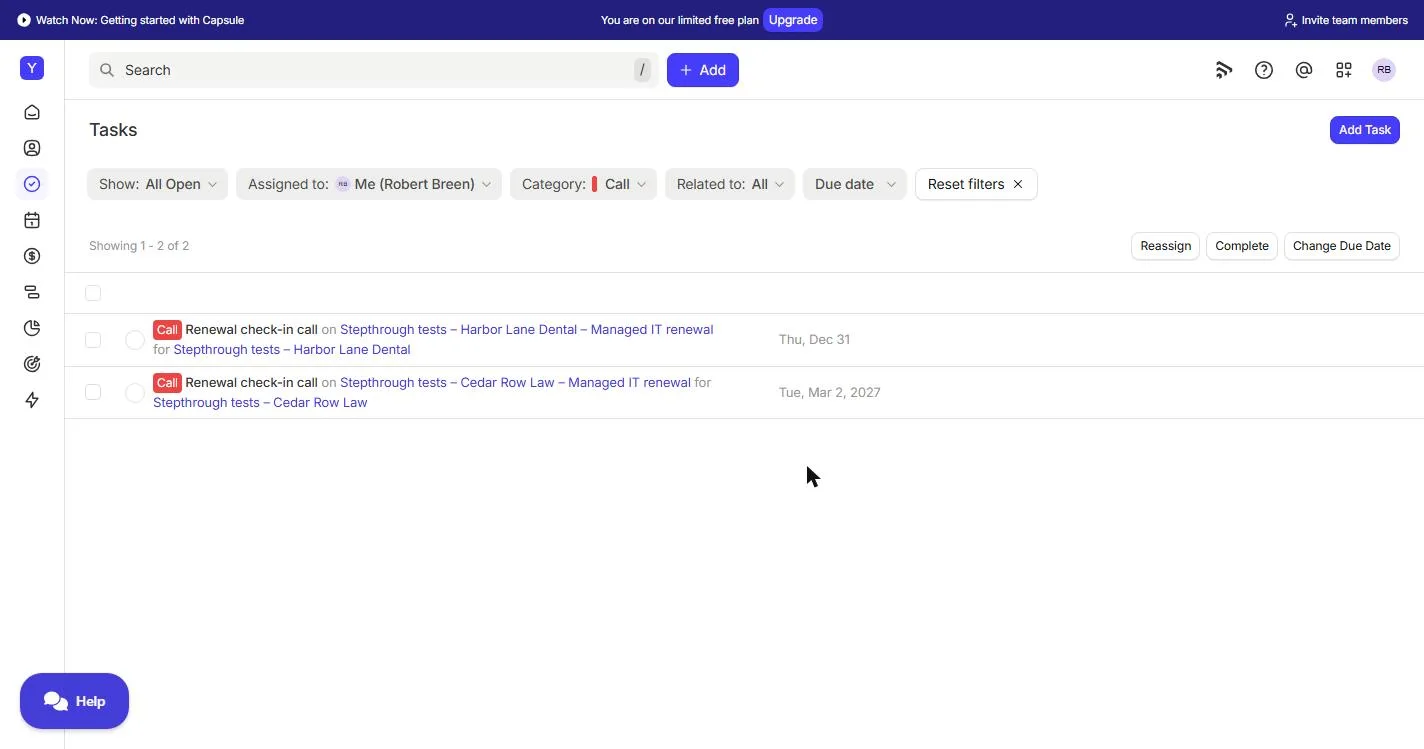
- See every renewal task. Same three tasks, new dates: Tue, Mar 2, 2027, Thu, Apr 1, 2027 and Sat, May 1, 2027. Now see them all together. Click Tasks in the menu.
Same three tasks, with their own dates. Now see them all in one list.
- Filter by category. Every renewal task, in date order, with the client beside it. Click Category: All.
Every renewal task, in date order, with the client beside it.
- Tick Call. Tick Call.
- Apply. Click Apply. This is the renewal call list, with the next call at the top.
That is the renewal call list, with the next call at the top.
6. What this saves you
- The next call. Click the first call, Renewal check-in call, due Thu, Dec 31.
- What this saves you. Click What this saves you.
Here is what it saves.
- Next: Transpond. Click Next business case: Transpond.
Next up, staying in touch with Transpond.
Screenshots
Frequently asked questions
- Can Capsule CRM remind me before a contract renewal?
- Yes. Build an opportunity track whose due dates are based on an end date chosen when adding the track, with tasks such as a call 90 days before, a quote at 60 and a signature by 30. When you add the track to a renewal and enter the contract end date, Capsule creates each task with its due date, and they appear in your Tasks list.
- Are Capsule tracks on the free plan?
- In our test of a Capsule Free-plan account in November 2026, we could create opportunity tracks, use an end date for the due dates, and add the track to opportunities. Plans change, so check capsulecrm.com/pricing for current limits.
- Can I add a track to a contract that is already in Capsule?
- Yes. Open the opportunity, click Add Track in the Tracks box, pick the track and enter the end date. The lesson does this for a second contract that was added before the track existed.
- Should renewals have their own pipeline in Capsule?
- A separate Renewals pipeline can be tidy, but multiple pipelines are on Growth and above. On the Free plan, keep renewals in the one Sales Pipeline and name each opportunity after the client and the contract, as the lesson does.
- Which Capsule AI features need a paid plan?
- AI Email Assist is on every Capsule plan, including Free, and the number of assists grows with your plan. AI Summaries, AI Meeting Prep and AI Business and Contact Enrichment are on Growth and above. The Capsule MCP, for working with Capsule from Claude or other AI tools, is in Beta.
- Is this lesson free, and has it been tested in the real Capsule app?
- The lesson is free and the practice copy needs no account. Every step was run in a real Capsule Free-plan account in November 2026. Capsule is a third-party product and screens change, so yours may differ slightly.
Terms in this lesson
Plain-English definitions, each with an example from a free lesson.