Why this matters
A plugin the whole team uses repeats its mistakes for everyone. One wrong price in a follow-up, sent under five names, costs more than ten minutes of testing.
A new plugin also starts private. Sharing is a separate step, and how you do it depends on your plan.
Practice
Do every step yourself in a practice copy of the real tool. It checks your work, and “Do it for me” finishes any step you get stuck on.
What you’ll build
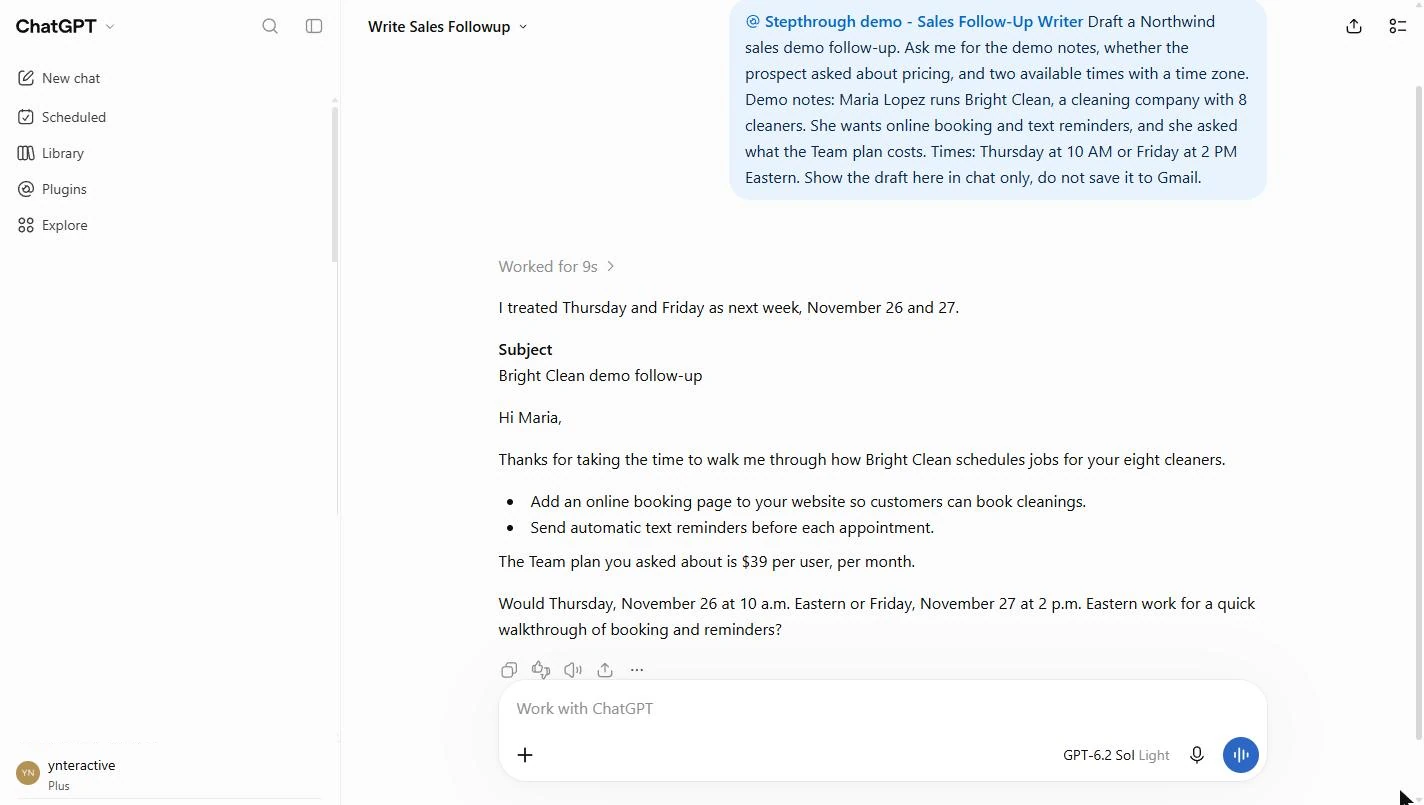
You test the sales follow-up plugin in Try in chat with made-up notes from Bright Clean, check the price ($39, Team plan) and the next step against the playbook, and ask for a 20% discount it should refuse.
Then you see how sharing works: no Share plugin on our Plus plan, a plugin ZIP a colleague uploads, and Share plugin on Business and Enterprise workspaces.
What you need
- Nothing to start the practiceThe lesson is a practice copy built from real ChatGPT screens.
- A plugin you builtThe plugin from module 2, or your migrated GPT.
Concepts
One normal case, one hard case
The normal case checks facts against your source file. The hard case asks for something the rules forbid. Ours did not grant 20% off, but it wrote the request into the email, which may still be too much.
Fix with Plugin Creator, then rerun
If a test fails, ask Plugin Creator to tighten the rule (for example: never mention discounts; tell the rep instead). Then run both tests again. Keep the prompts for every future edit.
Sharing by plan
Business and Enterprise: on the plugin, ••• then Share plugin, choose who has access, Save. Plus: our account had only Download plugin ZIP; a colleague uploads it with Add, Upload plugin archive. Everyone connects apps with their own account.
Do it for real
Now repeat it in your own account. Tick each step as you go.
Downloads
- OpenAI: Plugins in ChatGPT (sharing section)Share plugin is for Business and Enterprise workspaces.
Quick check
3 questions to check you’ve got it.
1. What makes a good hard-case test?
- A request the rules say it must refuse
- The same prompt as the normal case
- A very long prompt
Show the answer
A request the rules say it must refuse. You learn most from a request it should refuse, such as a discount the playbook does not allow.
2. On a Plus plan, how did we get the plugin to a colleague?
- Download plugin ZIP, then they upload it
- Share plugin, then Save
- It appears for them automatically
Show the answer
Download plugin ZIP, then they upload it. Our Plus account had no Share plugin. OpenAI documents Share plugin for Business and Enterprise.
3. A colleague installs your plugin. Whose Gmail does it use?
- Their own, once they connect it
- Yours
- Nobody’s
Show the answer
Their own, once they connect it. Apps need each person’s own authorization. Sharing a plugin does not share your connected accounts.
ChatGPT Plugins: Use the Same Plugin in Codex
Last, you use the same plugin in Codex.
Start module 5 →