Why this matters
A custom GPT only worked inside ChatGPT. A plugin also works in Codex, OpenAI’s agent for longer jobs, so a team builds a helper once and uses it wherever they work.
Practice
Do every step yourself in a practice copy of the real tool. It checks your work, and “Do it for me” finishes any step you get stuck on.
What you’ll build
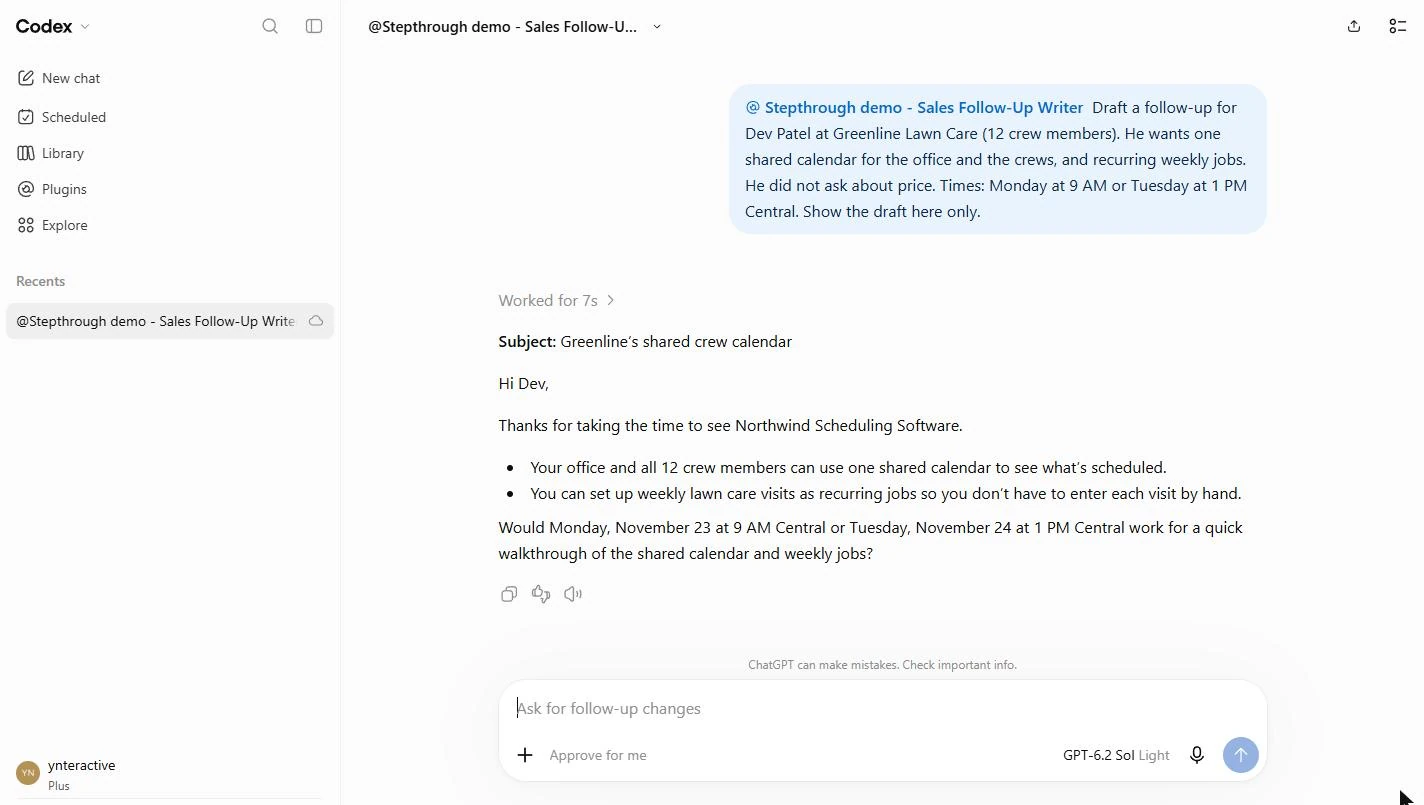
You open Codex on the web, mention the sales follow-up plugin with @, and get a draft for a made-up lawn care company that keeps the price out because the prospect never asked.
What you need
- Nothing to start the practiceThe lesson is a practice copy built from real screens.
- A ChatGPT plan that includes CodexOur Plus account’s Codex page said "Codex is included in your ChatGPT plan".
Concepts
Same plugin, no reinstall
The plugin you built in ChatGPT showed up in Codex when we typed @ and its name. Edits made with Plugin Creator apply in both places.
Do it for real
Now repeat it in your own account. Tick each step as you go.
Quick check
2 questions to check you’ve got it.
1. How do you call your plugin in Codex?
- Type @ and its name in the message box
- Rebuild it in Codex
- Upload the plugin ZIP to Codex
Show the answer
Type @ and its name in the message box. Plugins work in ChatGPT and Codex. In our test it appeared in the @ list straight away.
2. The prospect did not ask about price. What should the draft do?
- Leave the price out
- Quote every plan
- Offer a discount
Show the answer
Leave the price out. The skill says price only if asked, and Codex followed it.