Why this matters
Small offices share logins and get "your password expires today" emails every month. One click and one typed password can expose a schedule full of patient names or redirect a paycheck, and most offices have no IT person in the building to ask.
Three free browser tools give an office manager a ten-minute routine: check the link without opening it, score the shared password, and replace it with a long random one. The pages say all three run in your browser and send nothing.
Practice
Do every step yourself in a practice copy of the real tool. It checks your work, and “Do it for me” finishes any step you get stuck on.
What you’ll build
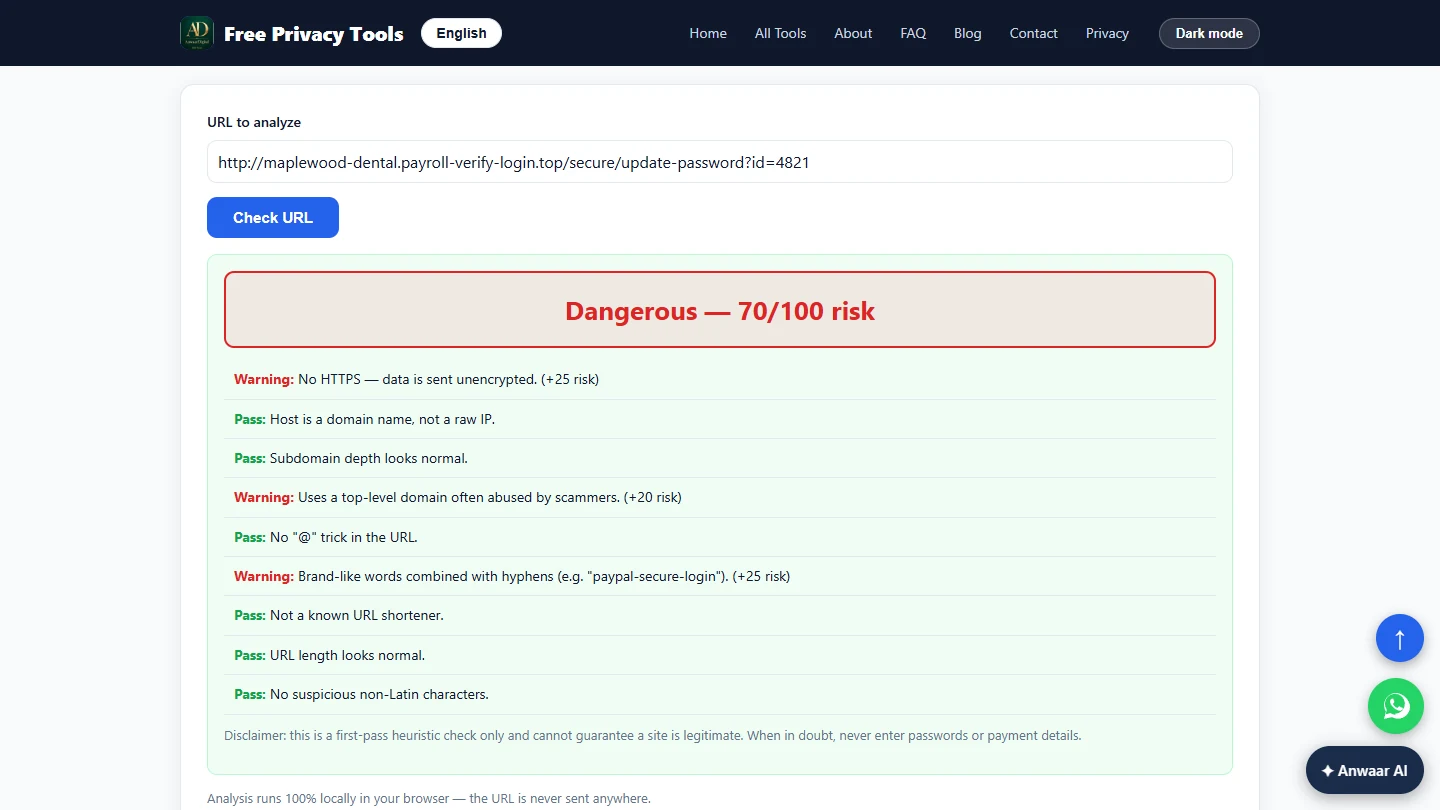
You manage the office at a made-up dental practice. You check a look-alike payroll link with Phishing URL Checker (Dangerous, 70/100), score the shared front-desk password with Password Strength Checker (Good, 72/100, about two days to crack), and generate a 20-character replacement with Password Generator.
The screens are real screenshots of Free Privacy Tools by Anwaar Digital, captured November 2026. The link was never opened and the old password is a made-up example.
What you need
- Nothing to start the practiceThe lesson is a practice copy of real screens. The practice, the link and the password are made up.
- The real tools, freePhishing URL Checker, Password Strength Checker and Password Generator on Free Privacy Tools by Anwaar Digital. No account.
- A team password managerSomewhere to store and share the new password. Never send passwords by email or chat.
Concepts
Copy the link, never click it
Right-click the link and choose Copy link address, then paste it into the checker. In our test the checker made no network request: it only reads the text of the address.
The three warnings on our link are the classic signs: no HTTPS, an ending often used by scammers (.top), and the real business name glued to someone else's domain with hyphens.
A heuristic, not a guarantee
The checker's own disclaimer says it is a first-pass check. A clever fake can pass, so "Safe" never means "click it". When in doubt, go to the site by typing its address yourself.
The strength checker scores length and character mix. It cannot know a password is shared, reused or was typed into a phishing page, so change it anyway after a scare.
Long and random
Password Generator uses your browser's secure random generator. For a shared login, use 16 to 20 characters with all four character sets, keep it in a password manager, and change it when someone leaves.
Do it for real
Now repeat it in your own account. Tick each step as you go.
Quick check
3 questions to check you’ve got it.
1. What is the safest way to check a link in a suspicious email?
- Copy the link address without opening it and paste it into the checker
- Open it in a private window
- Reply and ask the sender
Show the answer
Copy the link address without opening it and paste it into the checker. Copying the address never loads the page. The checker reads only the text.
2. The strength checker scores the shared password Strong. Someone typed it into a phishing page an hour ago. What now?
- Change it today anyway
- Keep it, it scored Strong
- Add one more character
Show the answer
Change it today anyway. A score measures guessing, not leaks. A password typed into a fake page must be replaced.
3. Which sign on a link is a classic phishing warning?
- Your business name joined with hyphens to another company’s domain
- The link uses HTTPS
- The link is short
Show the answer
Your business name joined with hyphens to another company’s domain. maplewood-dental.payroll-verify-login.top borrows the practice name, but the real domain is payroll-verify-login.top.