Why this matters
Supplier invoices arrive as PDFs. In a small firm someone opens each one, types the supplier, total and due date into a spreadsheet, and checks the big ones by eye before a partner approves them. It is slow, and the invoice that needed approval is easy to miss.
PaperOffice AI is a document platform that reads what you upload. It names and sorts each file, writes a summary, pulls out business fields such as amounts, supplier and PO number, and lets you ask questions about all your documents in plain English.
Practice
Do every step yourself in a practice copy of the real tool. It checks your work, and “Do it for me” finishes any step you get stuck on.
What you’ll build
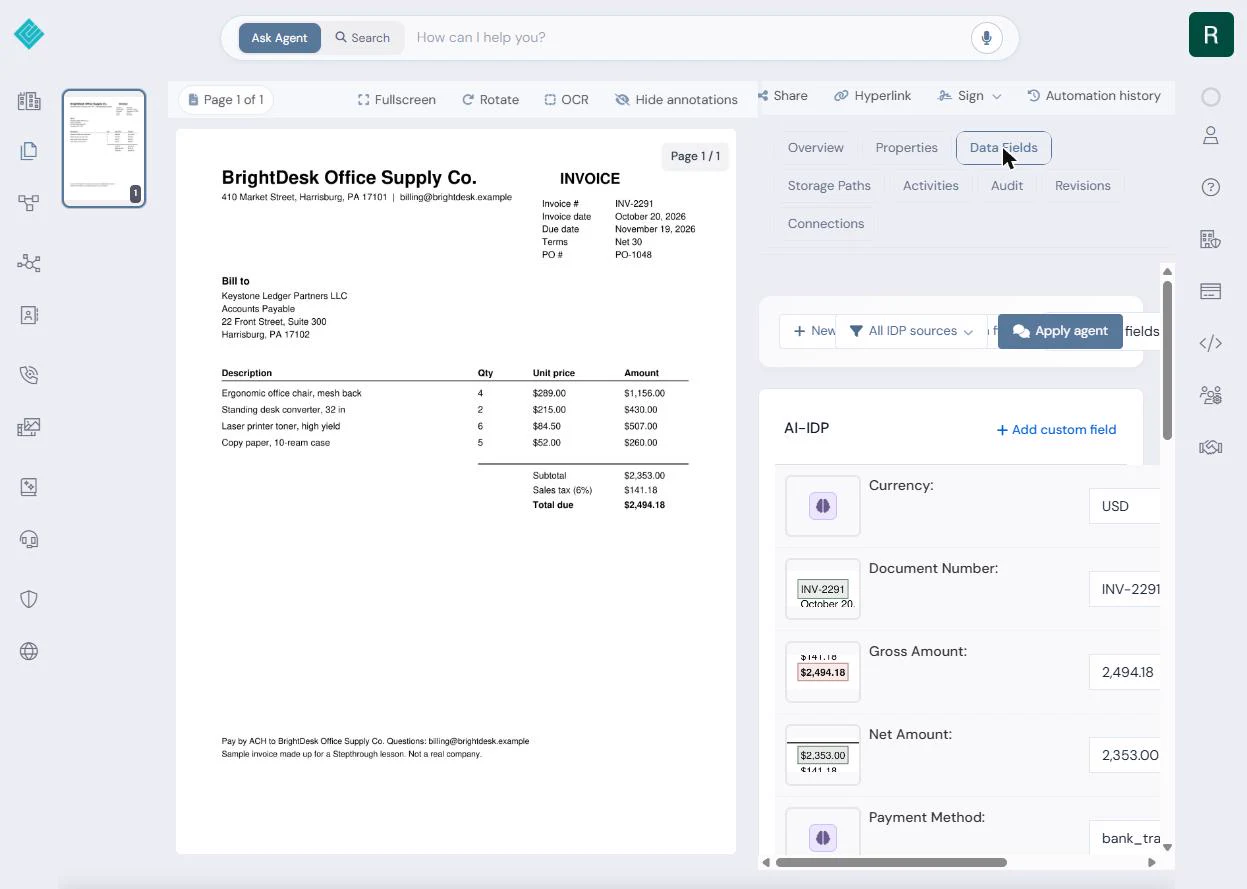
You upload a made-up supplier invoice (BrightDesk Office Supply Co., INV-2291, $2,494.18) for a made-up 12-person firm, Keystone Ledger Partners, whose rule is that anything over $2,000 needs a partner to approve it.
PaperOffice renames the file, sorts it as an invoice, writes a summary and fills in the data fields. Then you ask its agent which invoices are over $2,000 and when they are due. The screens are real screenshots from my own PaperOffice AI account, captured October 2026.
What you need
- Nothing to start the practiceThe lesson is a practice copy. The firm and the invoice are made up.
- A PaperOffice AI account, to do it for realpaperoffice.ai has a free plan. Plans change; check the site for what yours includes.
- A supplier invoice PDFYour own, or the sample BrightDesk invoice from this lesson.
Concepts
Pick the tier that reads business fields
When you upload, PaperOffice asks how much its AI should do. Storage only files the document. Basic reads, sorts and makes it searchable. Premium also pulls out business fields such as amounts, dates, supplier and PO number.
Use Premium for invoices, receipts and contracts, where the numbers matter.
Check one number, then ask questions
Every data field shows a small crop of the page it came from, so you can compare the total with the PDF in seconds before anything is paid.
Once your invoices are read, the agent at the top answers questions across every Workspace: which are over your approval limit, which are due this month, which supplier sent the most.
Do it for real
Now repeat it in your own account. Tick each step as you go.
Quick check
3 questions to check you’ve got it.
1. Which upload tier pulls out amounts, dates and the supplier?
- Premium
- Storage only
- Basic
Show the answer
Premium. Premium adds business fields on top of reading and sorting the document.
2. How do you check that PaperOffice read the total correctly?
- Compare the Gross Amount field’s crop with the PDF
- Re-type the invoice
- Ask the supplier
Show the answer
Compare the Gross Amount field’s crop with the PDF. Every field shows the spot on the page it was read from.
3. What did the agent answer for "Which invoices are over $2,000 and when are they due?"
- BrightDesk INV-2291, $2,494.18, due 19 November 2026
- Both invoices
- None
Show the answer
BrightDesk INV-2291, $2,494.18, due 19 November 2026. The other invoice on file was $851.71, under the limit.