Free Smallpdf tutorials for small business
Updated
Smallpdf. These 2 free modules teach it by building real projects, not by reading about features: Smallpdf for Beginners: Which Tool for Which PDF Job and Smallpdf: Get the Key Points of a 25-Page PDF in 5 Minutes.
The Smallpdf modules cover Operations. Every module runs in a practice copy of Smallpdf, so you can learn it without an account, then set it up for real.
2 modules
A five-minute map of Smallpdf before you use it: the AI PDF tools, Fill & Sign and the everyday tools, which one fits a long proposal, a scan or a file to share, and…
Free · Live ~5 min Beginner
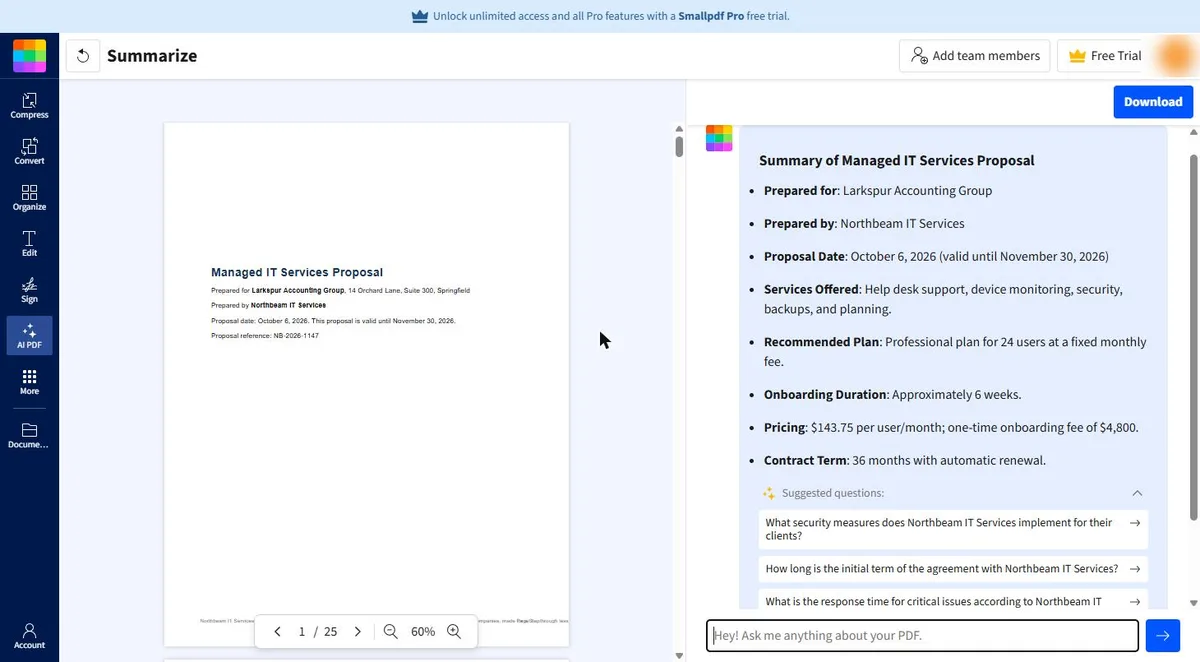 Smallpdf: Get the Key Points of a 25-Page PDF in 5 Minutes
A business case for anyone handed a long vendor proposal before a meeting: get an AI summary in Smallpdf, ask about renewal, exit fees and extra costs, check each…
Free · Live ~10 min Beginner
Prefer to watch or read? 1 of these module has a video walkthrough or a screenshot guide
What you do in each module
- Smallpdf for Beginners: Which Tool for Which PDF Job (about 5 minutes, 11 steps, beginner). You work through: What Smallpdf does, Which tool for which job and Before you trust it.
- Smallpdf: Get the Key Points of a 25-Page PDF in 5 Minutes (about 10 minutes, 23 steps, beginner). You work through: A 25-page proposal, 5 minutes, Open the AI summarizer, Read the summary, Ask about money and exits, Check it on the page and Save it and do the math.
Common questions
How long will this take?
The 2 modules take about 15 minutes in total, and you can do them in separate sittings.
Do I need experience first?
No. These modules are beginner level, and each step tells you exactly where to click.
Do I need a Smallpdf account to start?
No. The practice runs in a copy of Smallpdf inside your browser, and nothing touches your real accounts. When you are ready, you repeat the steps in your own account.
Is it free?
Yes. All 2 modules are free.
Where should I start?
Start with Smallpdf for Beginners: Which Tool for Which PDF Job, then continue with Smallpdf: Get the Key Points of a 25-Page PDF in 5 Minutes.
Compare tools
Side-by-side comparisons, with prices and features checked against the vendors’ own pages.
The best AI PDF editors as of October 2026: Foxit, Smallpdf, KDAN, Adobe Acrobat and PDFelement, what each one's AI does, and a free lesson to practice.
⇆The best AI PDF summarizers for long documents in 2026The best AI tools to summarize a PDF as of October 2026: Smallpdf, KDAN, Foxit, NotebookLM, ChatGPT, Claude and Acrobat, and how to check every summary.
⇆The best e-signature tools for small offices in 2026The best e-signature tools as of October 2026: Foxit eSign, DottedSign, Smallpdf, Jotform Sign, DocuSign, Acrobat Sign and Dropbox Sign, compared.
Frequently asked questions
- Are these Smallpdf tutorials free?
- Yes. All 2 live Smallpdf lessons here are free, and you can start without signing up. Each one is a real project you build step by step in a practice copy of Smallpdf that checks your work.
- Where should a beginner start with Smallpdf?
- Start with Smallpdf for Beginners: Which Tool for Which PDF Job, about 5 minutes. Every step shows you where to click, and "Do it for me" finishes any step you get stuck on.
- Do I need my own Smallpdf account to practice?
- No. The lessons run in a practice copy of Smallpdf in your browser, so nothing touches your real accounts. To build the same workflow for real afterwards you need your own Smallpdf account; check Smallpdf's current pricing first.
Related
How every module works
Each step is shown on the left, with a cursor pointing to exactly where to click. You do the same thing on the right, in a practice copy of the real tool. Get it right and it moves on. Nothing touches your real accounts until you're ready to build it for real.
Start learning free