Updated . Built against the tool’s current screens and checked step by step. How we check this lesson
Buyers now ask AI assistants such as ChatGPT, Claude, Perplexity and Google's AI answers for recommendations, with questions like "best free AI training". The AI replies with a short list of names, and if your business is not on it, that buyer never sees you. Olum (olum.ai) checks which buyer questions AI answers without you and drafts the fix. In this free business-case lesson you use a practice copy built from real Olum screenshots, captured October 2026 for my own site, learn.ynteractive.com: read the growth plan, check the AI answer scores, add a buyer question of your own and re-run the check, then look at coverage gaps, buyer signals and schema. Results differ per site. This is my own lesson, not an official Olum course.
At a glance
| Question | Answer |
|---|---|
| What you build | A business case for anyone whose buyers now ask AI assistants for recommendations: see which buyer questions ChatGPT, Claude and Google AI answer without you, add your own question, and find the gaps, buyer signals and schema fixes Olum drafts. |
| Tools | Olum |
| Time | About 12 minutes, 28 steps in 8 parts |
| Level | Beginner, no coding needed |
| Cost | Free |
| Ways to learn it | Practice it step by step |
The 8 parts, in short
- Is AI recommending you?: Read the question, See what Olum found, Put a price on it, Meet Olum.
- Open your growth plan: Go to the dashboard, Read Do These First, See What Buyers Are Asking.
- Check your AI answer coverage: Open AI Search Visibility, Open LLM Answer Coverage, Read the platform scores, Read the question table.
- Add your own buyer question: Click Run AI Audit, Review the suggested questions, Type your own question, Click Add, and 1 more step.
- Find the gaps to fix: Read the new results, Find your question, Look at Coverage Gaps.
- See what buyers are asking: Open Buyer Signals, Read the signal counts, Read Live Market Intelligence.
- Help AI read your pages: Open Schema for AI Search, Check FAQ coverage, Look at the FAQ Schema Queue, Read the JSON-LD preview.
- What it costs: What this gives you, Check the pricing.
Part of: AI for Marketing Teams (step 5 of 28)
Part of: AI Apps Worth Knowing (step 34 of 42)
The business case: when AI leaves you out
Search used to mean ten blue links. Now many buyers type a question into ChatGPT, Claude, Perplexity or Google and read the AI's answer: a short list of businesses, often with a reason for each. If your business is not on that list, the buyer never sees you, and nothing in your analytics tells you it happened.
Here is the arithmetic, using example numbers you should replace with your own. Say 200 buyers a month ask AI a question your business could answer, and 1 in 20 of them would have become a customer. If AI leaves you out, that is about 10 customers a month you never hear from.
We ran Olum on my own site, learn.ynteractive.com, in October 2026. For the five buyer questions it tracked first, Claude and Google AI Overviews both scored 0%: not one answer named Stepthrough. That is the kind of result this lesson teaches you to find. Your site's results will differ.
Who this is for, and what you need
Owners, marketers and consultants whose buyers research online before they get in touch. To follow along you need nothing: the lesson is a practice copy built from real screenshots. To do it for real you need an Olum account and your website address. Pricing is at olum.ai/pricing.
A note on screens: Olum's dashboard may look a little different for you, and every question and score depends on your own site.
Step 1: open your growth plan
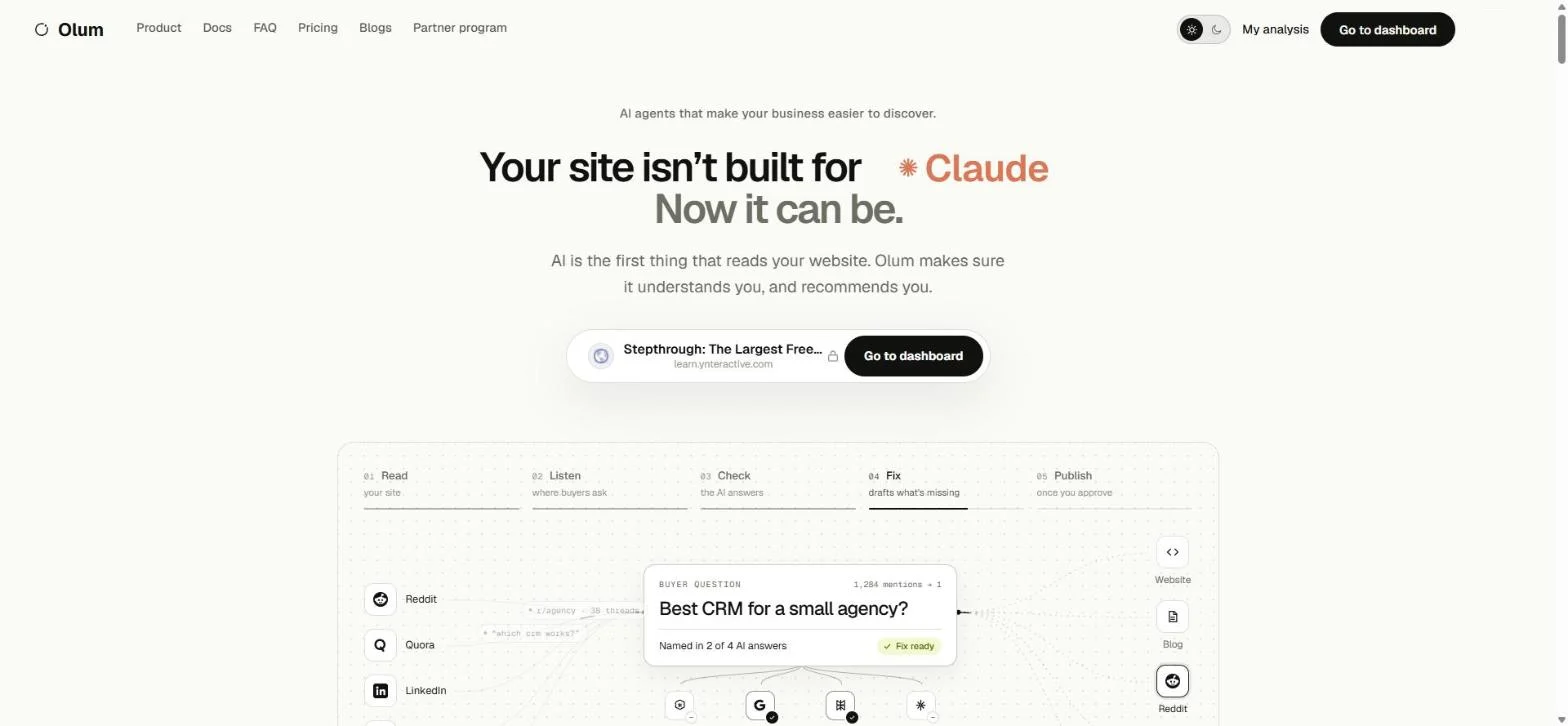
Olum's home page reads "Your site isn't built for Claude. Now it can be." Once your site has been analysed, click Go to dashboard. The dashboard opens on This Week's Growth Plan.
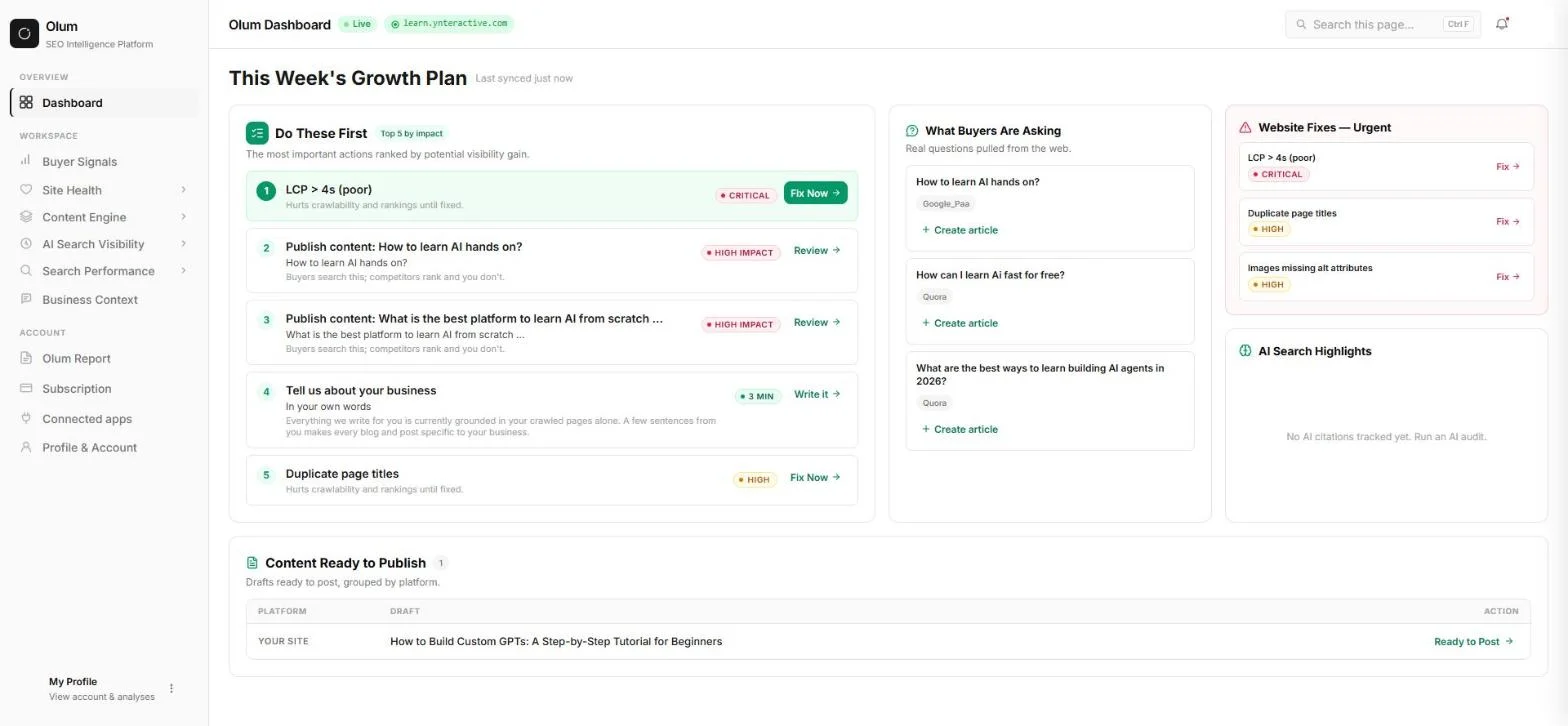
Do These First ranks the top five actions by impact. For our site, the first was a slow page load (LCP over 4 seconds, marked Critical), followed by content to publish for buyer questions such as "How to learn AI hands on?". What Buyers Are Asking lists real questions pulled from the web, tagged with where they came from, such as Google People Also Ask or Quora, each with a Create article link.
Step 2: check your AI answer coverage
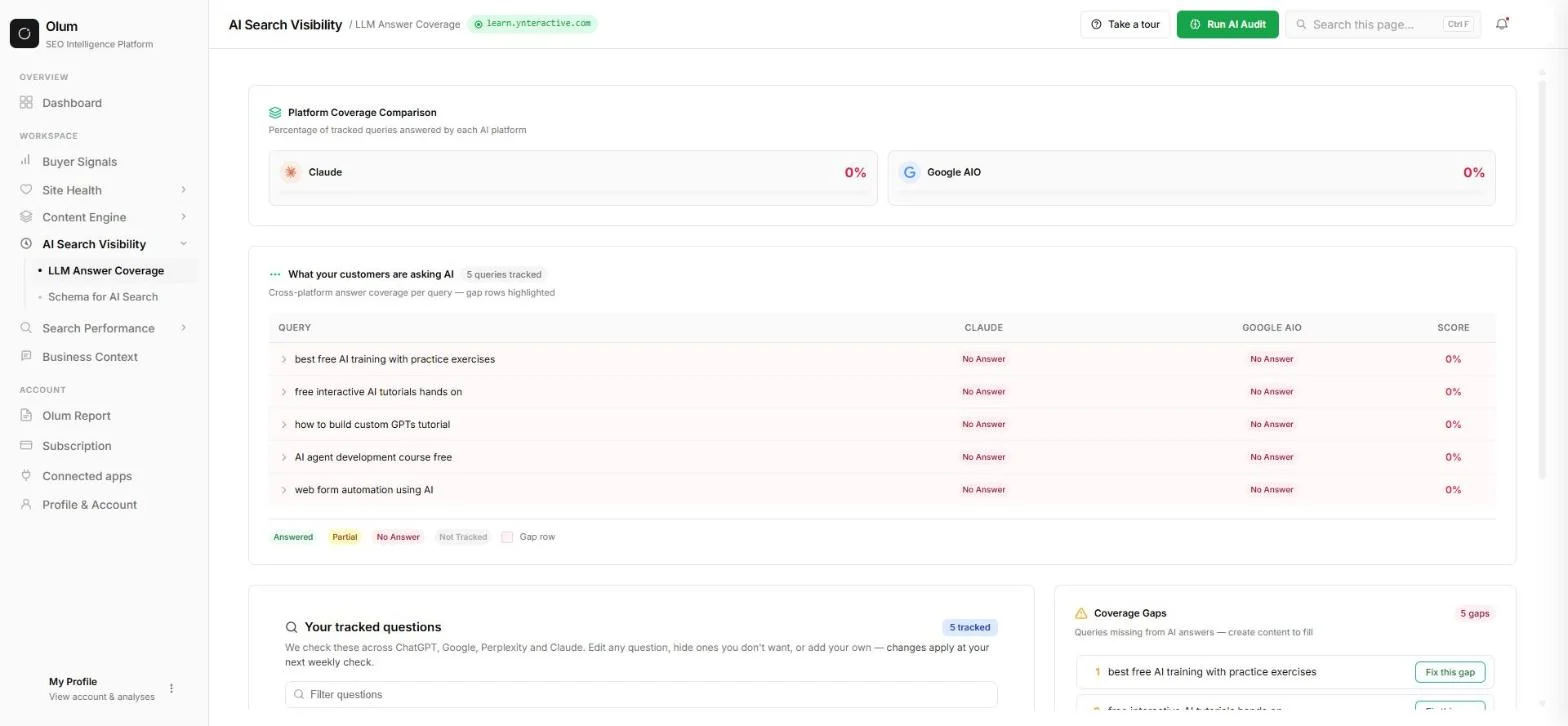
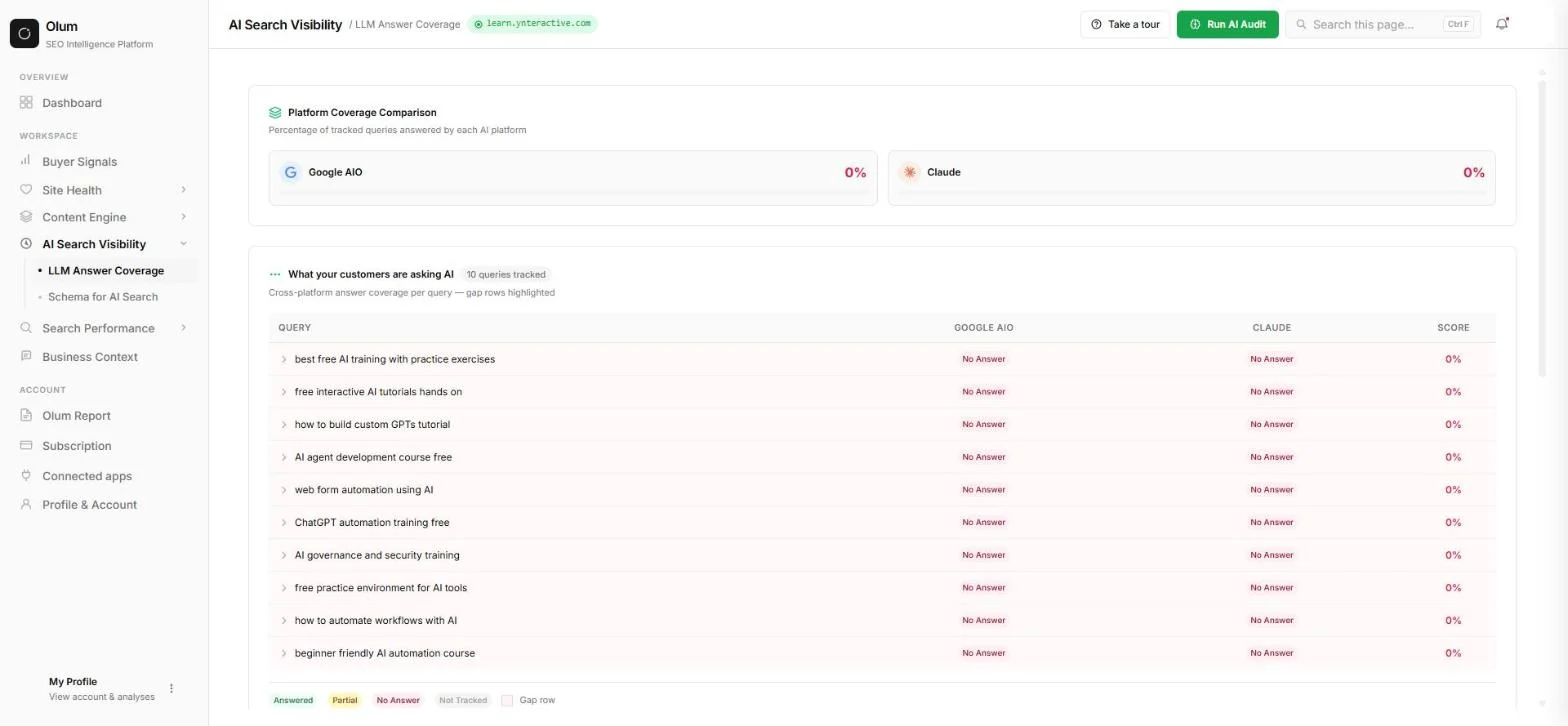
In the left menu, open AI Search Visibility, then LLM Answer Coverage. Platform Coverage Comparison shows the share of your tracked questions each AI platform answers with you. Ours were Claude 0% and Google AIO 0%.
Below it, What your customers are asking AI lists each tracked question with Answered, Partial or No Answer for each engine, and a score. Rows shaded as gaps are the questions where AI leaves you out.
Step 3: add your own buyer question and re-run
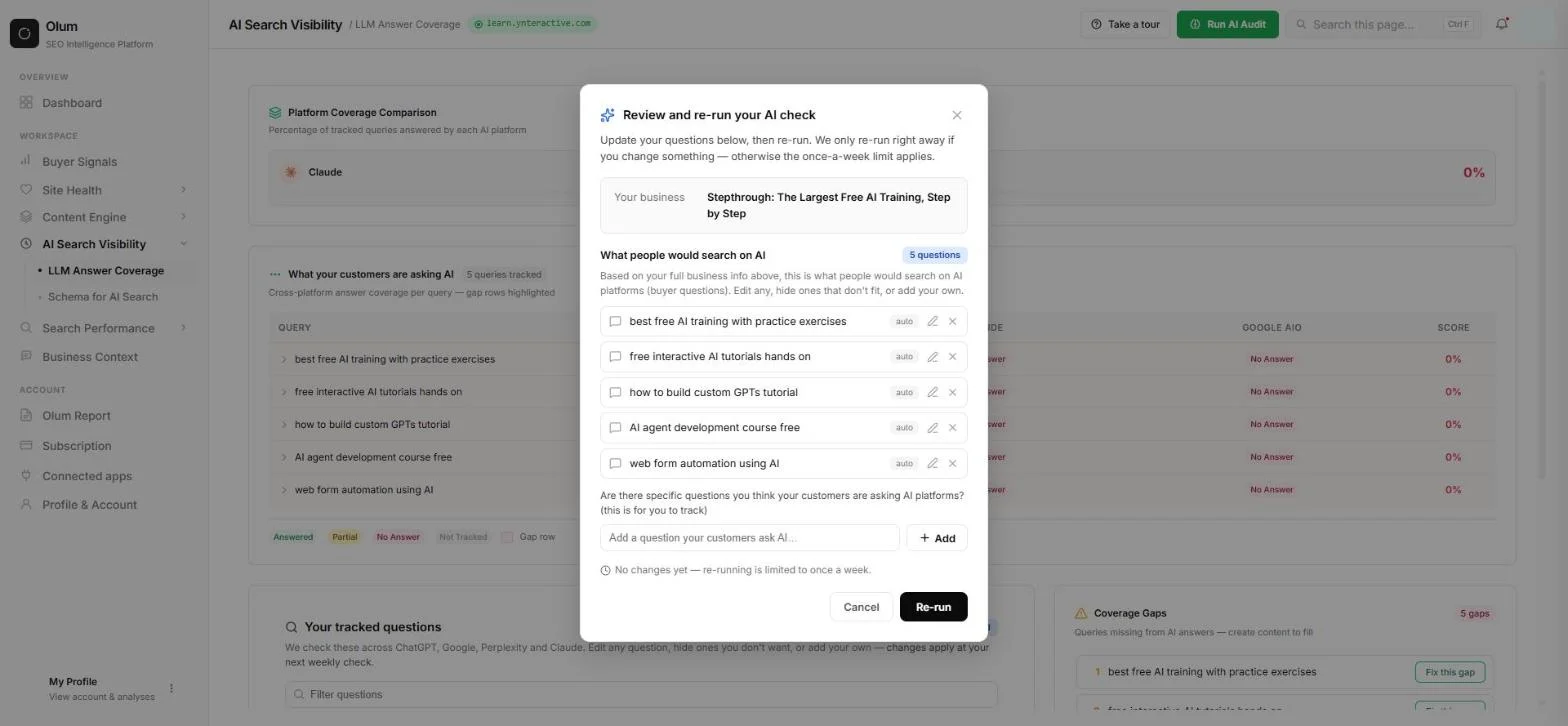
Click Run AI Audit. The Review and re-run your AI check box shows your business and the questions Olum wrote, each marked auto, with a pencil to edit and an x to hide. Under "Are there specific questions you think your customers are asking AI platforms?" type a question your buyers really ask, and click Add. We added "free n8n tutorial for beginners".
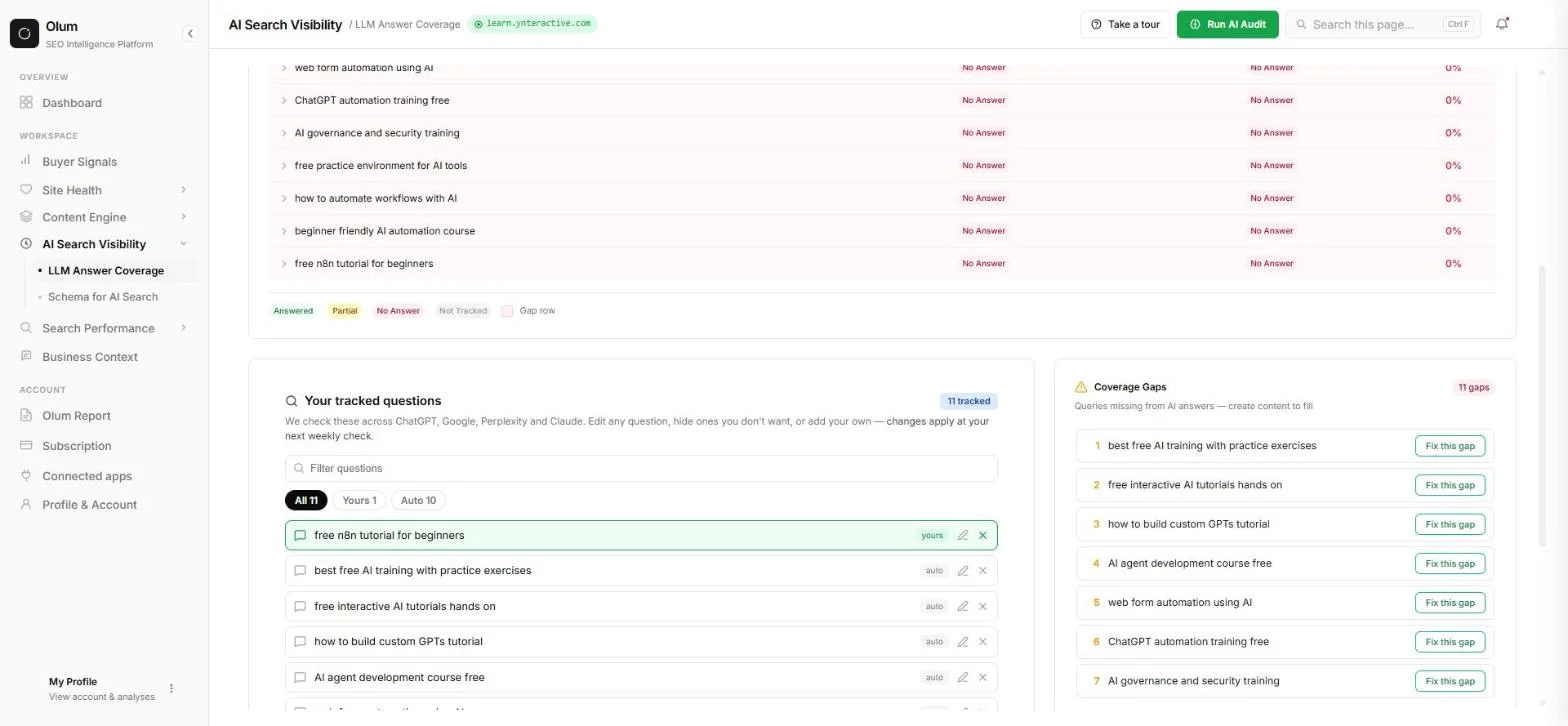
The box notes that re-running is limited to once a week unless you change something. Adding a question counts as a change, so you can re-run right away. After our re-run, Olum tracked 10 queries, and our own question appeared under Your tracked questions, marked yours.
Step 4: find the gaps, the buyer signals and the schema fixes
Coverage Gaps lists the queries missing from AI answers, 11 for us, each with a Fix this gap button. Olum describes the fix as creating content to fill the gap, and its dashboard keeps drafts under Content Ready to Publish for you to approve. We did not click Fix this gap in this test.
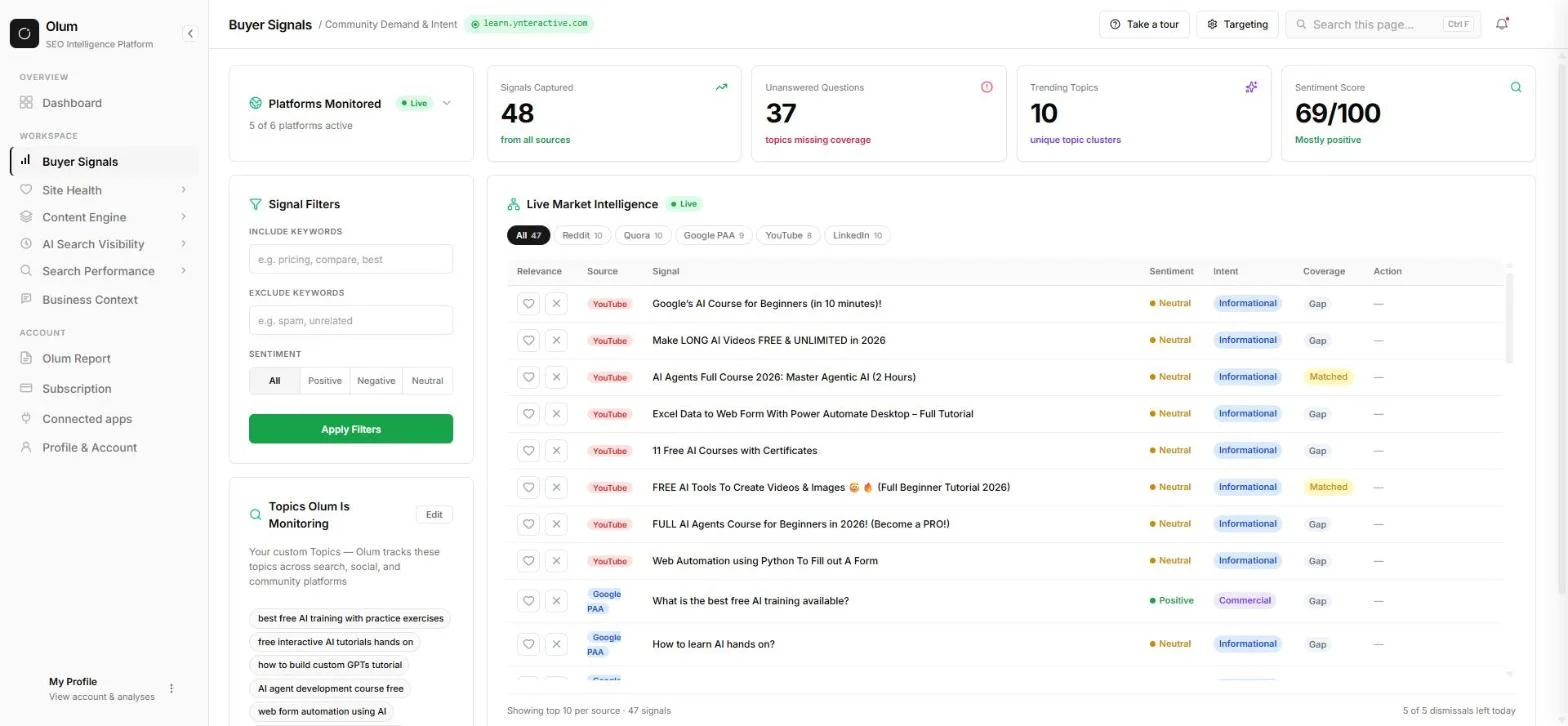
Buyer Signals shows how many signals Olum captured across platforms (48 for us), how many questions were unanswered (37), trending topics and a sentiment score. Its Live Market Intelligence table lists real questions from Reddit, Quora, Google People Also Ask, YouTube and LinkedIn, each marked Gap or Matched.
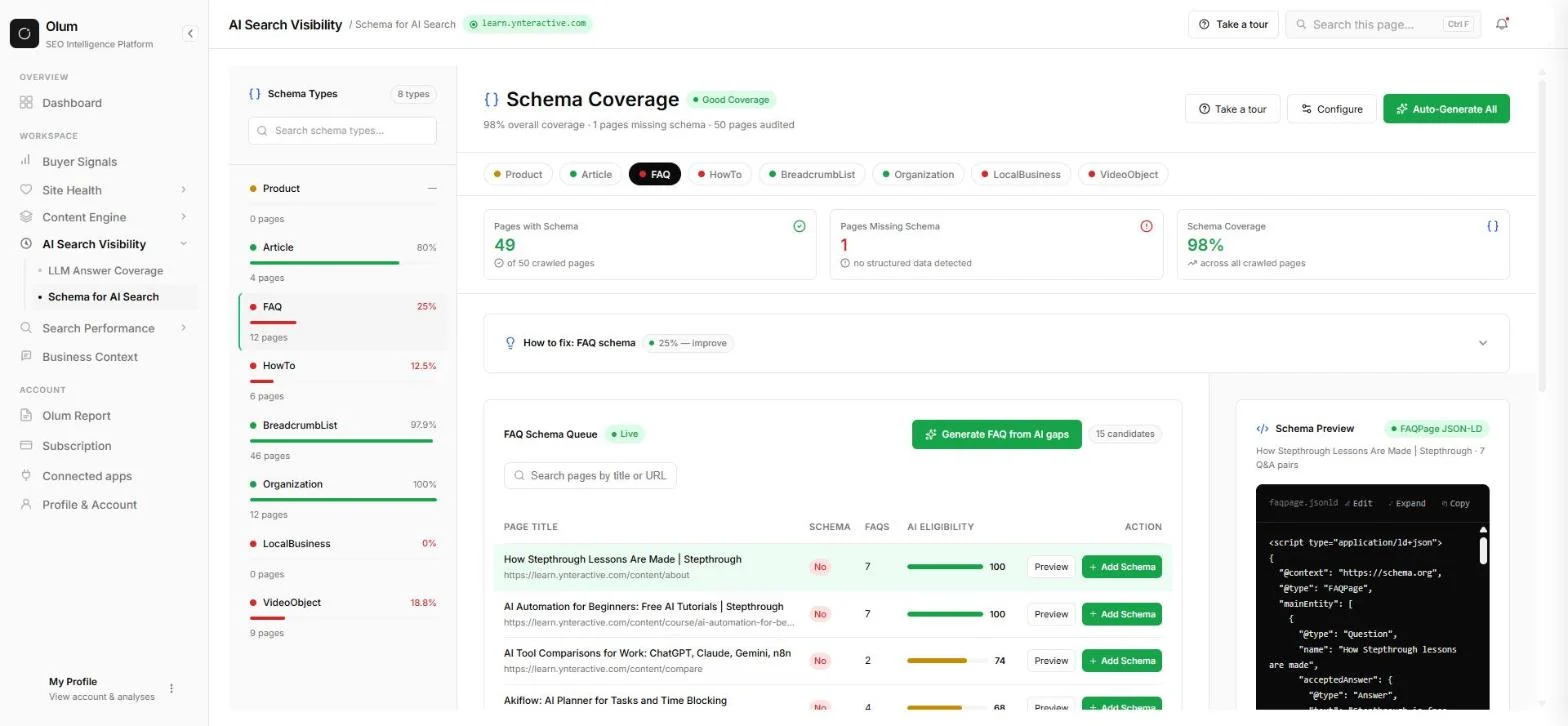
Schema for AI Search shows how many of your pages carry each type of structured data. Ours read 98% overall but only 25% for FAQ and 12.5% for HowTo. The FAQ Schema Queue lists pages missing FAQ schema with an Add Schema button, and a preview shows the FAQPage JSON-LD Olum drafted, which you can edit or copy. We did not click Add Schema.
Mistakes to avoid
- Reading one week's score as permanent. AI answers change, so check again after you publish.
- Keeping only the auto questions. Add the questions your own buyers really ask.
- Publishing a drafted fix without reading it. Check every draft and every schema block before it goes live.
- Expecting a guarantee. No tool can promise that an AI will name your business.
- Treating the example numbers in this lesson as yours. Use your own traffic and conversion numbers.
Links
- Olum: the AI search visibility tool this lesson teaches.
- Olum pricing: current plans. Olum is $100 a month billed monthly, Olum Studio is $349 a month billed monthly, annual billing saves 30%, and the page says you can run your first analysis free with no card (read 17 October 2026).
Try it yourself, free
Reading the steps is a start. Doing them is how it sticks. The interactive module walks you through every click in a practice copy of Olum, checks each step, and never touches your real accounts.
Start “Olum: See If ChatGPT and Google AI Recommend Your Business”Step by step: Olum: See If ChatGPT and Google AI Recommend Your Business
All 28 steps of the interactive module, in order. In the module you watch each one, then do it yourself in a practice copy that checks your work.
1. Is AI recommending you?
- Read the question. Buyers now ask AI assistants such as ChatGPT, Claude, Perplexity and Google's AI answers things like "best free AI training with practice exercises". The AI replies with a short list of names. If your business is not on it, you are invisible to that buyer. Click the question.
Buyers now ask AI tools which business to pick. If the answer leaves you out, they never see you.
- See what Olum found. We ran Olum on my own site, learn.ynteractive.com. For the 5 buyer questions it tracked, Claude and Google AI Overviews both scored 0%: not one answer named Stepthrough. Your site's results will differ. Click the results.
We checked my own site. Claude and Google's AI answers named us zero percent of the time.
- Put a price on it. Say 200 buyers a month ask AI a question your business could answer, and 1 in 20 would have become customers. That is about 10 customers a month you never hear from. These are example numbers, so swap in your own. Click the total.
Even with small example numbers, that adds up to customers you never hear from.
- Meet Olum. Olum (olum.ai) shows which buyer questions AI answers without you, and drafts the fix for you to approve. The next screens are real Olum screenshots for learn.ynteractive.com, captured October 2026. Click the Olum card.
Olum shows which buyer questions AI answers without you, and drafts the fix.
2. Open your growth plan
- Go to the dashboard. Olum's home page reads "Your site isn't built for Claude. Now it can be." Once your site has been analysed, it shows your site in the box with a Go to dashboard button. Click Go to dashboard.
On Olum's home page, click Go to dashboard.
- Read Do These First. The dashboard opens on This Week's Growth Plan. Do These First ranks the top 5 actions by impact. For our site the first is a slow page load (LCP > 4s, marked Critical), then Publish content for buyer questions such as "How to learn AI hands on?". Click the Do These First list.
Do These First ranks your top five fixes, from a slow page to content buyers are looking for.
- See What Buyers Are Asking. What Buyers Are Asking lists real questions pulled from the web, each tagged with where it came from, such as Google PAA or Quora, and a Create article link. Click What Buyers Are Asking.
What Buyers Are Asking shows real questions from the web, with where each one came from.
3. Check your AI answer coverage
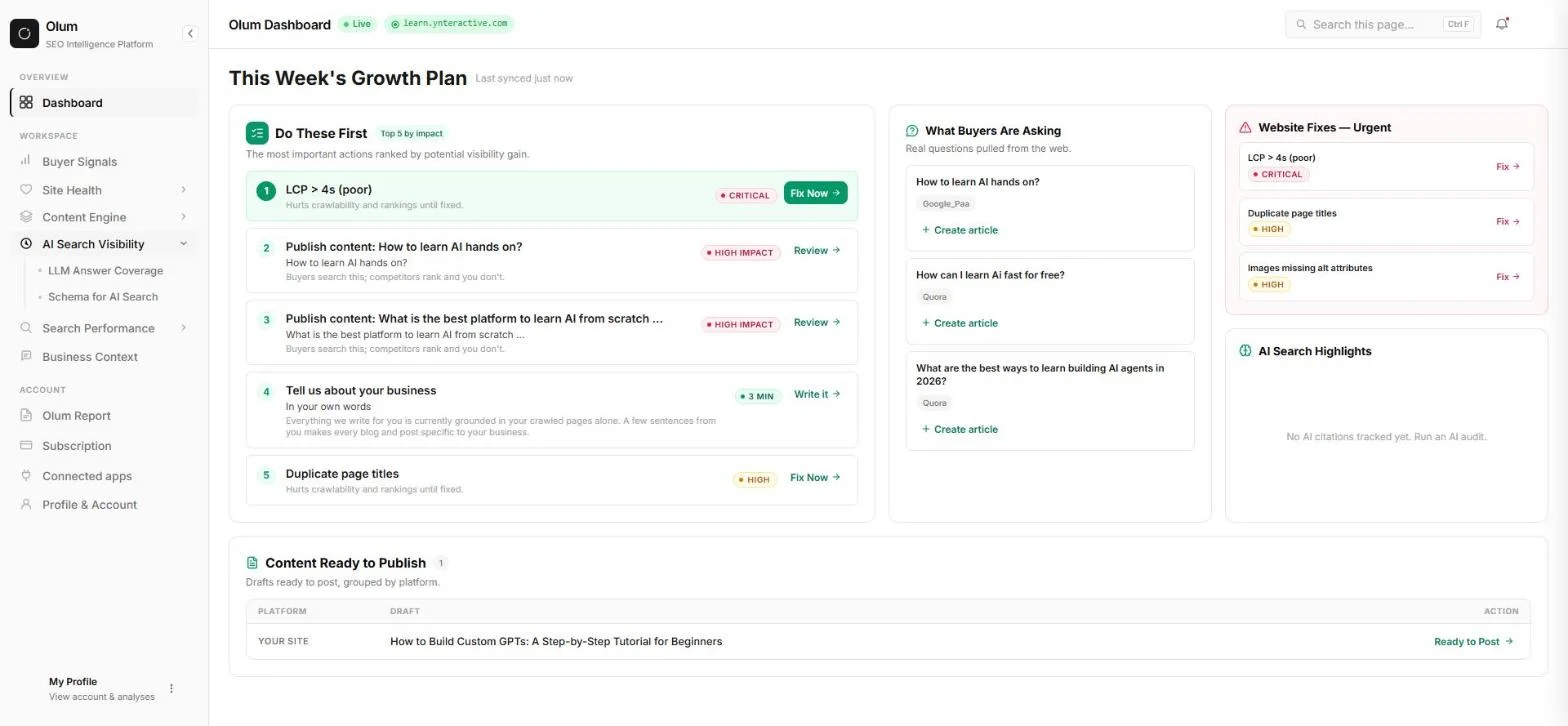
- Open AI Search Visibility. In the left menu, click AI Search Visibility to open it.
In the left menu, open AI Search Visibility.
- Open LLM Answer Coverage. Two pages sit under it: LLM Answer Coverage and Schema for AI Search. Click LLM Answer Coverage.
- Read the platform scores. Platform Coverage Comparison shows the share of your tracked questions each AI platform answers with you. Ours: Claude 0% and Google AIO 0%. A low score means that engine rarely surfaces your content. Click the scores.
Each AI platform gets a score. Ours was zero for Claude and for Google.
- Read the question table. What your customers are asking AI lists each tracked question, such as "best free AI training with practice exercises", with No Answer under Claude and Google AIO and a score of 0%. Rows shaded pink are gaps. Click the table.
The table shows every question, and which AI left you out.
4. Add your own buyer question
- Click Run AI Audit. To change the questions, click Run AI Audit at the top right.
- Review the suggested questions. Review and re-run your AI check shows your business and What people would search on AI: 5 questions Olum wrote, each marked auto, with a pencil to edit and an x to hide. Click the question list.
Olum suggests five questions. You can edit or hide any of them.
- Type your own question. Under Are there specific questions you think your customers are asking AI platforms?, type a question your buyers really ask. We added free n8n tutorial for beginners. Type it in the box.
Now add a question your own buyers ask. We typed: free n8n tutorial for beginners.
- Click Add. Click + Add. Your question joins the list, marked yours.
- Re-run the check. The note says re-running is limited to once a week unless you change something. Adding a question counts as a change, so the button lets you save and re-run now. Click Re-run.
Adding a question lets you re-run the check right away.
5. Find the gaps to fix
- Read the new results. After the re-run, Olum tracked 10 queries, including new ones such as "ChatGPT automation training free" and "beginner friendly AI automation course". Every one still says No Answer for our site. Click the table.
After the re-run, Olum tracked ten questions. Every one was still a gap for us.
- Find your question. Scroll down to Your tracked questions. It now says 11 tracked, and free n8n tutorial for beginners sits at the top, marked yours. Filter with All, Yours and Auto. Click your question.
Further down, your own question is now tracked, marked yours.
- Look at Coverage Gaps. Coverage Gaps lists the queries missing from AI answers, 11 gaps for us, each with a Fix this gap button. Olum says the fix is to create content to fill the gap, and its dashboard keeps drafts in Content Ready to Publish for you to approve. We did not click Fix this gap in this test. Click Coverage Gaps.
Coverage Gaps lists what to fix, with a Fix this gap button on each one.
6. See what buyers are asking
- Open Buyer Signals. In the left menu, click Buyer Signals.
- Read the signal counts. Across 5 of 6 platforms, Olum captured 48 signals. 37 unanswered questions are topics missing coverage, there are 10 trending topics, and the sentiment score is 69/100. Click the counts.
Olum found forty-eight buyer signals, and thirty-seven questions nobody answered for us.
- Read Live Market Intelligence. Live Market Intelligence lists real posts and questions from Reddit, Quora, Google PAA, YouTube and LinkedIn, each with sentiment, intent and Coverage: Gap means your site does not answer it, Matched means it does. Click the table.
Each buyer question is marked Gap or Matched, so you know what to write next.
7. Help AI read your pages
- Open Schema for AI Search. Open AI Search Visibility in the left menu again, then click Schema for AI Search. Schema is a small block of code on a page that tells search engines and AI what the page is about. Click AI Search Visibility.
Next, open Schema for AI Search, under AI Search Visibility.
- Check FAQ coverage. Schema Coverage reads 98% overall, but by type it is uneven: FAQ 25% of 12 pages, HowTo 12.5%, VideoObject 18.8% and LocalBusiness 0%. Click FAQ.
Overall schema looks good, but only a quarter of our FAQ pages had FAQ schema.
- Look at the FAQ Schema Queue. The FAQ Schema Queue lists pages without FAQ schema, with how many FAQs each has, an AI Eligibility score and Preview and Add Schema buttons. We did not click Add Schema in this test. Click the queue.
The queue lists pages missing FAQ schema, each with an Add Schema button.
- Read the JSON-LD preview. Schema Preview shows the FAQPage JSON-LD Olum drafted for the page, with questions and answers. You can edit, expand or copy it before it goes on your site. Click the preview.
The preview shows the code Olum drafted, so you can check it before it goes live.
8. What it costs
- What this gives you. Click What this gives you.
Here is what you get, and what we did not test.
- Check the pricing. On olum.ai/pricing (read 17 October 2026), Olum is $100 a month billed monthly, and Olum Studio is $349 a month, adding a human team that does the work. Annual billing saves 30%. The page says you can run your first analysis free, with no card. Click the pricing card.
Olum is one hundred dollars a month. Check olum dot A I slash pricing for current plans.
Screenshots
Frequently asked questions
- Is this an official Olum course?
- No. This is my own lesson. Olum is a separate, third-party product from olum.ai, and the screens are real Olum screenshots captured October 2026 for learn.ynteractive.com, my own site.
- What does Olum cost?
- From olum.ai/pricing on 17 October 2026: Olum is $100 a month billed monthly, Olum Studio, which adds a human team that does the work, is $349 a month billed monthly, and annual billing saves 30%. The page says you can run your first analysis free, with no card. Check the page for current plans.
- Which AI assistants does Olum check?
- The tracked questions panel says Olum checks across ChatGPT, Google, Perplexity and Claude. The coverage screens in our test showed scores for Claude and Google AI Overviews.
- Can I add my own questions?
- Yes. Click Run AI Audit, type the question under the suggested ones, click Add and re-run. Your question shows up under Your tracked questions, marked yours.
- Will my results look like these?
- No. Every question and score in this lesson is for learn.ynteractive.com. Your site will get its own questions, scores and fixes.
Terms in this lesson
Plain-English definitions, each with an example from a free lesson.