Why this matters
Buyers now ask AI assistants such as ChatGPT, Claude, Perplexity and Google's AI answers which business to pick. If the answer leaves you out, that buyer never sees you, and you never find out.
Olum checks which buyer questions AI answers without you and drafts the fix. When we ran it on our own site, Claude and Google AI Overviews named us in 0% of the questions it tracked.
Practice
Do every step yourself in a practice copy of the real tool. It checks your work, and “Do it for me” finishes any step you get stuck on.
What you’ll build
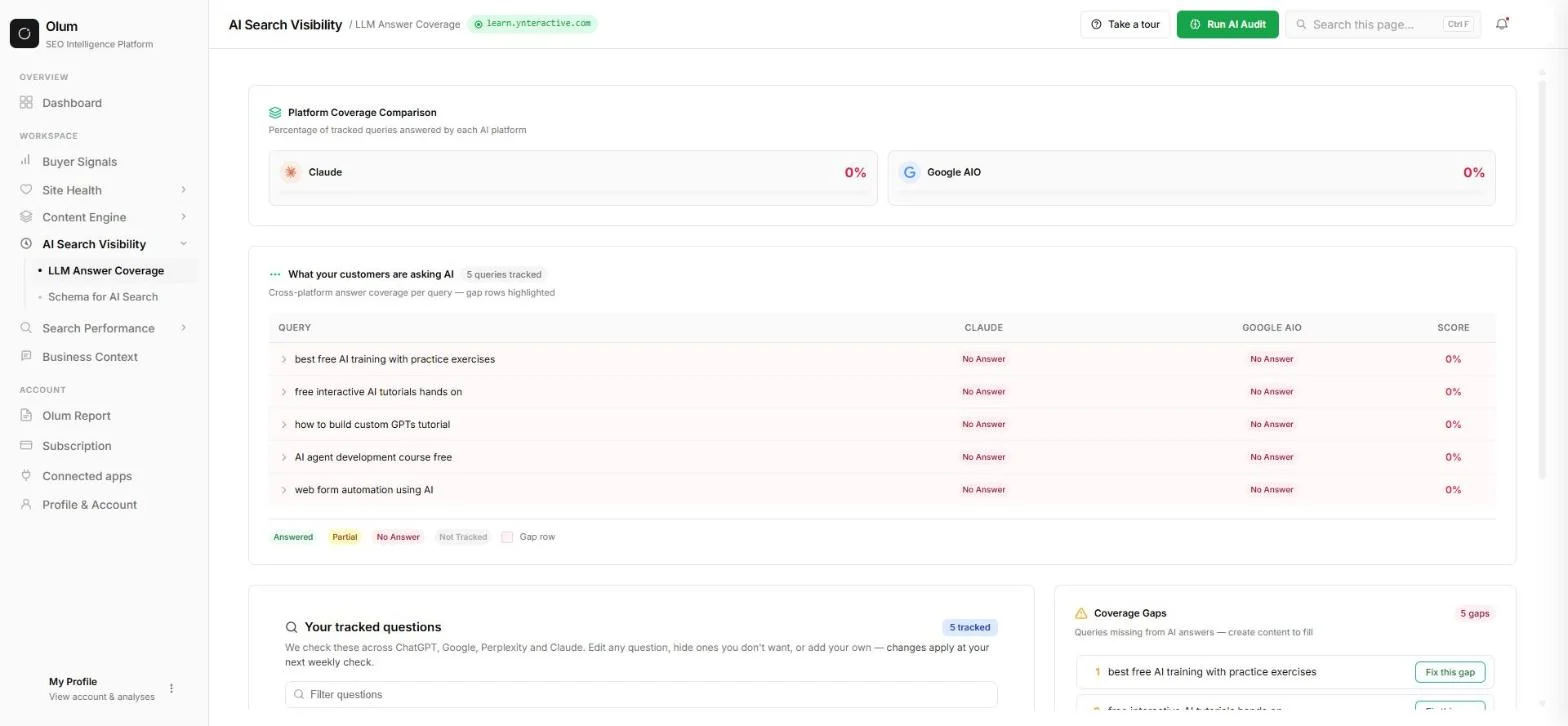
You check learn.ynteractive.com, Stepthrough's own site, in Olum. You read the growth plan, check the AI answer scores for each tracked buyer question, add a question of your own and re-run the check.
You then read Coverage Gaps, the buyer questions people post on Reddit, Quora, YouTube, LinkedIn and Google, and the FAQ schema Olum drafts. The screens are real Olum screenshots, captured October 2026. Results differ per site.
What you need
- Nothing to start the practiceThe lesson is a practice copy built from real screenshots. The business-case numbers are example numbers.
- An Olum account and your website address, to do it for realPlans are at olum.ai/pricing, read 17 October 2026: Olum is $100 a month billed monthly, Olum Studio is $349 a month billed monthly, annual billing saves 30%, and the page says you can run your first analysis free with no card.
- Two or three questions your buyers really askAdd them next to the questions Olum suggests, so the check covers what matters to you.
Concepts
AI answer coverage
Coverage is the share of your tracked buyer questions that an AI engine answers with your business. Olum shows one score per engine and one row per question, marked Answered, Partial or No Answer.
A 0% score does not mean your site is bad. It means the AI answers those questions with someone else, so those are the questions to work on first.
Track the questions your buyers really ask
Olum writes a first set of questions from your site, marked auto. Edit or hide any that do not fit and add your own, marked yours. Re-running is limited to once a week unless you change something, so add your questions before you re-run.
Gaps, signals and schema
Coverage Gaps lists the questions AI answers without you, each with a Fix this gap button. Buyer Signals shows questions people post online, marked Gap or Matched. Schema for AI Search shows which pages lack structured data, such as FAQ schema, and drafts the JSON-LD. We did not click the fix buttons in our test, so read every draft before it goes live.
Do it for real
Now repeat it in your own account. Tick each step as you go.
Quick check
3 questions to check you’ve got it.
1. Olum shows Claude 0% for your tracked questions. What does that mean?
- Claude cannot read your website at all
- Claude answered none of those questions with your business
- Your site has no schema
Show the answer
Claude answered none of those questions with your business. Coverage is the share of tracked questions an engine answers with you, so 0% means none of them named you.
2. Your buyers ask a question Olum did not suggest. What do you do?
- Wait for next month
- Add it under Run AI Audit, then re-run
- Edit your site first and hope it shows up
Show the answer
Add it under Run AI Audit, then re-run. You can add your own questions in the re-run box. A change lets you re-run right away instead of waiting a week.
3. Olum drafts FAQ schema for a page. What should you do before it goes live?
- Publish it straight away
- Read the questions and answers and fix anything wrong
- Delete the page
Show the answer
Read the questions and answers and fix anything wrong. Drafts can be wrong. Check every question and answer before it goes on your site.
Jinxo: Plan a Client Kickoff with Claude in a Jinxo Group Chat
You checked whether AI recommends your business and found the questions to work on. Review the apps you have met in this course and pick one to try on your own work.
Start module 25 →