What does fetch do in JavaScript?
Quick answer
fetch is the function built into every browser that asks a web address (usually an API) for data. With await, the code waits for the answer; response.json() then turns the reply into a list or object the rest of the code can use.
Last updated
Take the free module →Module 3 of the free JavaScript for Small Business Jump Start course, about 12 minutes. No account needed.
Updated · By Robert Breen
Why it matters for a small business
Business data lives in other systems: a CRM, a booking tool, an accounting app. Their APIs answer with data, and fetch is how a web page or small script reads it, instead of someone copying it by hand.
The pattern is always the same three lines: fetch the address, await the response, read the JSON. Real APIs add an API key, which must stay out of public pages.
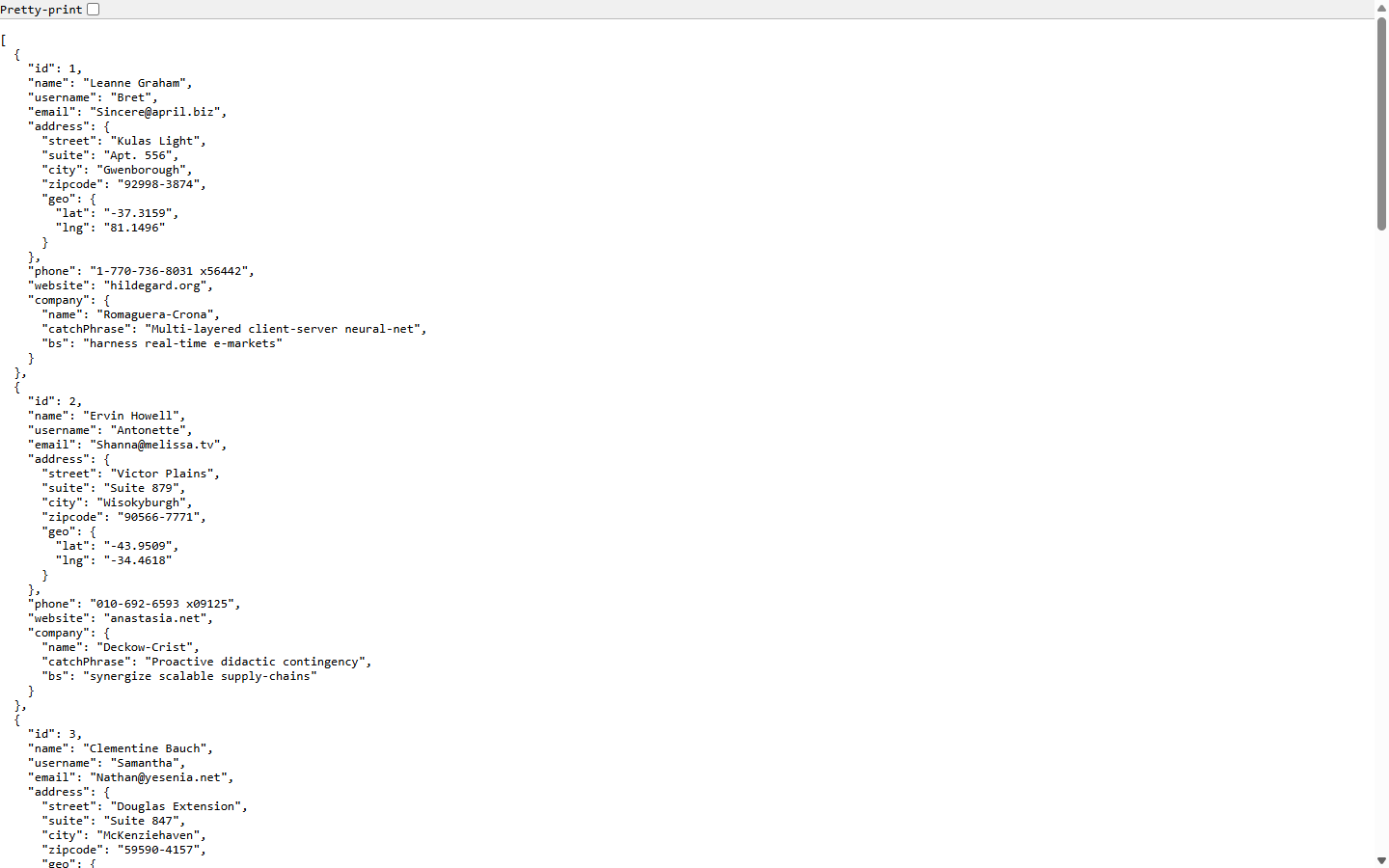
Once the data is in a list, the rest is ordinary JavaScript: a for loop goes through each item, and each item's fields are read with a dot, such as u.name or u.company.name for a field inside another field. The same pattern fills a table, a drop-down list or a dashboard card, and it is how most no-code tools and website widgets pull live data from the systems a business already uses, from contact lists to bookings and stock levels.
In a real lesson: JavaScript: Pull Contacts from an API into a Table
In the free JavaScript API contacts lesson, the code asks JSONPlaceholder, a free practice API, for its users: const response = await fetch(url); then const users = await response.json();.
A for loop then writes one table row per user with u.name, u.company.name and u.email: ten made-up contacts on the page, read live from the API.
Try this lesson free or read the step-by-step guide.
Common confusions
fetch vs an API
The API is the address that answers with data. fetch is the JavaScript function that asks it.
await vs async
await waits for the answer; it only works inside a function marked async, such as async function load().
Tips
- Open the API address in your browser first, to see the field names you will use.
- Never put a real API key in a public fiddle or a page anyone can read; it would let others use your account.
Related terms
More Web apps terms
Where you use it: free lessons
- JavaScript: Pull Contacts from an API into a Table (JSFiddle, 12 min)
- n8n AI Email Responder: Draft Gmail Replies Automatically (n8n, 12 min)
- Add AI to Make.com: ChatGPT Writes a Personal Reply, Gmail Sends It (Make, 18 min)
- n8n + Signatoro: AI Drafts Every Reply, Signatoro Signs It (n8n, 10 min)
Frequently asked questions
- Why does my fetch code show nothing?
- Usually because the data had not arrived yet. Put await in front of fetch and of response.json(), inside an async function.
- Do I need a key to use fetch?
- fetch itself needs nothing. Many real APIs ask for a key in the request; practice APIs such as JSONPlaceholder do not.
- What format does fetch return?
- A response. Most business APIs send JSON, which response.json() turns into JavaScript lists and objects.