What is the model picker in Claude?
Quick answer
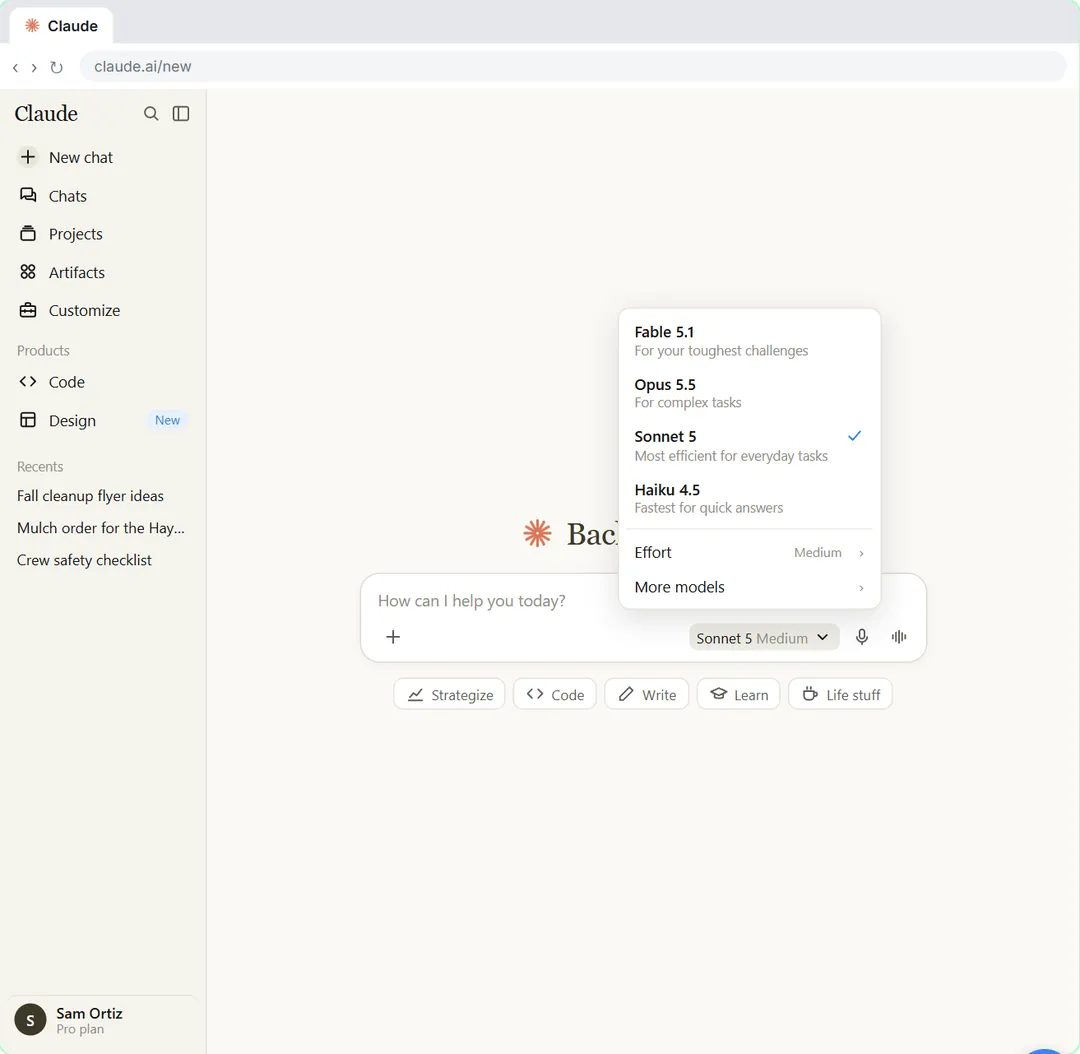
The model picker is the control under Claude's message box that shows which model and effort you are using, such as Opus 5.5 Medium. Click it to switch models or change effort before you send a message.
Last updated
Updated · By Robert Breen
Why it matters for a small business
Claude comes in more than one model. In the lesson's picker, Fable is for your toughest challenges, Opus is for complex and everyday work, Sonnet is the most efficient for simpler tasks, and Haiku is the fastest. A faster model suits a quick rewrite, and a stronger one suits a long document or a tricky decision.
You don't need to fiddle with it every time. The recommended setting is fine for ordinary email and summaries. Names change as new versions arrive, and the Free plan shows fewer models, so treat the list as a menu that moves, not as something to memorize.
It also helps to know what the picker is not. It does not decide what Claude knows about your business, and it does not make a vague prompt clear. A better model given a weak instruction still gives a weak answer, which is why the lesson goes straight from the picker to writing a prompt with four parts: a role, the context, a task and a format. Treat the picker as a quick choice you make once per chat, and spend your effort on the prompt instead.
In a real lesson: Your First Chat with Claude: Models, Files and a Great First Prompt
In the first chat lesson, you run the office at Bright Path Landscaping, a made-up business. Before writing anything you click the model picker just under the message box, on the right, where it reads something like Opus 5.5 Medium.
You look at the model descriptions, then click Effort and keep Medium, the recommended setting. Only then do you attach a customer's complaint email and write your prompt.
Try this lesson free or read the step-by-step guide.
Common confusions
Model vs effort
The model is which Claude answers. Effort is how hard it thinks before replying. They are two separate choices in the same picker.
Model picker vs a different plan
Paid plans show more models in the picker. Everything else in the lesson works on the Free plan too.
Tips
- Start with the recommended model and change it only if the answer disappoints.
- Expect different names after Claude updates.
- Check your company's AI policy before using a personal account for work.
Related terms
More AI assistants terms
Where you use it: free lessons
Prompt templates that use it
Frequently asked questions
- Which Claude model should I pick?
- For everyday work, the lesson points to Opus and the recommended Medium effort. Sonnet is described as the most efficient for simpler tasks and Haiku as the fastest.
- Where is the model picker?
- Just under the message box on Claude's home screen, on the right.
- Why do I see fewer models?
- The Free plan shows fewer, and paid plans show more.