How do you use these prompts?
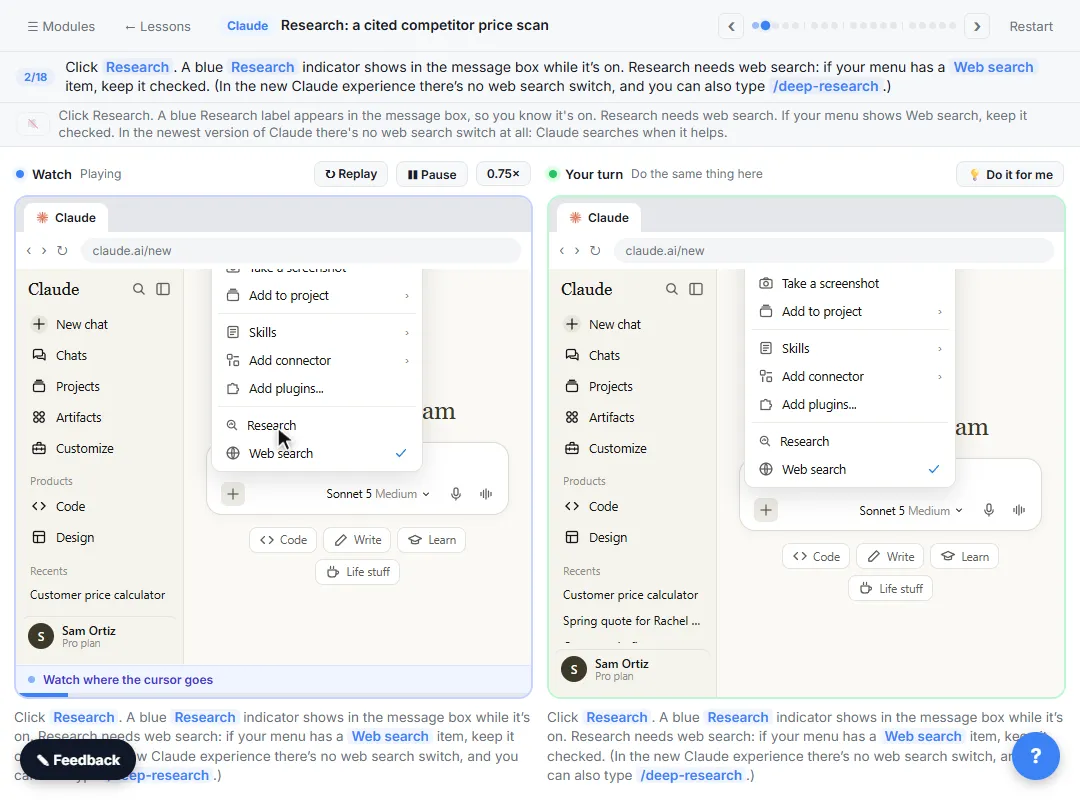
In Claude, click + at the bottom left of the message box and click Research. A blue magnifier lights up next to the + while it's on. Paste one prompt, fill in the [BLANKS] and send it. The lesson notes that Research is on paid plans (Pro, Max, Team and Enterprise), takes a few minutes and uses your limits faster than a normal chat, so save it for questions that need many sources.
Three parts make a research prompt work:
- Ask for a source link for every number or claim. That's what makes the report checkable.
- Ask it to say when something is missing, old or not from the company itself. A report that admits gaps is more useful than one that fills them.
- Give it your own numbers to compare with. Then the report answers your question, not a general one.
The deep research and AI citations glossary pages explain the ideas.
Competitors and prices
1. A competitor price scan
Research [TYPE OF BUSINESS] companies that serve [AREA] and towns within [N] miles. For each one, find their published prices for [SERVICE 1], [SERVICE 2] and [SERVICE 3], plus any minimums or contracts. Put it in a table with a source link for every price, and say when a price is missing, old, or not from the company itself. Then compare them with our prices: [YOUR PRICES].
This is the lesson's request with the details opened up. It's the template for most of the others.
2. How competitors describe themselves
Research how [3 TO 5 COMPETITORS] describe their services on their own websites: who they say they serve, what they promise, and any guarantees. Table with a source link per row. Quote short phrases exactly and mark anything that comes from a review site instead of the company.
3. Who else serves a new area
We're thinking about serving [NEW AREA]. Research which [TYPE OF BUSINESS] companies already serve it, how long they've been there if they say, and whether they publish prices. Source link for every company. Say clearly if you found fewer than [N].
Vendors and tools
4. A vendor shortlist
Research [TYPE OF VENDOR] for a [SIZE] [TYPE OF COMPANY] in [COUNTRY OR STATE]. Find 5 options and, for each, what they offer for [OUR NEED], published pricing if any, and the plan or contract terms they state. Table with a source link per cell that has a fact. Mark any price that's "contact us" or older than a year.
5. Compare two products you're choosing between
Compare [PRODUCT A] and [PRODUCT B] for [OUR USE]. Use only the vendors' own pages and help docs for features and prices, and say which page each fact came from. List what each one doesn't say publicly.
Asking for the vendor's own pages first keeps reviews and old blog posts out of the facts.
6. Check a vendor's claims
[VENDOR] told us: "[CLAIM]". Research whether their own published materials say the same thing. Quote the relevant line with a source link, and tell me if you can't find it.
Market and planning questions
7. A quick market overview
Research what's publicly reported about demand for [SERVICE] in [REGION] over the last [N] years. Use sources that name where their numbers come from. Summarize in 5 bullets with a source for each, and list anything that sounded like a guess.
8. Typical prices for something you're about to buy
Research typical published prices for [ITEM OR SERVICE] for a business our size, [SIZE]. Table: source, price, what's included, date of the page. Mark any price without a date.
9. Questions to ask before a big purchase
Research what buyers commonly ask before choosing [TYPE OF VENDOR]. Turn it into 10 questions we should ask in a sales call, each with the source that suggested it.
10. A rules and requirements starting list
Research what [TYPE OF BUSINESS] in [STATE] typically needs for [TOPIC, e.g. a permit or license]. Use official government sites first and give the source for each requirement. This is a starting list for our attorney or accountant to review, not advice.
Rules change and depend on your facts. Have a licensed professional review anything legal, tax or HR before you act on it.
Follow-ups after the report
Turn Research off for these. The lesson notes it usually switches itself off when the report is done; if the blue magnifier is still lit, click it.
11. Mark a source you found to be wrong or old
[COMPANY]'s page says the prices are from [DATE], so mark that row as out of date. Then [WHAT YOU NEED NEXT].
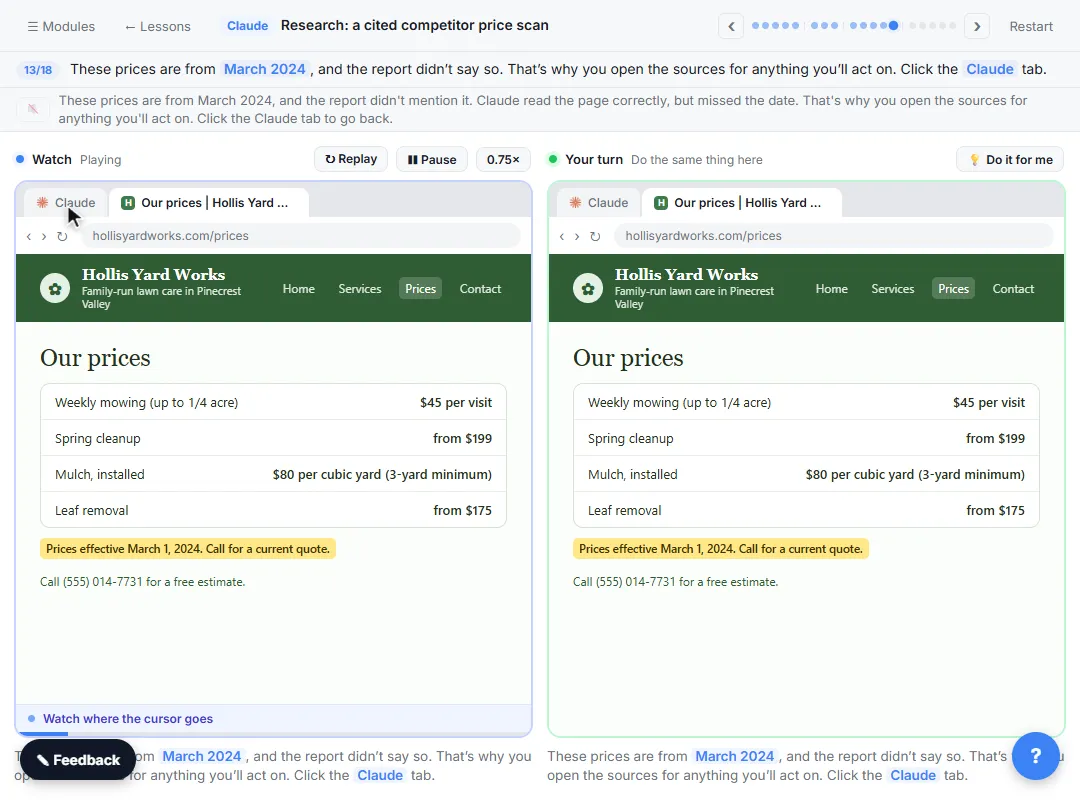
In the lesson, you open the Hollis Yard Works citation and find the price list is from March 2024, which the report didn't say. That catch is why you open sources.
12. List the weakest sources
List every claim in the report that rests on one source, a review, or a page with no date. Rank them by how much I'd be relying on them.
13. Turn the report into talking points
Give me 3 short, friendly talking points for when a customer says [OBJECTION]. Use only the current prices in the report. Don't suggest changing our prices yet.
That last line, from the lesson's follow-up, keeps the answer to what you asked for.
14. Make a one-paragraph summary for your boss
Summarize the report in one paragraph for [ROLE]: what we found, how sure we are, and what we'd need to check before deciding. Mention the out-of-date or weak sources.
Try it free, step by step
Claude Research: Get a Cited Competitor Price Scan, Then Check It. Turn on Research, have Claude check what nearby competitors charge, read the cited report, check a source and ask a follow-up. You do every step yourself in a practice copy of Claude, it checks your work as you go, and “Do it for me” finishes any step you get stuck on. Free, and nothing touches your real accounts.
Start the free lessonWhat should you check in a Claude Research report?
Open the sources for anything you'll act on. Click a citation, open the page, and read it yourself, including the small print. The lesson's report already warned that one price came from a customer review, not the company, but it missed the 2024 date on another page, and that was only visible on the source. Prices change and pages get misread, so check, or pick up the phone, before you change your own prices. The source verification glossary page covers the habit.
Research is module 6 of the free Claude Jump Start course. Before you run your first report, read Claude Research Mistakes to Avoid.
Key takeaways
- Research is for questions that need many sources; a quick fact only needs a normal chat.
- Say where to look, what to find, how to lay it out and what to compare it with.
- Ask for a source link for every claim, and a warning when a source is missing, old or not from the company.
- Turn Research off for quick follow-ups in the same chat.
- Open the sources for anything you'll act on.
Frequently asked questions
- Which Claude plans include Research?
The lesson says Research is on paid plans: Pro, Max, Team and Enterprise. On Team and Enterprise an Owner turns on web search first.
- How long does Claude Research take?
A few minutes, sometimes longer. The lesson notes that in the new Claude experience it keeps running if you leave the page.
- Can I trust the citations in a Claude Research report?
Use them to check, not as proof. Open the source and read it yourself, because a page can be out of date or misread.
- Are the competitors in the lesson real?
No. Bright Path Landscaping, Pinecrest Valley and every competitor, website and price in the lesson are made up.