Why this matters
The last screen a tenant sees should match their problem. With one ending, the tenant with water coming through the ceiling gets the same cheerful thank-you and confetti as the one with a sticking drawer, and nothing tells them to call.
A second ending page and one page-logic rule fix that. Urgent requests finish on a page that repeats the emergency number, and routine requests get a clear promise of when you will reply, so fewer people phone the office to ask.
Practice
Do every step yourself in a practice copy of the real tool. It checks your work, and “Do it for me” finishes any step you get stuck on.
What you’ll build
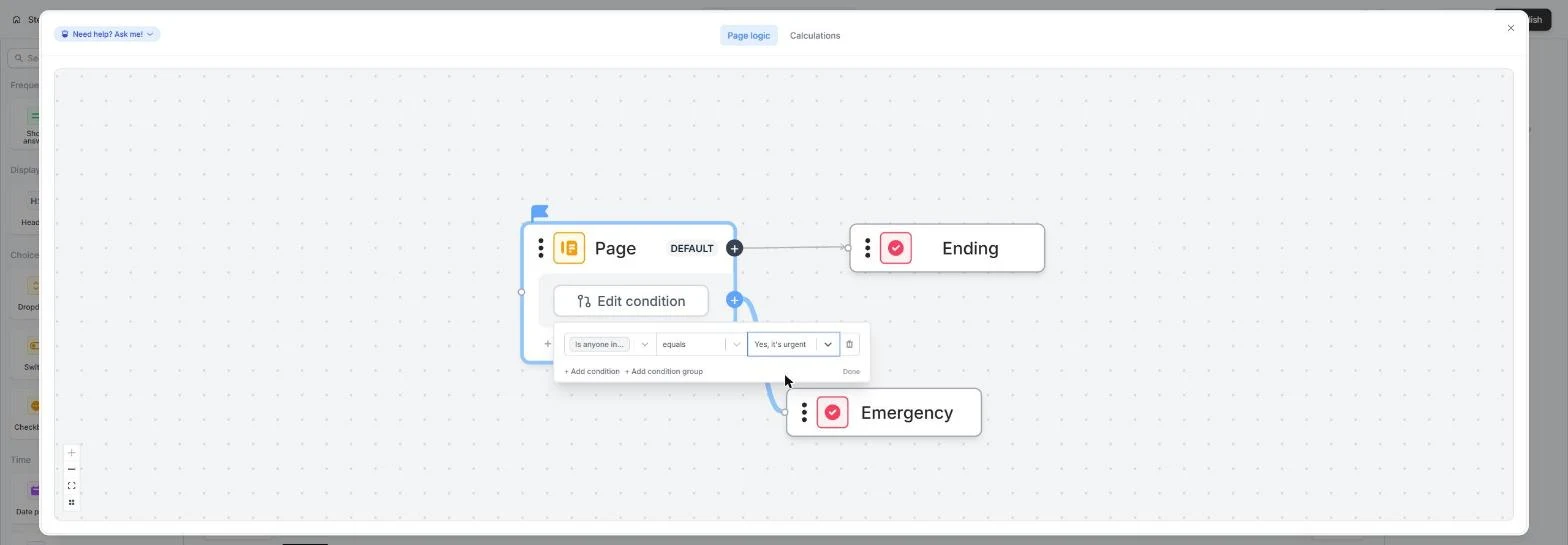
You add an Emergency ending to the maintenance form from module 1, turn its confetti off and change its words, give the routine ending a one-business-day promise, and draw a page-logic branch that sends Yes, it's urgent to the Emergency page.
Then you publish and test both paths on the live form. The screens are real screenshots from my own Fillout account on the Free plan, captured November 2026.
What you need
- Nothing to start the practiceThe lesson is a practice copy. The property company and tenants are made up.
- A Fillout form with a yes/no questionModule 1 builds the maintenance form this lesson uses. Any form with a question to branch on works.
Concepts
Ending pages
An ending is the page shown after Submit. A form can have several; each one has its own text and its own confetti switch.
A new ending is not used until page logic sends someone to it. Fillout reminds you with a yellow note on the page.
Branches and the default path
On the logic map, drag from a page's + onto the page it should lead to, then Set condition.
Anyone who matches no branch takes the DEFAULT path, so routine requests still reach the normal ending.
Publish to make it live
Editor changes only reach tenants after you publish. Test with one routine and one urgent request every time you change the logic.
Do it for real
Now repeat it in your own account. Tick each step as you go.
Quick check
3 questions to check you’ve got it.
1. You added an Emergency ending but tenants never see it. Why?
- No page-logic branch sends anyone to it
- Confetti is off
- It needs a paid plan
Show the answer
No page-logic branch sends anyone to it. A new ending is only used when a branch on the logic map leads to it.
2. A tenant answers No, it can wait. Where do they finish?
- On the default ending
- On the Emergency ending
- Nowhere until you add a rule
Show the answer
On the default ending. Anyone who matches no branch condition follows the DEFAULT path.
3. You changed the logic. What must you do before tenants see it?
- Publish the form
- Clear the results
- Rename the form
Show the answer
Publish the form. Editor changes go live only when you publish.