Why this matters
A list of form submissions tells you what came in, not what is happening. Without a status, the office asks every morning whether anyone booked the plumber, and finished jobs get mixed in with open ones.
Linking the form to a Zite database turns each request into a work order. A Status field that starts at Open, an Assigned to column for the vendor, and a view that hides Done give you one list to work from, and new requests join it on their own.
Practice
Do every step yourself in a practice copy of the real tool. It checks your work, and “Do it for me” finishes any step you get stuck on.
What you’ll build
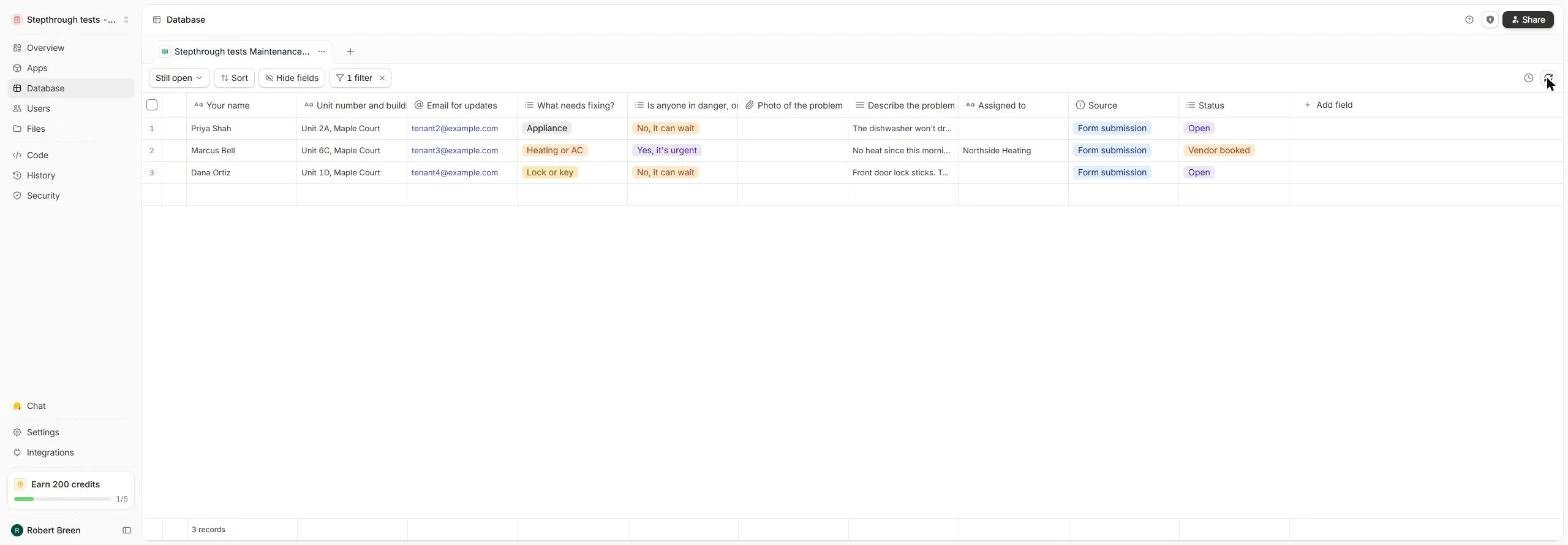
You filter the urgent requests in Results, link the maintenance form to a new Zite database, add a Status single select (Open, Vendor booked, Done) with Open as the default, assign a vendor and make a Still open view that hides finished jobs.
Then a new request arrives from the live form, already marked Open. The screens are real screenshots from my own Fillout and Zite account on the Free plan, captured November 2026.
What you need
- Nothing to start the practiceThe lesson is a practice copy. The property company, tenants and vendor are made up.
- A Fillout form with some responsesModules 1 and 2 build the maintenance form. A Zite database is included on the free plan; check zite.com/pricing for storage limits.
Concepts
Results versus a database
Results can filter, sort and export your responses, but you can't add your own columns. A linked Zite database keeps every answer and lets you add fields like Status and Assigned to.
Link to database copies existing submissions in. Publish the form again so new ones follow.
Single select with a default
A single select holds one value from a fixed list, so statuses never drift into open, Open and in progress. A default value fills new rows automatically.
The default applies to rows created after you add the field. Set the existing ones by hand once.
Views
A view is a saved way of looking at the same table. A Still open view with the filter Status is not Done is the morning to-do list; the main grid still has everything.
Do it for real
Now repeat it in your own account. Tick each step as you go.
Quick check
3 questions to check you’ve got it.
1. Why link the form to a Zite database instead of working in Results?
- So you can add your own fields like Status and Assigned to
- Results can't filter
- The form stops collecting otherwise
Show the answer
So you can add your own fields like Status and Assigned to. Results filters and exports, but only the database lets you add columns that track the work.
2. You added Status with default Open, but the old rows are blank. Why?
- Defaults only fill rows created after the field
- The form isn't published
- Single select can't have defaults
Show the answer
Defaults only fill rows created after the field. Existing rows keep their values; set them once by hand. New requests start as Open.
3. Which filter makes a list of jobs still to chase?
- Status is not Done
- Status is Done
- Your name contains Done
Show the answer
Status is not Done. Hiding Done leaves Open and Vendor booked, the work still in progress.