Why this matters
A small support team answers the same questions every day: prices, hours, cancellations. Each one is quick, but together they fill the morning, and two people can give two different answers.
A chatbot built on your own help docs can take the repeat questions. The risk is the question your docs do not cover, where a bot sounds just as sure while making something up. This lesson tests for exactly that.
Practice
Do every step yourself in a practice copy of the real tool. It checks your work, and “Do it for me” finishes any step you get stuck on.
What you’ll build
You run member support at a made-up coworking space. You load its help center into Dify, fix how the file is split, and check the right article comes back.
Then you build a chatbot and test a question the docs answer and one they do not. The screens are real screenshots from a free Dify workspace, captured October 2026.
What you need
- Nothing to start the practiceThe lesson is a practice copy. The company and its help center are made up.
- A free Dify account, to do it for realOur free Sandbox workspace started with 200 credits and worked with no API key. Check the current plans.
- The made-up help centerThe download link is in the steps for doing it for real. Use this or your own public help articles while you try it.
Concepts
How you split the file decides what the bot can find
Dify looks up pieces of your file, called chunks. The default split on every new line gave us 28 tiny chunks, with headings cut off from the facts under them.
Splitting at each article heading gave us 8 whole chunks. Always click Preview Chunk before you save, and split on whatever starts a new topic in your docs.
Test retrieval before you build the bot
Retrieval Testing shows which articles a question pulls up, with a score. Our meeting room question returned the right article first, at 0.95.
If the right article does not come back here, no prompt can save the answer. Fix the docs or the split first.
The empty prompt is not a safe prompt
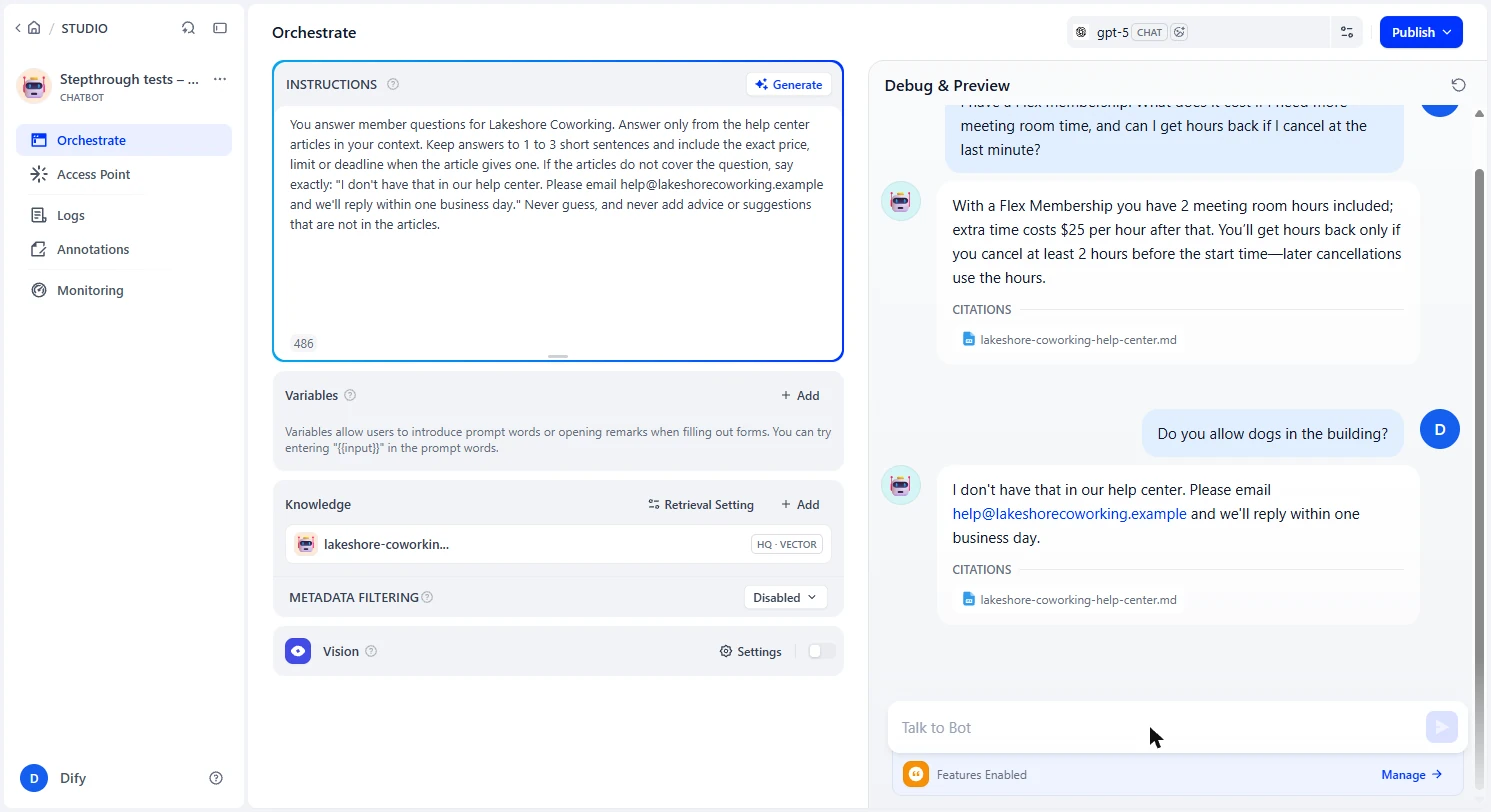
With no instructions, our bot said it did not know about dogs, then told the member to check with the front desk and hinted that policies can differ. Our docs say neither.
After we added rules, it gave our exact hand-off sentence and nothing else. So always test a question your docs do not answer.
Check what is already public
Our new app showed Web App: In Service with a public link before we published anything, and the screen says access points match the running version.
So turn the web app off under Access Point until you are ready, and publish updates when your rules change. Anyone with the link can chat, and chats use your credits.
Do it for real
Now repeat it in your own account. Tick each step as you go.
Downloads
- Made-up help center (Markdown)The Lakeshore Coworking help articles used in this lesson.
Quick check
3 questions to check you’ve got it.
1. Preview Chunk shows a heading alone in its own chunk. What do you do?
- Change the delimiter so each article stays whole, and preview again
- Save anyway, the AI will work it out
- Delete the heading from your docs
Show the answer
Change the delimiter so each article stays whole, and preview again. Our default split gave 28 tiny chunks. Splitting on the article heading gave 8 whole ones.
2. Why test a question your docs do not answer?
- A bot can sound sure while inventing an answer, and that is the risky case
- It saves credits
- Dify requires it before publishing
Show the answer
A bot can sound sure while inventing an answer, and that is the risky case. With no rules, our bot added advice that was not in the docs. With rules, it gave the exact hand-off line.
3. Your new app shows Web App: In Service before you are ready. What should you do?
- Turn it off under Access Point until you are ready
- Nothing, it cannot be reached yet
- Delete the app
Show the answer
Turn it off under Access Point until you are ready. Ours showed a public link from the start. Anyone with the link can chat, and chats use your credits.