Why this matters
Sales inquiries rarely include what you need to answer them. "Is October 17 open?" tells an event venue nothing about the guest count or budget, so the team emails back and forth for days before it can quote, and some leads go cold.
A Mixdesk AI agent answers first, collects the missing details one question at a time, and leaves your team a clean summary to follow up on. It does not quote or promise anything, because you told it not to.
Practice
Do every step yourself in a practice copy of the real tool. It checks your work, and “Do it for me” finishes any step you get stuck on.
What you’ll build
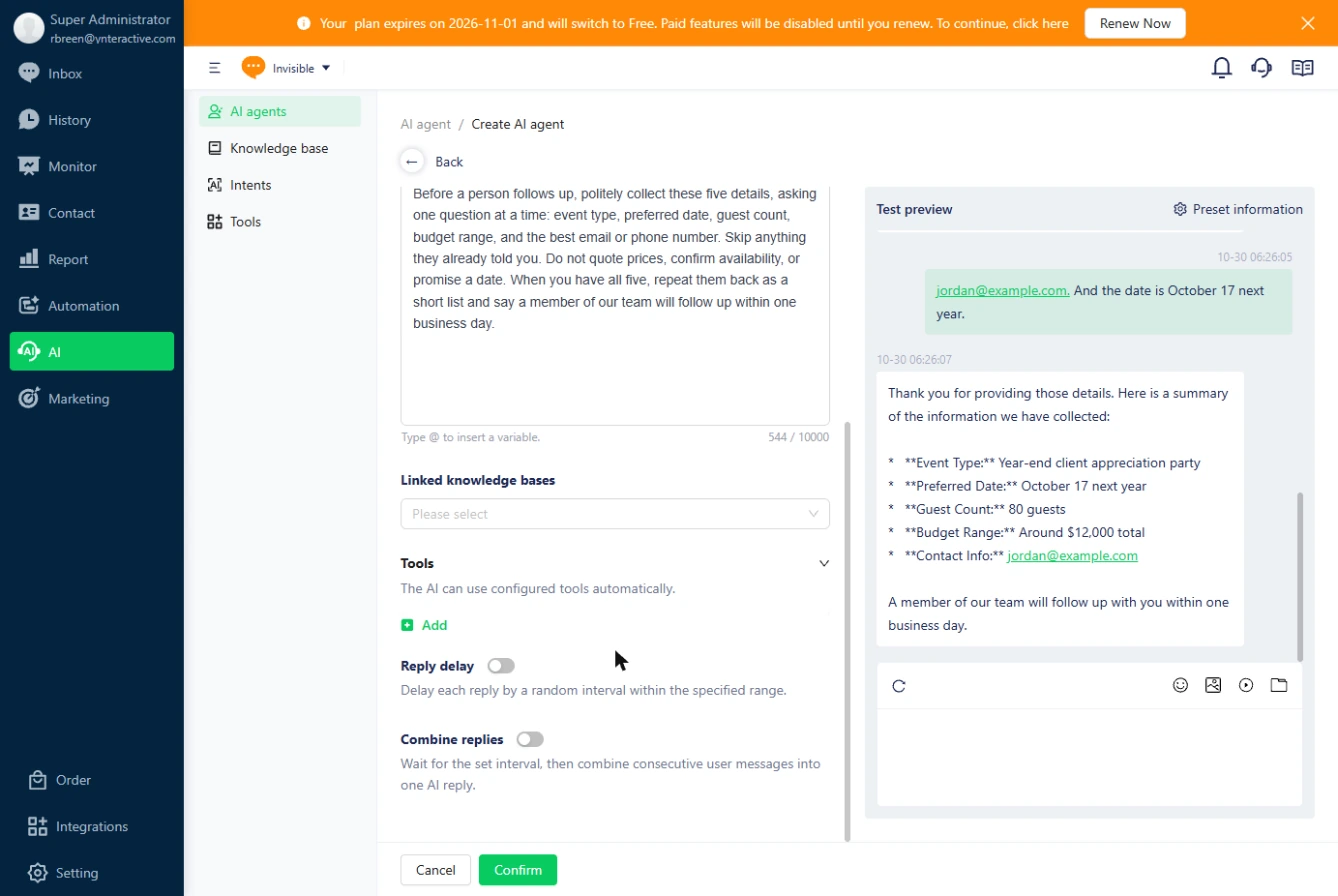
You run sales for a made-up event venue. You create an AI agent, write a persona with five details to collect and a rule against quoting prices or promising dates, and test it with a one-line inquiry.
Then you add it to an automation as the first responder, with a button to reach a person. The screens are real screenshots from my own Mixdesk trial account, captured October 2026.
What you need
- Nothing to start the practiceThe lesson is a practice copy. The venue and the guest are made up.
- A Mixdesk trial or paid plan, to do it for realAI Agents need a paid plan after the trial; the free inbox plan does not include them. Check the current plans.
- A logo or imageThe avatar is required: JPG, GIF or PNG, up to 5 MB.
Concepts
Give the agent one narrow job
An agent that only collects details is easier to trust than one that answers everything. List the details, ask for them one at a time, and tell it to skip anything the customer already said.
Then name what only a person may do. Here that is prices, availability and promises.
Test the messy answers
Customers do not answer the question you asked. In our run the agent asked which year, got the guest count instead, and moved on without asking for the year again.
Try the awkward replies in Test preview, and tighten the persona if a detail slips through. Keep a Talk to an agent button so a customer can always reach a person.
Do it for real
Now repeat it in your own account. Tick each step as you go.
Quick check
3 questions to check you’ve got it.
1. Where do you tell the agent not to quote prices?
- In the Persona
- In the Name
- In the Avatar settings
Show the answer
In the Persona. The persona describes its role and boundaries in plain language.
2. You saved the agent. Why does it still not answer customers?
- Nothing sends conversations to it until an automation assigns it
- It needs a day to train
- Test preview must stay open
Show the answer
Nothing sends conversations to it until an automation assigns it. An Assign AI agent node in an automation makes it the responder.
3. What did Test preview show that was worth fixing?
- A detail can be skipped when a customer answers a different question
- It quoted a price
- It refused to reply
Show the answer
A detail can be skipped when a customer answers a different question. It moved on without the year. Test messy answers and tighten the persona.