Why this matters
Small businesses sign service agreements every month: bookkeeping, IT support, cleaning, software. The first invoice looks fine; the clauses that cost money are the yearly price increase, the automatic renewal and the cost of leaving. When someone spots them, the comment usually goes into an email ("see section 2") that gets lost before signing.
Foxit PDF Editor lets you put the comment on the exact words: highlight a clause, say what to ask for, and stick a note on the next one. The person who signs, and the vendor, read the same marked-up PDF.
Practice
Do every step yourself in a practice copy of the real tool. It checks your work, and “Do it for me” finishes any step you get stuck on.
What you’ll build
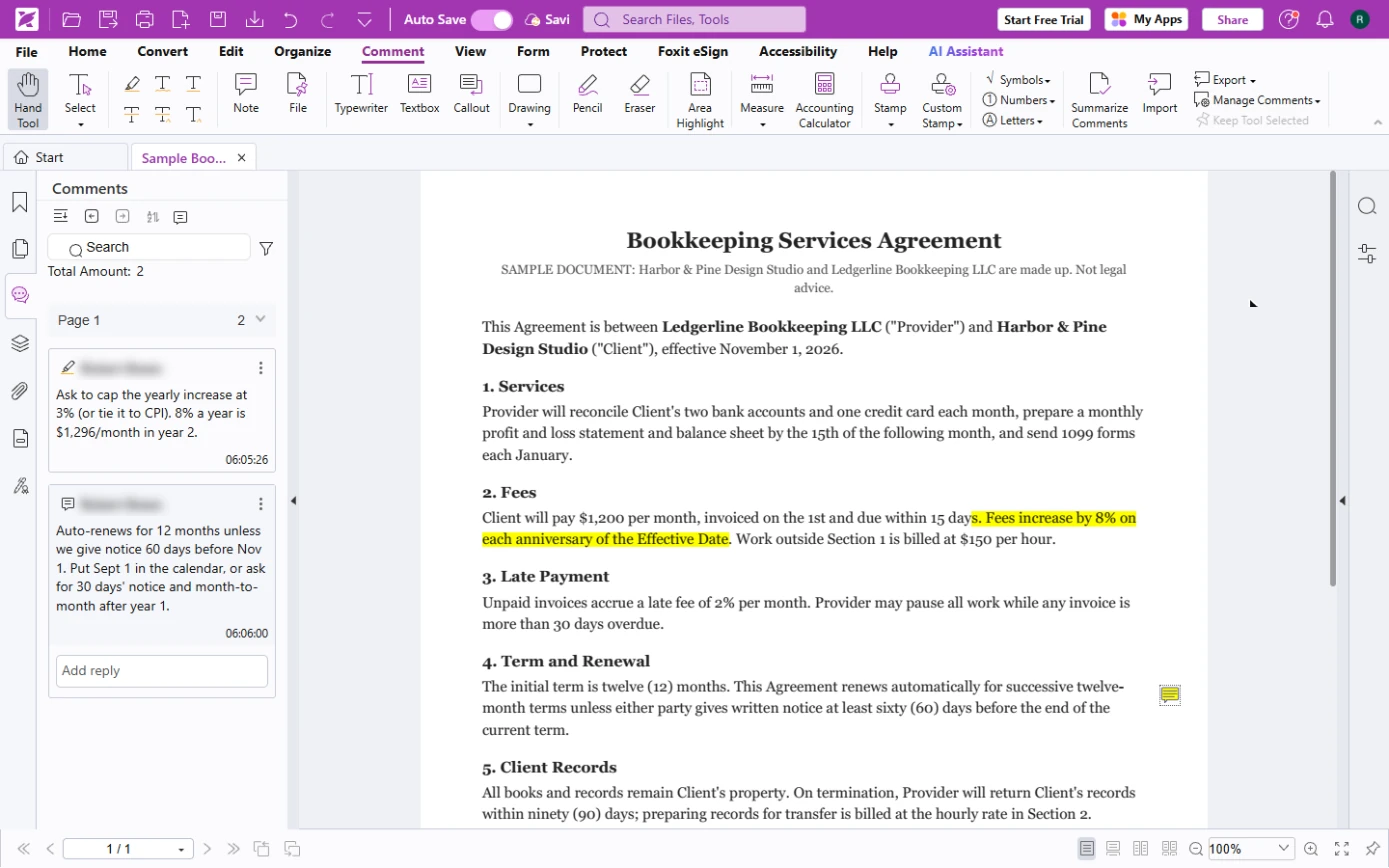
You review a made-up Bookkeeping Services Agreement for Harbor & Pine Design Studio before the owner signs it.
You highlight the 8% yearly fee increase and comment on it, put a sticky note on the 60-day auto-renewal, and check both in the Comments panel. The screens are real screenshots from my own Foxit account, captured October 2026.
What you need
- Nothing to start the practiceThe lesson is a practice copy. The agreement and both companies are made up.
- The sample agreement, to follow along for realSample-Bookkeeping-Services-Agreement.pdf: one made-up page, safe to upload anywhere.
- Foxit PDF Editor onlinepdfonline.foxit.com. The highlight, comment and note tools in this lesson worked on a free account in October 2026; editing tools such as Redact asked for a paid trial.
Concepts
Comment on the words, not about them
Highlight puts a colour on the exact sentence; the speech bubble above it attaches your comment. A Note is a sticky note you drop anywhere, handy for a whole clause.
Write each comment as risk plus ask: what it costs you, and what you want instead. One or two lines.
Read three clauses first
How the price changes (a yearly increase), how the contract renews or ends (auto-renewal and notice period), and what it costs to leave (getting your records back). They decide what you pay over three years.
This is not legal advice. For large or unusual contracts, ask a lawyer.
Do it for real
Now repeat it in your own account. Tick each step as you go.
Quick check
3 questions to check you’ve got it.
1. Where does a highlight comment live?
- On the exact highlighted words in the PDF
- In a separate email
- In Foxit settings
Show the answer
On the exact highlighted words in the PDF. The comment is attached to the highlight, so everyone sees it on the clause.
2. Which clause in the sample is the renewal trap?
- 4. Term and Renewal: auto-renews unless notice 60 days before the end
- 1. Services
- 7. Confidentiality
Show the answer
4. Term and Renewal: auto-renews unless notice 60 days before the end. Miss the 60-day notice and you are in for another 12 months.
3. How do you see all comments at once?
- The Comments icon in the left bar
- Print the PDF
- Undo each one
Show the answer
The Comments icon in the left bar. The Comments panel lists every comment with its author, time and a reply box.