Why this matters
A paper pulls from many pages, and they end up in tabs, bookmarks and downloads. When you need the exact number, you reopen everything, and a quote without its source loses marks.
Qind saves each source into one library and answers questions from it, with a numbered citation after each line, so you can check every claim against a page you chose.
Practice
Do every step yourself in a practice copy of the real tool. It checks your work, and “Do it for me” finishes any step you get stuck on.
What you’ll build
You are a made-up student writing a term paper on heat pumps in cold climates. You save two Wikipedia pages and ask one question that comes back with citations.
Then you check which sources the answer really used before you quote it. The screens are real screenshots from my own Qind account, captured November 2026.
What you need
- Nothing to start the practiceThe lesson is a practice copy. The student is made up.
- A free Qind account, to save your own sourcesThe Free plan has 100 saved items and 10 Ask Qind questions a day, no card.
Concepts
Save first, then ask
Capture saves a link with Auto-tag, Auto-organize and Summarize. A tick in Everything means Qind has read the item.
The first time, Qind asks you to allow AI processing; nothing is sent to its AI providers until you do.
Answers from your library
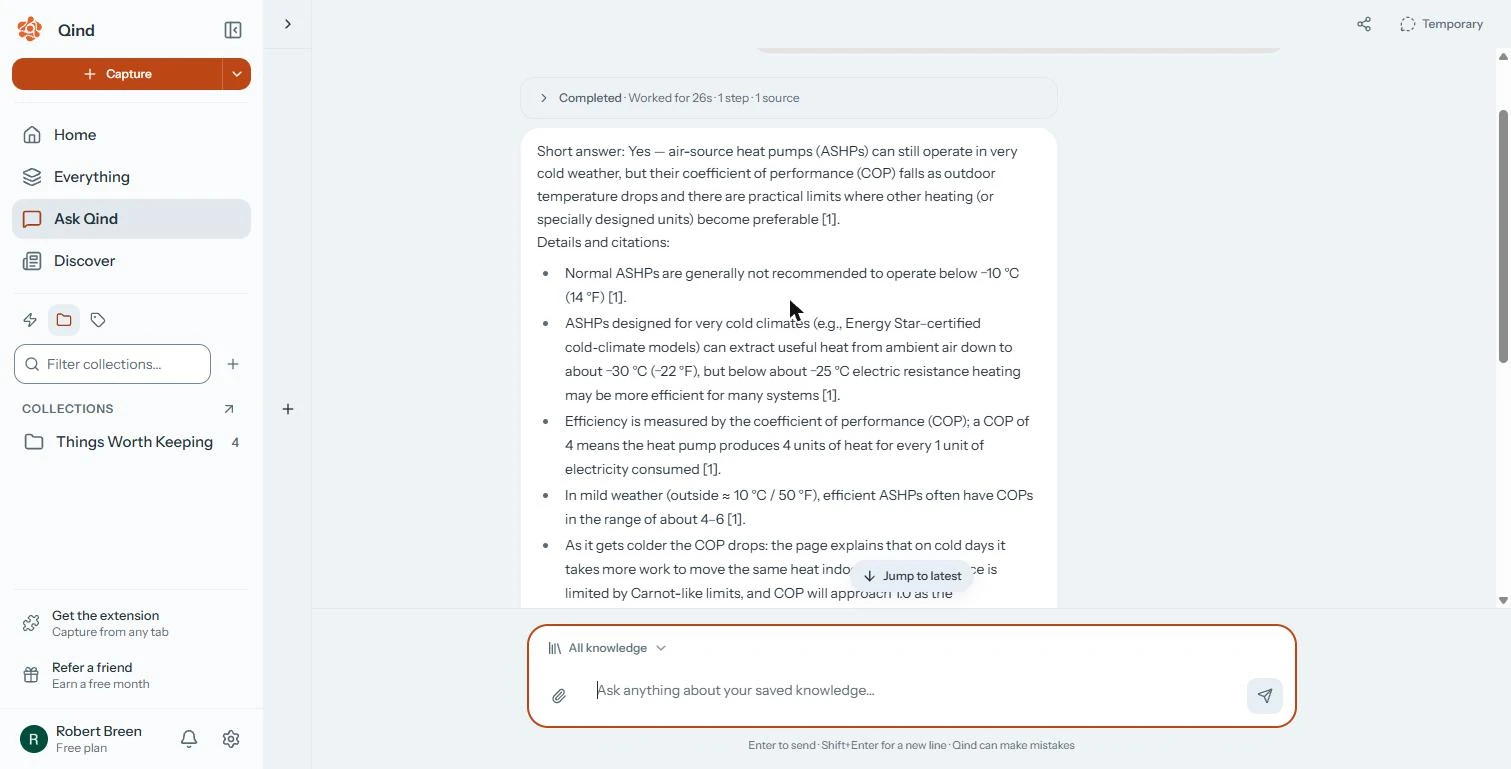
Ask Qind searched the library (12 results) and answered in 26 seconds, with [1] after each line pointing to a saved page.
Ask for citations in the question, and ask about what you saved rather than the whole web.
Check the Sources list
The answer used only one of the two saved pages, and some quoted lines are marked citation needed on Wikipedia.
Open each cited source, confirm the numbers you quote, and replace flagged lines with a stronger reference.
Do it for real
Now repeat it in your own account. Tick each step as you go.
Quick check
3 questions to check you’ve got it.
1. What does [1] after a line in the answer mean?
- It points to the saved source the line came from
- It is the line number in your paper
- It means the claim is verified
Show the answer
It points to the saved source the line came from. The number links the line to a source in the Sources list. You still check the source yourself.
2. The answer cites only one of your two pages. What should you do?
- Open the cited page, check the numbers, and look for stronger sources for flagged lines
- Quote it as is
- Delete the page that was not used
Show the answer
Open the cited page, check the numbers, and look for stronger sources for flagged lines. A citation helps only if the source holds up; your reader checks the reference, not the AI.
3. Where does Ask Qind look for answers?
- In what you saved to your library
- Across the whole web
- Only in the last page you opened
Show the answer
In what you saved to your library. It searched your library and answered from your saved items.