Why this matters
Small firms pay for stock photos, and the obvious ones for a law firm (gavels, scales, handshakes) sit on every competitor's blog. A header that looks like everyone else's says nothing about the firm, and paid stock adds up over a year of posts.
MaxVideoAI's Image tab shows the price of every model for your settings before you choose. Seedream 5.5 made a 16:9 header from one prompt for $0.06, and the wallet dropped by exactly that.
Practice
Do every step yourself in a practice copy of the real tool. It checks your work, and “Do it for me” finishes any step you get stuck on.
What you’ll build
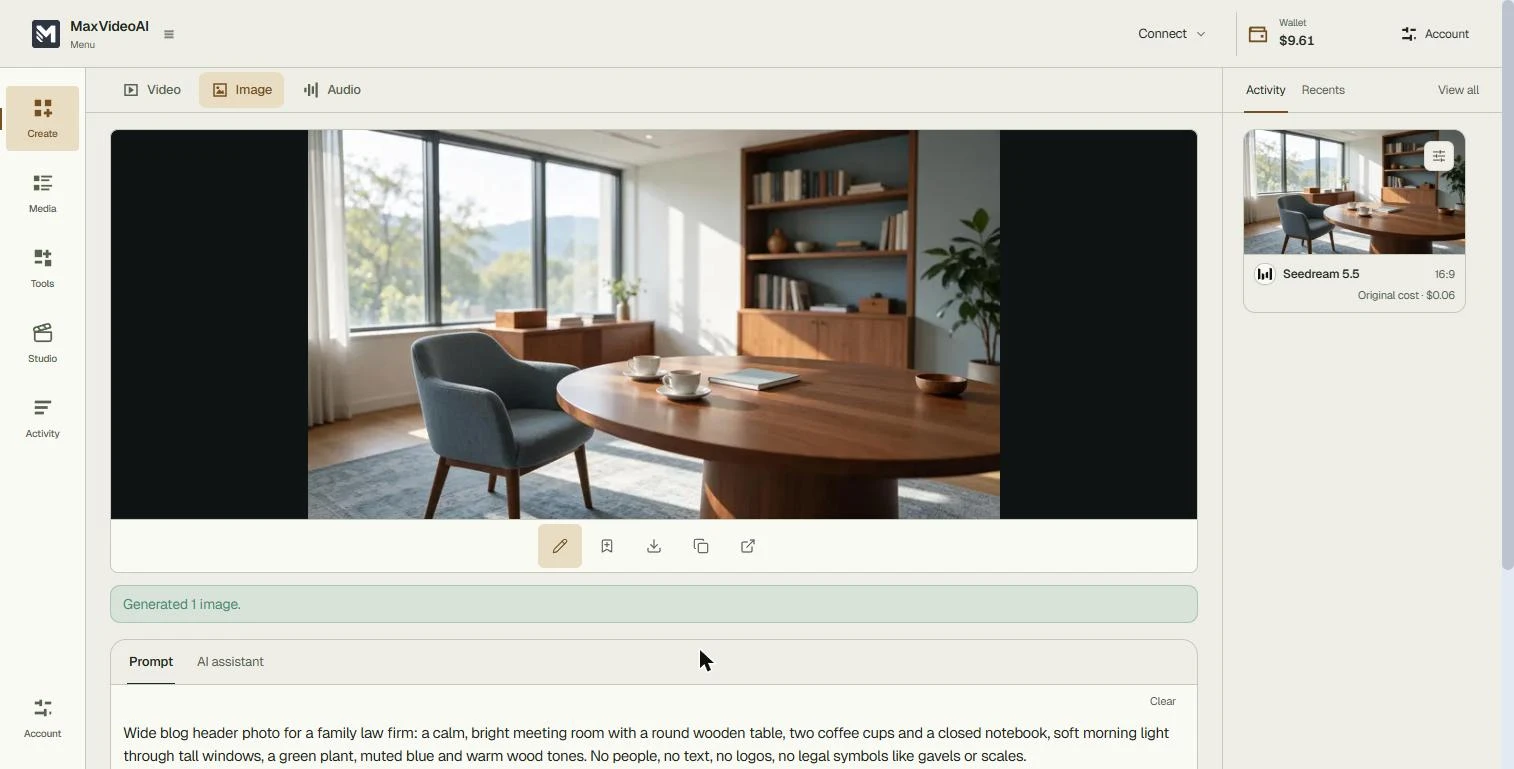
You run the office at a made-up family law firm. You make a wide blog header image that shows a calm, bright meeting room, with no people, text, logos or gavels.
You compare model prices, set the format, write the prompt, generate one image and check it before you download. The screens are real screenshots from my own MaxVideoAI account, captured November 2026.
What you need
- Nothing to start the practiceThe lesson is a practice copy. The firm is made up.
- A MaxVideoAI account with wallet funds, to make images for realMaxVideoAI is pay-as-you-go: each image is charged from your wallet at the price on the Generate button.
Concepts
See the price before you choose
Choose a model listed 14 image models in 4 families, each priced for the current settings: Seedream 5.0 Flash $0.03, Seedream 5.5 $0.06, Seedream 5.0 Pro $0.16 for one 2K image.
The Generate button repeats the price, and our wallet dropped by exactly that amount.
Say what to leave out
An image model fills gaps with the most common picture, and for a law firm that is a gavel. AI people and AI text are also the parts that most often look wrong.
The last line of the prompt ruled them out: no people, no text, no logos, no gavels or scales. The image had none of them.
Reuse the prompt
Keep the prompt and change one detail each month: a different room, a window seat, autumn light.
Every header then looks like it belongs to the same firm, for a few cents a post.
Do it for real
Now repeat it in your own account. Tick each step as you go.
Quick check
3 questions to check you’ve got it.
1. Where do you see what an image will cost before you generate it?
- In Choose a model and on the Generate button
- Only on your monthly invoice
- After the image is made
Show the answer
In Choose a model and on the Generate button. Each model shows its price for your settings, and the Generate button shows the price you will pay.
2. Why end the prompt with "No people, no text, no logos, no gavels"?
- The model fills gaps with clichés, and AI people and text often look wrong
- It makes the image cheaper
- MaxVideoAI requires it
Show the answer
The model fills gaps with clichés, and AI people and text often look wrong. Ruling things out keeps the image on brief. It does not change the price.
3. Which format fits a blog header?
- Horizontal 16:9
- Vertical 3:4
- Square 1:1
Show the answer
Horizontal 16:9. Blog headers are wide, so 16:9 fits without cropping.