What is a text splitter in n8n?
Quick answer
A text splitter is the tool or n8n sub-node that cuts a loaded document into chunks before they are turned into embeddings. You set the chunk size and overlap. In n8n it plugs into the Default Data Loader, and the Recursive Character Text Splitter is the one recommended for most uses.
Last updated
Take the free module →Module 15 of the free AI for Customer Support course, about 14 minutes. No account needed.
Updated · By Robert Breen
Why it matters for a small business
Chunking is the idea; the text splitter is the part that does it. In n8n you meet it as a slot called Text Splitter under the Default Data Loader, once you set the loader's Text Splitting option to Custom. n8n offers three: a Character Text Splitter that cuts on one separator you choose, a Recursive Character Text Splitter, and a Token Splitter that counts tokens instead of characters.
The recursive one is the safe default because it tries to keep text whole. It cuts at paragraph breaks first, then line breaks, then spaces, and only cuts mid-word as a last resort. For a handbook or policy that means a rule is less likely to be chopped in half. The splitter's two settings, Chunk Size and Chunk Overlap, decide how long each piece is and how much neighbors share.
In a real lesson: Make Your Handbook Searchable for an AI Helpdesk using Pinecone + n8n
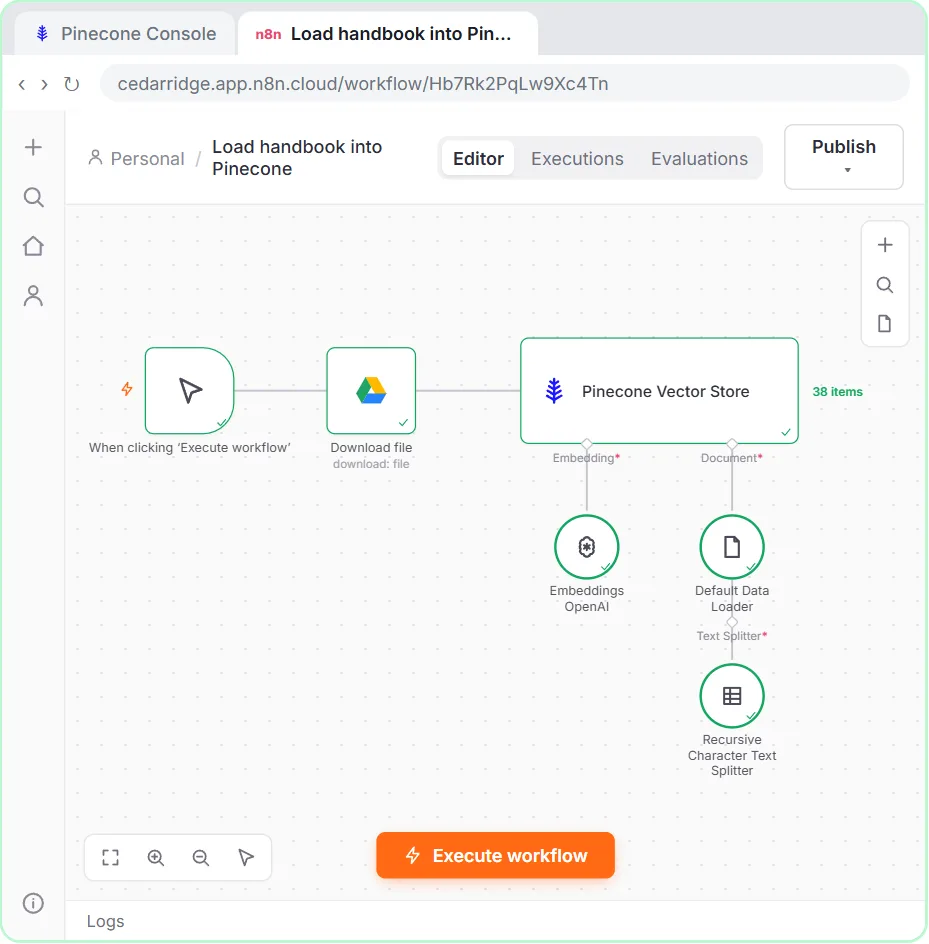
In Make Your Handbook Searchable, you open the Default Data Loader, change Type of Data from JSON to Binary so it reads the PDF from Google Drive, and set Text Splitting to Custom. A new Text Splitter slot appears under the loader. You click the plus and choose Recursive Character Text Splitter, which the lesson notes is the one n8n recommends for most uses.
Chunk Size is 1000 characters and you set Chunk Overlap to 200. After Execute workflow, the Pinecone Vector Store node shows 38 items: the splitter turned one handbook into 38 chunks, each embedded with text-embedding-3-small and saved with its page number.
Try this lesson free or read the step-by-step guide.
Common confusions
Text splitter vs Split Out node
The Split Out node turns a list inside one item into separate items. A text splitter cuts long text into chunks for a vector store.
Text splitter vs data loader
The Default Data Loader reads the file and passes the text on. The text splitter, plugged into the loader, cuts that text into pieces.
Tips
- Use the Recursive Character Text Splitter unless you have a clear reason not to.
- Set Text Splitting to Custom on the loader if you want to see and change the chunk settings.
- Clean up messy files, such as scans without text, before splitting: a splitter can't fix bad input.
Related terms
More n8n and automation terms
Where you use it: free lessons
Frequently asked questions
- Which text splitter should I use in n8n?
- The Recursive Character Text Splitter fits most documents. Use the Character Text Splitter only when your file has one clear separator you want to cut on.
- Why is there no Text Splitter slot on my loader?
- In the lesson, the slot appears after Text Splitting is set to Custom on the Default Data Loader.
- What chunk size should I start with?
- 1000 characters with 200 overlap, as in the lesson, is a reasonable start. Test real questions and adjust from there.