Felo (felo.ai) is an AI search tool. You ask a question in plain words, Felo searches the web for you, and it writes one answer with a small numbered source after each claim, so you can open the page behind every number. Felo describes itself as a free, multilingual AI search and creation platform. You can try it hands-on in the free lesson Felo: Price a New Service in 10 Minutes, with a Source for Every Number, which is the first module of the free Felo Jump Start.
This page is for office managers, analysts, consultants and small-business owners who need quick answers to public questions, such as what a service sells for or what competitors publish, and want to know what Felo is, what it is good at, and how to check what it says. It is my own explainer, not an official Felo guide. The examples use a made-up business, and every Felo screen described here comes from a real Felo Free-plan account used in October 2026.
What problem does Felo solve?
Research for work usually means a dozen open tabs. You search, open pages, copy numbers into a document, lose track of where each one came from, and start again when someone asks "where did that come from?". A chat assistant that answers from memory is faster, but it can state a number with no way to see where it came from, or make one up. That is called a hallucination.
AI search sits in between. It does the searching and reading for you, like a chat assistant, but it ties each claim to a page you can open, like a search engine. For a question with a public answer (prices, policies, who offers what, what changed this year) that is often the quickest way to a first draft you can defend.
How does Felo work?
Five ideas cover most of what you see in Felo.
The question box. The home screen has an Ask anything box. You type a question the way you would ask a colleague. Better questions say who is asking, what to find and how to lay it out, for example "a table, a source for every number, and mark the estimates".
Pro Search. A Pro switch next to the box turns on a deeper search. In our run, Felo split one pricing question into 7 smaller searches, read 53 sources in 3 languages and then wrote the answer. The Pro menu also lets you pick the model, with Best marked as the recommended one.
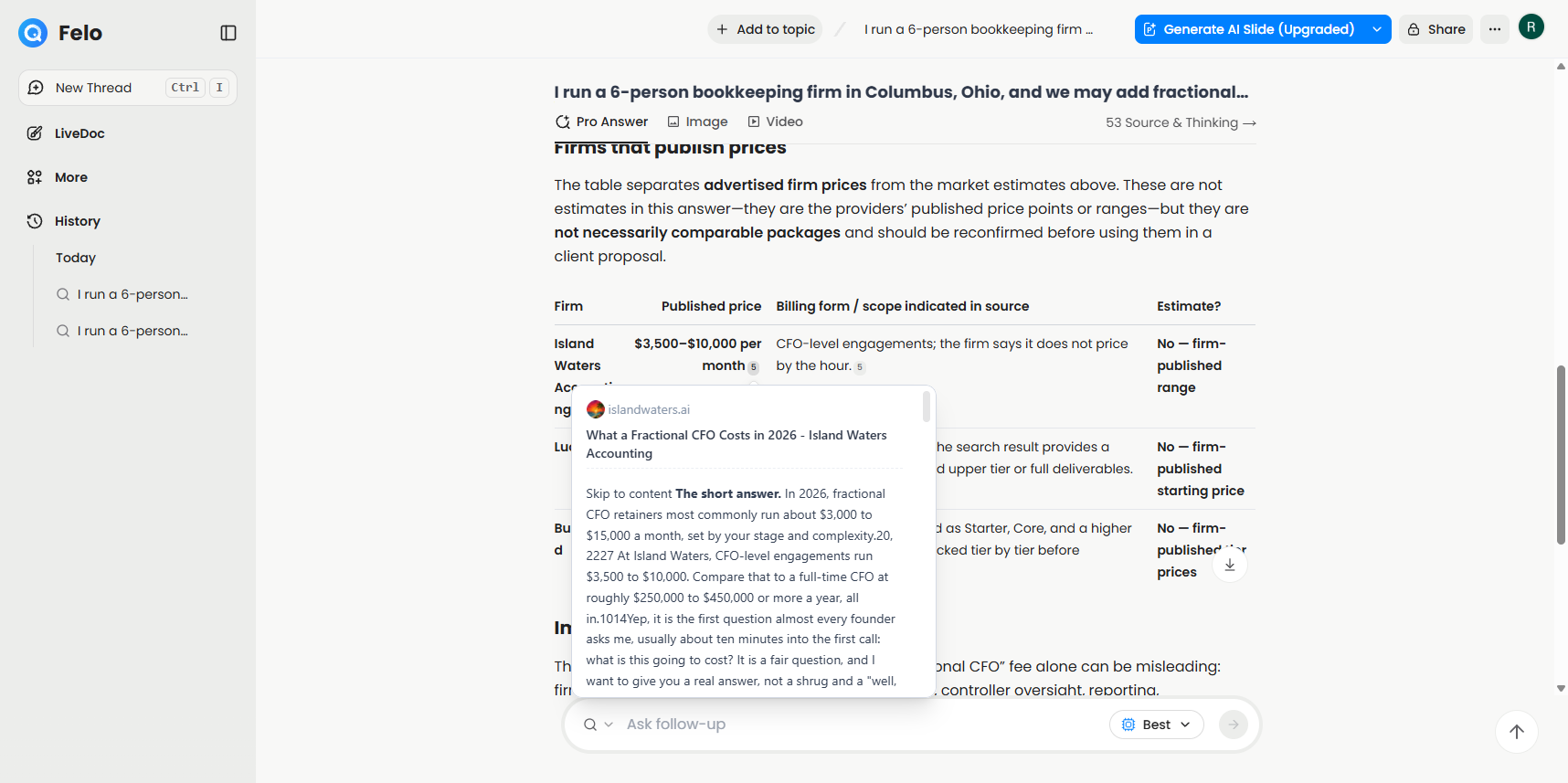
Numbered sources. Each claim in the answer ends with a small number. Point at it and a citation card shows the page it came from and the passage Felo used. A Source & Thinking view lists every page Felo read. This is the feature that makes Felo useful at work, because you can check a number in seconds.
Follow-ups. You can keep asking in the same thread. In the lesson, a follow-up asks Felo to add a Source type column and the page URL for each price, which shows at a glance which numbers came from a company's own site and which came from someone writing about it.
Convert and export. Under an answer, Convert answer to turns it into a mind map (AI Page and AI Slide were marked Upgrade on the Free plan when we tested). The Export menu offers Notion, Google Drive, Felo Docs, PDF, Word, Markdown and TXT.
What do businesses use Felo for?
The pattern is the same every time: a narrow question with a public answer, where you need to show your sources.
- Pricing a new service. A bookkeeping firm finds what fractional CFO packages sell for and which firms publish their prices. This is the free Felo pricing lesson.
- Checking competitors. A marketing team lists what three competitors say on their own pages about features, guarantees or service areas.
- Briefing before a call. A sales rep gets a short, sourced summary of a prospect's industry and recent news.
- Fact-checking a draft. An analyst checks each figure in a report against a public source before it goes to a client.
- Answering a policy question. An office manager finds what a public rule or deadline says, then opens the official page to confirm it.
Felo is not the right tool for questions about your own private files, numbers only you have, or decisions that need judgment. It searches the public web.
How do you check a Felo answer?
A citation is a pointer, not proof. The lesson builds the habit in four checks, and they work for any AI search tool:
- Open the page behind every number you will use. Find the number on the page. If you cannot find it, do not use it.
- Check who wrote the page. In our run, one firm's prices were cited to a comparison article, not the firm's own website. A third-party page can be out of date or wrong.
- Check the date. Prices and policies change. Look for a date on the page, and prefer the newest official source.
- Re-read the whole answer after every follow-up. When we asked for source types, Felo also swapped one firm for another. Follow-ups can change more than you asked for.
The glossary has more on source verification and AI citations.
How is Felo different from a chat assistant or a search engine?
A search engine gives you links and leaves the reading to you. A chat assistant gives you an answer, sometimes with sources and sometimes without, depending on the tool and the mode. Felo starts from search: every answer is built from pages it found for that question, and the sources are shown by default. It also has a mind map and an export menu built in, so the research can leave Felo as a file or a page in Notion or Google Drive.
The trade-off is that Felo is only as good as the pages it finds. If the best source is behind a login, in a PDF it cannot read, or not online at all, the answer will be thinner, and you will still need to look yourself.
Is Felo free?
Felo has a free plan. Our Free account showed a daily credit allowance, and Pro Search and mind maps used credits each time, so you can do a few deep searches a day. Felo's pricing page lists the current plans and limits. Check it before you rely on the Free plan for regular work. This page does not list prices because they change.
What else does Felo offer?
Felo's site also lists LiveDoc, Agent, Slides, an LLM Playground, an API and SEO automation. The free lesson covers AI search, citations, mind maps and export only, because those are the features we tested end to end. See felo.ai for what the other products do today.
How do you start learning Felo?
Start with one real question from your work and the free Felo Jump Start course:
- Felo: Price a New Service in 10 Minutes, with a Source for Every Number: ask with Pro Search, check a citation, catch a third-party source, ask a follow-up, make a mind map and open the export options. About 10 minutes in a practice copy of the real Felo screens.
More Felo modules will be added to the same course as they are built and tested in the real app.
Key takeaways
- Felo is an AI search tool: it searches the web for your question and writes one answer with a numbered source on each claim.
- Pro Search goes deeper by splitting your question into smaller searches before it answers.
- Every number you plan to use needs a check: open the page, find the number, see who wrote it and when.
- Follow-ups are useful but can change other parts of the answer, so re-read the whole thing.
- Convert answer to and Export move the research into a mind map, a document or Notion and Google Drive.
Frequently asked questions
- What is Felo used for?
Quick research on questions with a public answer: prices, competitors, policies and background before a call, with a source you can open for each claim.
- Is Felo accurate?
It is as accurate as the pages it cites, and it can still pick the wrong page or mix sources. Treat each answer as a sourced first draft and open the page behind every number you will use.
- Do I need an account to learn Felo?
No. The practice copy in the free lesson needs no account. To use Felo for real you need a Felo account, and the Free plan is enough for the lesson.
- Is this an official Felo course?
No. Felo is a Stepthrough partner, and this is my own explainer and lesson, built in a real Felo account.
Sources
- Felo home page (read October 20, 2026)
- Felo pricing for current plans and limits
- The Felo app itself, on the Free plan, used to build the linked lesson on October 20, 2026