Why this matters
A small clinic's front desk answers the same questions all day: do I need a referral, do you take my insurance, what happens if I cancel. Each call ties up the phone while the next caller, often a new patient who wants to book, waits on hold.
A website chat can answer those questions from the clinic's own FAQ, collect a booking request, and hand anything else to a person. Landbot AI Copilot drafts it from one message. Your job is to check that it really knows your answers and that every request reaches someone.
Practice
Do every step yourself in a practice copy of the real tool. It checks your work, and “Do it for me” finishes any step you get stuck on.
What you’ll build
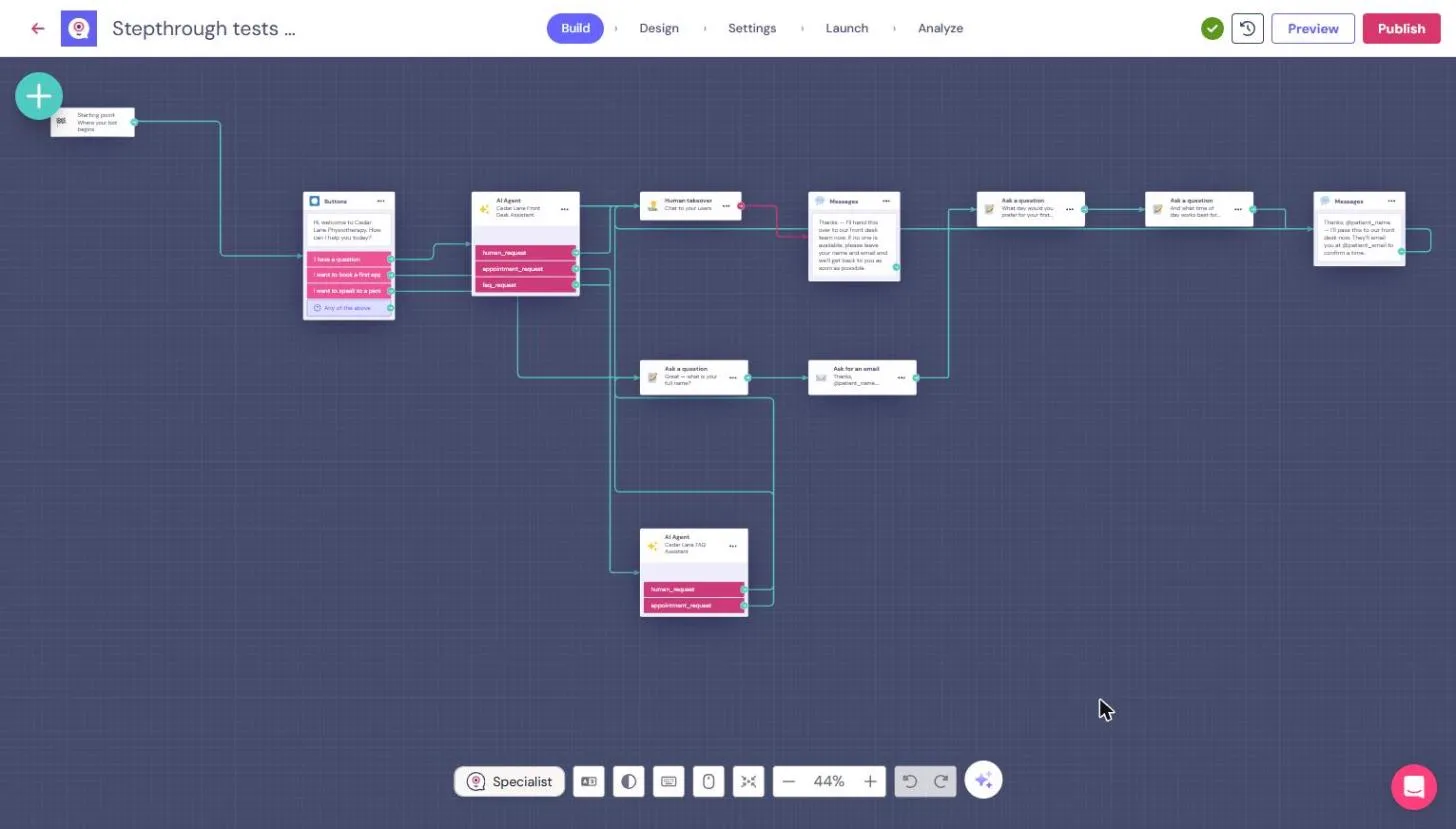
You run the front desk at a made-up physiotherapy clinic. You describe the job to Copilot, test the first draft as a patient, give it the clinic FAQ, and find that the knowledge base it said it used was empty.
Then you add the FAQ yourself, test three questions in a patient's own words plus one it should not answer, take a booking request, and replace a placeholder webhook with a real handoff to the front desk. The screens are real screenshots from my own Landbot trial, captured November 2026.
What you need
- Nothing to start the practiceThe lesson is a practice copy. The clinic and the patient are made up.
- A Landbot account, to do it for realLandbot has a free trial and a Free plan. AI Agent answers and Human takeover may need a paid plan after the trial, so check the current plans.
- Your clinic FAQThe real wording and fees for referrals, insurance and cancellations, approved by the practice manager.
Concepts
Give it your answers, then prove it has them
The first draft knew the topics from the brief, but not the answers, so it replied with a fixed message. When we pasted the FAQ, Copilot first planned keyword rules, then an AI Agent that "answers only from your FAQ". It said Done, and the agent's Knowledge base was empty.
Add the FAQ under Knowledge base yourself (Text, Document or Website), then test each answer in words a patient would use. Also ask one thing the FAQ does not cover: it should say it does not know and offer the front desk, not guess.
Follow every request to a person
Copilot's booking path ended in a Webhook to https://example.com/webhook, a placeholder. The chat still told the patient the request had been sent to the front desk. Nobody would ever have seen it.
We replaced it with Human takeover, so the chat goes to the team in Landbot's Inbox, and a message that promises only what is true: the front desk will email to confirm a time.
Keep health details out of the chat
A front desk chat answers admin questions. It should not ask about symptoms or give medical advice, and the agent's first reply asks patients not to share health details.
Check your own privacy rules before you publish. The chat stores what people type, and the booking request only needs a name, an email and a preferred time.
Do it for real
Now repeat it in your own account. Tick each step as you go.
Quick check
3 questions to check you’ve got it.
1. Copilot says the agent answers only from your FAQ. What should you do?
- Open the AI Agent and check the Knowledge base, then test it
- Publish it, since Copilot said done
- Ask Copilot again whether it is sure
Show the answer
Open the AI Agent and check the Knowledge base, then test it. In our test the Knowledge base was empty, and the agent said it had no information about a fee that was in the FAQ.
2. The chat tells a patient their request was sent to the front desk. What did we find behind that message?
- A Webhook to a placeholder address
- An email to the clinic
- A new row in Contacts
Show the answer
A Webhook to a placeholder address. Copilot added a Webhook to https://example.com/webhook on its own, so the request went nowhere.
3. A patient asks whether there is parking, and the FAQ does not say. What is the right answer?
- Say the FAQ does not cover it and offer the front desk
- Guess from what most clinics have
- Ignore the question and ask for their name
Show the answer
Say the FAQ does not cover it and offer the front desk. That is what our agent did. A guessed answer is worse than no answer.
You reached the end of AI for Medical & Dental Office Admin
For a chat that asks about deadlines and alerts a law firm, see the first Landbot lesson: a law firm intake chat that flags urgent cases.
Pick your next course →