Why this matters
Small coaching, consulting and advisory practices get leads on TikTok, but they arrive as direct messages: "how much?", "can I book?". They get answered between client sessions, often a day later, and by then the person has moved on.
Manychat replies to a TikTok message with a keyword in seconds, sends your booking link, asks for an email and flags the chat for a person. You build it once and it stays switched off until you test it.
Practice
Do every step yourself in a practice copy of the real tool. It checks your work, and “Do it for me” finishes any step you get stuck on.
What you’ll build
You help Priya Shah at Clearpath Career Coaching, a made-up two-person practice. A DM with the word book, booking, consult or price gets an offer of a free resume review and the booking link, then a question for the email. A valid email tags the lead resume-review-lead and marks the chat Open in Manychat's Inbox.
The screens are drawn from a real Manychat Free account with TikTok connected, November 2026. The automation was saved as a draft and never set live.
What you need
- Nothing to start the practiceThe lesson is a practice copy of the real Manychat screens.
- A Manychat account, to do it for realManychat has a free plan; our test account showed a limit of 25 contacts. Data Collection showed an Upgrade tag, so check the pricing page. Affiliate link: I may earn a commission, at no cost to you.
- A TikTok account connected to ManychatYou connect it in Manychat when you sign up. It asks for TikTok permissions, so read them before you accept.
- A booking pageCalendly, Microsoft Bookings or a contact page on your site.
Concepts
Messages, not comments
For TikTok, Manychat's triggers are a message, a link click and a QR code scan. The comment trigger showed "TikTok doesn't support this trigger in your region yet" in our account, and Home listed Comments on TikToks as Coming soon. So this automation starts when someone sends you a message that contains a keyword.
Keywords are not case-sensitive. Pick the words people already use: book, booking, consult, price.
Links are plain text in TikTok messages
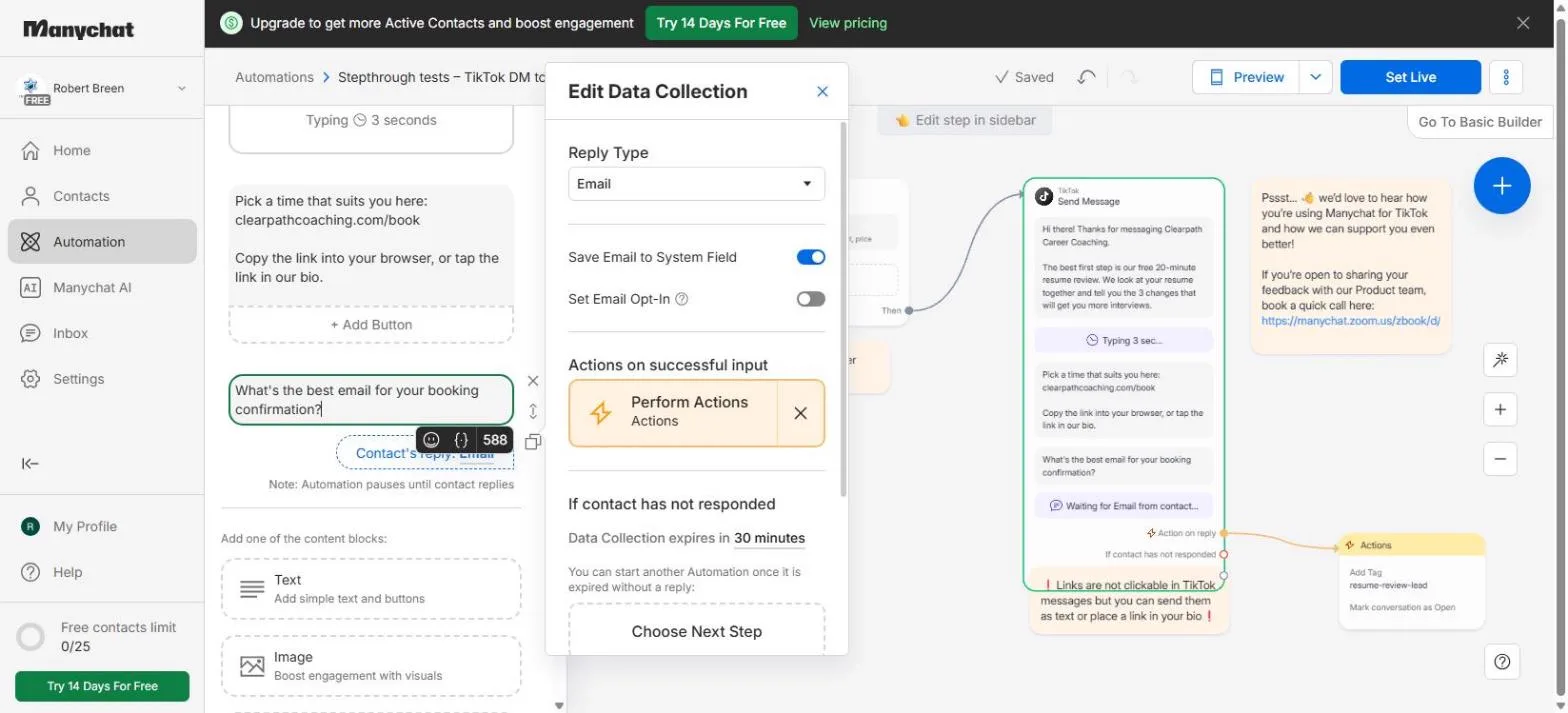
Manychat shows a note on the canvas: links are not clickable in TikTok messages. Put the booking link in the text, tell people to copy it, and keep the same link in your bio.
Ask for the email, then hand it to a person
A Data Collection block asks a question and waits up to 30 minutes for the reply. With Reply Type set to Email, Manychat saves the address to the contact. Set Email Opt-In says you have consent for marketing email, so leave it off when you only asked for a booking confirmation.
Perform Actions runs only after a valid email: add a tag, then Mark conversation as Open, so every lead waits in the Inbox for a person.
Do it for real
Now repeat it in your own account. Tick each step as you go.
Quick check
3 questions to check you’ve got it.
1. Someone DMs "Price?" and your keyword is price. Does the automation start?
- Yes, keywords are not case-sensitive
- No, the case must match
- Only if the message is one word
Show the answer
Yes, keywords are not case-sensitive. Manychat says keywords are not case-sensitive, so "Price" and "price" are the same.
2. Where do you put the booking link in a TikTok reply?
- In the text, as plain text, and in your bio
- On a button
- Nowhere, TikTok blocks links
Show the answer
In the text, as plain text, and in your bio. Manychat notes that links are not clickable in TikTok messages, but you can send them as text or place a link in your bio.
3. When does the Actions step with the tag run?
- After the person replies with a valid email
- As soon as the first text is sent
- When you click Set Live
Show the answer
After the person replies with a valid email. It hangs off Action on reply in the Data Collection block, so it runs only after a valid email arrives.