Why this matters
Most small businesses already record good video, such as a webinar or a 5-minute tips video, but social feeds want short, captioned, vertical clips. Cutting them by hand takes hours.
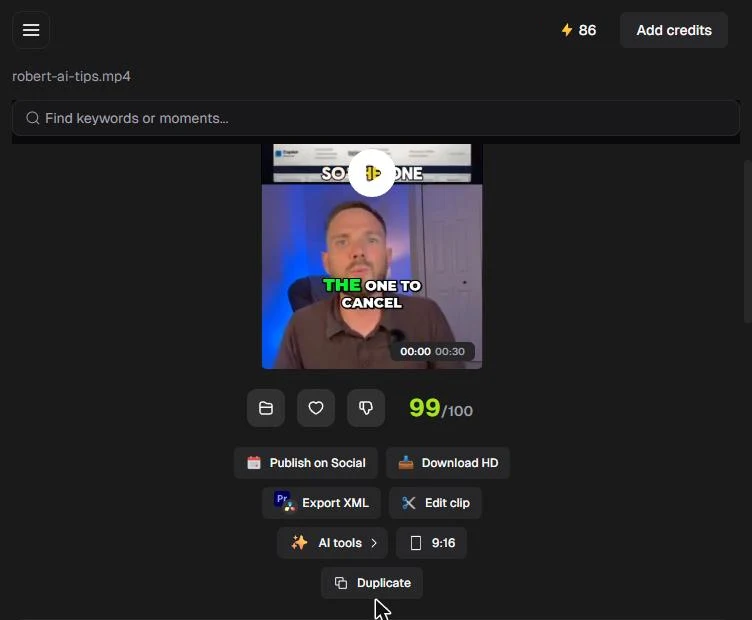
Opus Clip finds the moments, adds captions, makes the clips vertical and ranks them. On my own 4:55 tips video it returned 12 clips, and the top one scored 99 out of 100.
Practice
Do every step yourself in a practice copy of the real tool. It checks your work, and “Do it for me” finishes any step you get stuck on.
What you’ll build
You upload a video to Opus Clip, tell it which moments to find, pick Karaoke captions and 9:16, and get clips in one click.
You then read the 12 ranked clips: the top score, the buttons under each clip, the title, the scene analysis and the transcript. The screens are real Opus Clip screenshots, captured October 2026. Clips and scores differ per video.
What you need
- Nothing to start the practiceThe lesson is a practice copy built from real screenshots. The business-case numbers are example numbers.
- An Opus Clip account and one video, to do it for realPlans are at opus.pro/pricing, read 17 October 2026: Free is $0 with no credit card required, Starter is $15 a month, Pro is $29 a month and Business is custom. On Free, caption templates carry a watermark.
- A desktop-width browser window, to edit clipsIn a narrow window, Edit clip says editing features are available on desktop.
Concepts
Prompt for the moments you want
Include specific moments tells the AI what to look for, such as "find tips about choosing the right AI tool for work". Leave it empty and Opus Clip picks for you. The list of clips is then headed by your prompt and a count.
A virality score is a guess
Each clip gets a score out of 100, and the list is ranked best first. Use the score to decide which clips to review first, not as a promise of views.
Check before you post
Each clip has a title, a scene analysis and a transcript with the time in the video. Read the transcript to fix caption typos and to make sure a clip does not take a sentence out of context.
Do it for real
Now repeat it in your own account. Tick each step as you go.
Quick check
3 questions to check you’ve got it.
1. You only want clips about one topic from your webinar. What do you do?
- Upload it twice
- Type the topic in Include specific moments before you get clips
- Pick a different caption style
Show the answer
Type the topic in Include specific moments before you get clips. Include specific moments tells Opus Clip which parts of the video to look for.
2. Your top clip scored 99/100. What does that mean?
- It is guaranteed to go viral
- It is Opus Clip's best guess, so review it first
- It has already been posted
Show the answer
It is Opus Clip's best guess, so review it first. The score ranks the clips. It is a guess, not a promise, so you still check each clip.
3. Edit clip says "Editing features are available on Desktop". What do you do?
- Upgrade your plan
- Widen the browser window to desktop width
- Delete the project
Show the answer
Widen the browser window to desktop width. The editor needs a desktop-width window. In a narrow window it shows that message.
Wispr Flow: Answer Emails and Write AI Prompts by Voice
You turned one video into ranked social clips. Review the apps you have met in this course and pick one to try on your own work.
Start module 29 →