Why this matters
Every quarter a sales manager rebuilds the same review deck for leadership: revenue against target, top accounts, lost deals, next quarter's plan. The layout barely changes, but copying the numbers in by hand eats an afternoon.
Presentations.AI builds a deck from a short brief and your notes. In our test it turned a quarter's numbers into a 7-slide sales review in a couple of minutes, and it also put revenue figures on a chart that we never gave it. That is why the checking step matters.
Practice
Do every step yourself in a practice copy of the real tool. It checks your work, and “Do it for me” finishes any step you get stuck on.
What you’ll build
You help Dana Whitfield, the sales manager at Brightwell Office Supply, a made-up company, build her Q3 2026 sales review for leadership.
You describe the deck, answer the AI's questions about the company, the audience and the numbers, read the 7-slide draft, and check every number on it. The screens are real Presentations.AI screenshots from a free account, captured October 2026. The AI writes a fresh deck each time, so yours will differ.
What you need
- Nothing to start the practiceThe lesson is a practice copy built from real screenshots. Brightwell Office Supply and its numbers are made up.
- A Presentations.AI account, to do it for realStart on the free plan at presentations.ai. The pricing page lists 100 credits for Starter; our free account showed 400, and a 7-slide deck used 50.
- Your real numbersRevenue against target, top accounts and lost deals, from your CRM or sales report. The more you give it, the less it guesses.
- A paid plan for the fileOn our free account, Download asked for a paid plan. Pro is $20 a month and Gold $100 a month, billed annually, per presentations.ai/pricing.
Concepts
A brief, then questions
Start with a short brief that names the company, the main numbers, what you lost and the plan, and says how many slides. Presentations.AI then asks who the deck is for and offers a box for more notes. Answer all of it.
The AI fills gaps
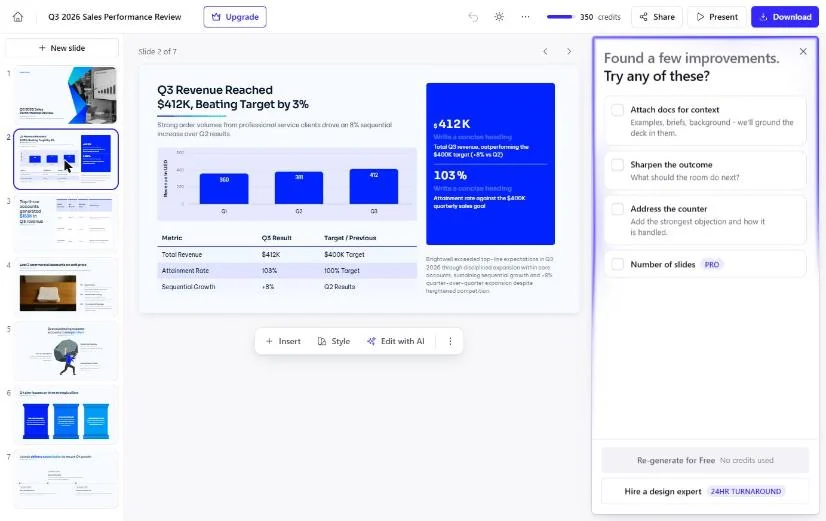
We gave no Q1 or Q2 revenue, and the chart on slide 2 showed Q1 at 360 and Q2 at 381 anyway. Q1 was made up, and Q2 looks worked backward from "up 8%". It also gave a reason for the growth we never supplied. Anything you did not give it, it may invent, and it will look finished.
Check every number
Trace each number back to your source, as we did on slide 3, where the three accounts add up to $153K and each share is the account divided by $412K. Fix or delete what you cannot back up, and fill or remove empty boxes before anyone sees the deck.
Do it for real
Now repeat it in your own account. Tick each step as you go.
Quick check
3 questions to check you’ve got it.
1. Slide 2 shows Q1 and Q2 revenue, but you only gave it Q3. What do you do?
- Keep it, the chart looks right
- Replace them with your real numbers or delete the chart
- Ask the AI if it is sure
Show the answer
Replace them with your real numbers or delete the chart. The AI filled in numbers it was never given. Only numbers you can trace back to your report belong on the slide.
2. What is the best way to cut down on made-up details?
- Ask for fewer slides
- Give it all your real numbers and attach your report
- Pick a different design
Show the answer
Give it all your real numbers and attach your report. The less it has to guess, the less it invents. The improvements panel suggests attaching docs for the same reason.
3. On our free account, what happened when we clicked Download?
- A PowerPoint file downloaded
- A plan window opened, saying paid plans include PowerPoint and PDF export
- Nothing happened
Show the answer
A plan window opened, saying paid plans include PowerPoint and PDF export. Check your plan before you promise anyone the file.
Opus Clip: Turn One Video into Ranked Social Clips
You turned a quarter's numbers into a sales review deck with Presentations.AI and caught the numbers it made up. Review the apps you have met in this course and pick one to try on your own work.
Start module 28 →