What is IVR (interactive voice response)?
Quick answer
Interactive voice response (IVR) is an automated phone system that greets callers, offers a menu of options and routes each call based on the keys they press or the words they say. A typical example is "Press 1 for billing, press 2 for support." Many IVRs also play recorded answers without involving a person.
Last updated
Updated · By Robert Breen
Why it matters for a small business
An IVR lets a small team handle more calls without putting everyone through the same line. Billing questions go to billing, new clients reach sales and simple questions like office hours get a recorded answer. It is the most common front end for call routing, and most phone systems for small offices include a basic version.
The weak spot is the menu itself. Long menus, vague options and no way to reach a person are why callers hang up or keep pressing zero. Newer IVRs use speech-to-text, so a caller can just say "I have a question about my invoice." That works better, but it still depends on clear categories and a fallback. An AI receptionist goes a step further and holds a real conversation instead of reading a menu.
In a real lesson: Gmail AI Triage: Auto-Label Every Email and Draft Replies
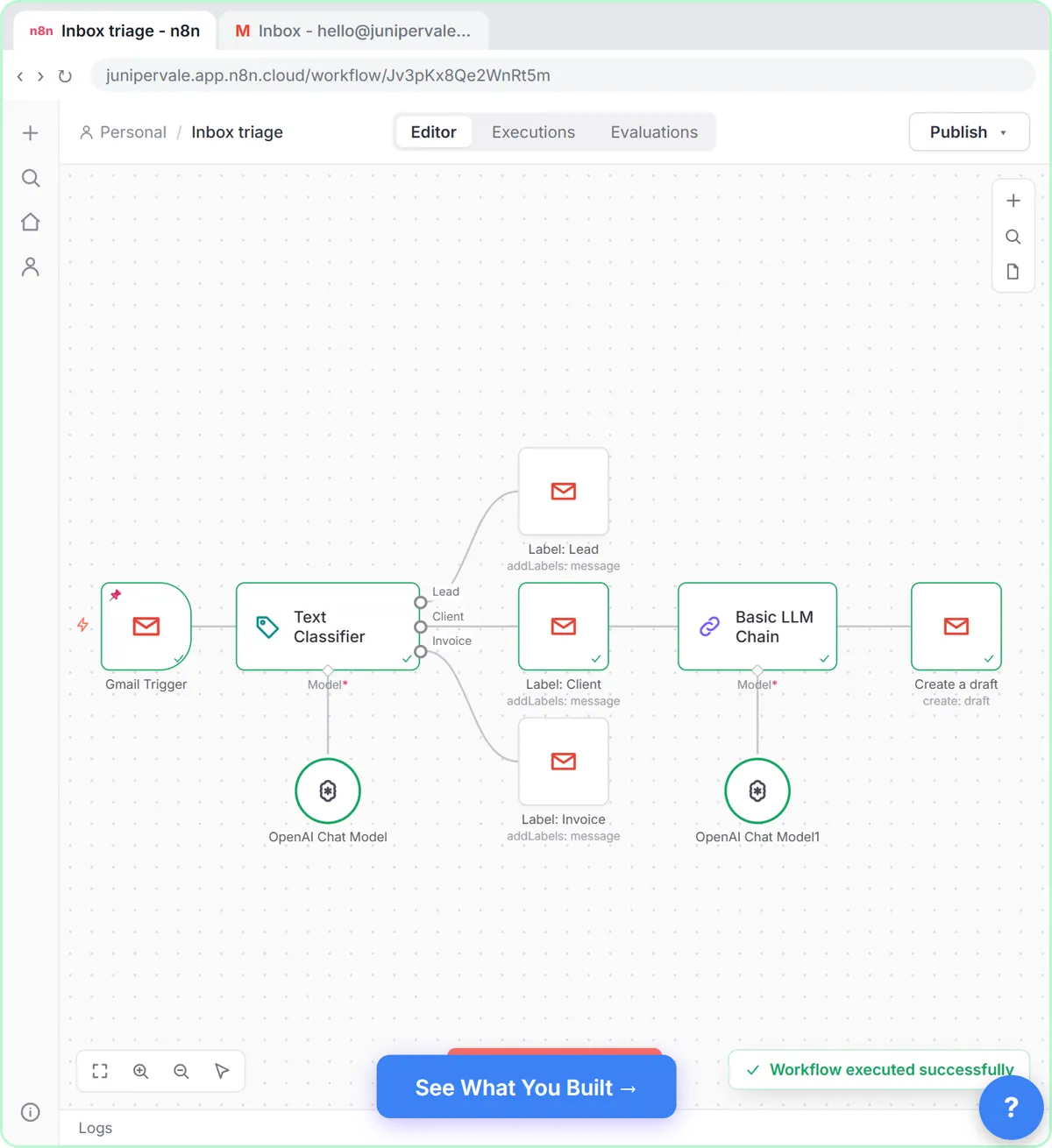
Stepthrough's voice lessons aren't live yet, so there is no phone menu to build. The Gmail AI Triage lesson builds the same sorting step for email. You are Sam at Juniper & Vale Marketing, a made-up agency, and you add a Text Classifier to an n8n workflow with three categories: Lead, Client and Invoice.
Those categories are a menu where AI makes the choice instead of the caller. Lead is described as "Someone new asking about our services, prices or availability," and Client as "An existing client writing about their own project or account with us." The descriptions do what a clear IVR prompt does: they make each option easy to tell apart.
Each category connects to its own Gmail label, and only client emails get a draft reply, which you read before anything is sent. A speech-enabled IVR runs the same pattern on a call: hear the request, pick a category, send it down the right path. Good descriptions matter in both.
Try this lesson free or read the step-by-step guide.
Common confusions
IVR vs AI receptionist
An IVR offers fixed choices and routes the call. An AI receptionist asks open questions, understands the answer and can take a message or book a time. Many businesses put a short IVR in front of people or AI.
IVR vs auto attendant
An auto attendant is a simple IVR that only greets callers and transfers them, such as "press 2 for accounting." Fuller IVR systems can also look up account information or take payments by phone.
Tips
- Keep the main menu to four or five options.
- Put the most common reason for calling first.
- Always offer a way to reach a person.
- Call the menu yourself, start to finish, after every change.
Related terms
More Voice agents terms
Where you use it: free lessons
Frequently asked questions
- What is an example of IVR?
- Calling a doctor's office and hearing "For appointments, press 1. For billing, press 2. For prescription refills, press 3." Your keypress routes the call, and some options play recorded information without ever reaching a person.
- What is the difference between IVR and an AI voice agent?
- IVR follows a fixed menu tree. A voice agent understands open-ended speech and responds in a natural conversation. Some modern systems combine them: the AI understands the request, then routes it the way an IVR would.
- Does a small business need IVR?
- Not always. If one person answers every call, a menu adds friction. It starts to help when calls need to reach different people or departments, or when the same simple question, like hours or address, comes in all day.