ChatGPT vs Claude vs Gemini for cited research reports
Quick answer
All three have a research mode that searches many web pages and writes a longer report than a normal chat, so for a competitor price scan or a brief before a client meeting, use the one your company already pays for. Claude Research and Gemini Deep Research are the two Stepthrough has walked through step by step in free lessons. In both, the most important step was the same: opening a cited source and finding a problem the report didn't mention. ChatGPT's deep research is described on OpenAI's help page; we have not built a ChatGPT lesson for this job yet, so this page makes no claim that one is more accurate.
Last updated
Take the free module →Module 6 of the free Claude Jump Start course, about 7 minutes. No account needed.
This page is for office managers, analysts, consultants, account managers and owners who need a cited answer to a business question. Features below are from each lesson and each vendor's help page, as of October 2026. To practice, start with Research: a cited competitor price scan or Gemini Deep Research: a cited brief before a client meeting.
How do they compare at a glance?
| Question | ChatGPT | Claude | Gemini |
|---|---|---|---|
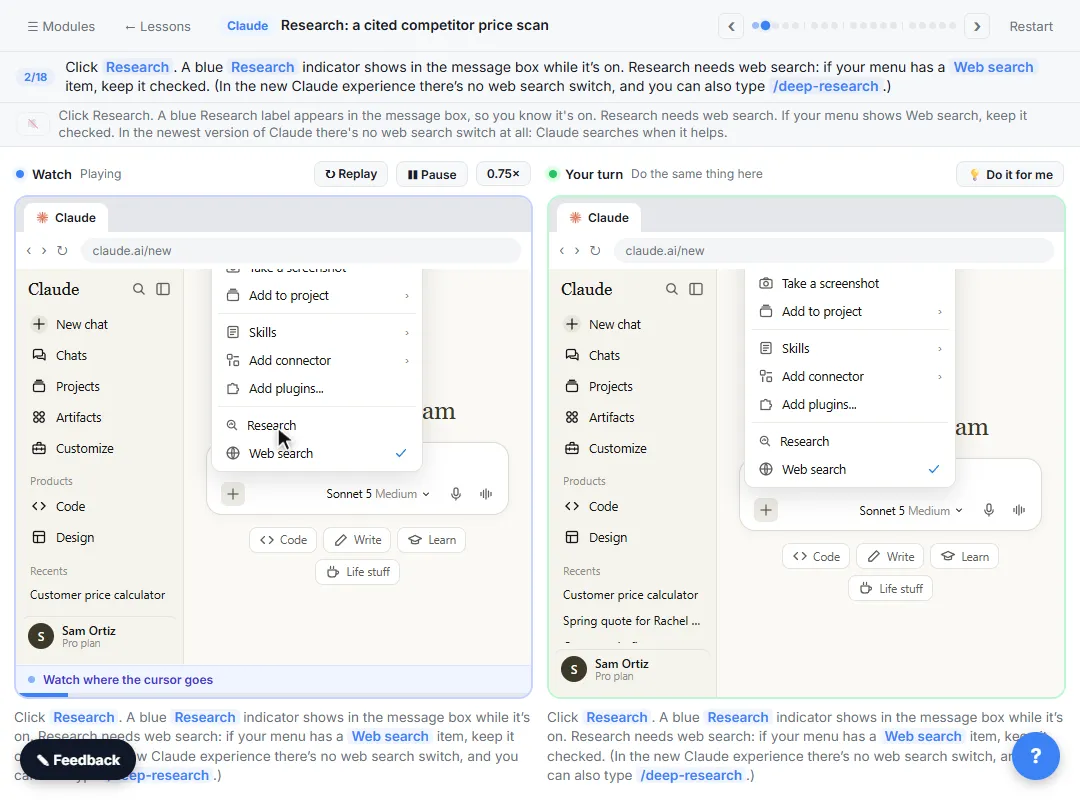
| How do you start it? | Choose deep research in ChatGPT. See OpenAI's help page for where it sits in your plan. | Click + in the message box, then Research. A blue magnifier shows it's on. | Click + in the prompt box and choose Deep research (sometimes under More tools). |
| Can you review a plan first? | Not covered in a Stepthrough lesson yet. | It plans, then searches; a progress card shows the steps and the source count. | Yes. It shows a plan; More shows every step, and Edit plan changes it before it starts. |
| What do you get back? | A cited report, per OpenAI's help page. | A report beside the chat with a citation on every claim, plus a short summary in the chat. | A long cited report in a panel. Share & Export includes Export to Docs. |
| How long did it take in the lesson? | Not tested by Stepthrough. | 64 sources in 5m 48s in the lesson's run. | About five minutes in the lesson's test. Google's help page says usually 5 to 10 minutes. |
| Which plans? | Check OpenAI's help page for your plan. | Paid plans only: Pro, Max, Team and Enterprise, with web search on. | Signed-in Gemini app users; Google AI Pro and Ultra get higher limits, per Google's help page. |
| What did the source check catch? | Not tested by Stepthrough. | A competitor price page dated March 2024 that the report didn't flag. | Exact-looking percentages from a vendor blog post that never gave a sample size. |
Which is best for research at work, ChatGPT, Claude or Gemini?
For most office research, the honest answer is the one you already have on an approved business account. All three search the web, read many pages and write a cited report. The result depends far more on your request and on whether you check the sources than on the logo. We have tested Claude and Gemini in step-by-step lessons, and both produced useful reports that still needed a person to open the sources.
If you want to compare for your own job, run the same request in each and check the same three numbers at their sources. For a related comparison that includes Perplexity, see Perplexity vs ChatGPT vs Gemini for research.
What makes a good research request in any of them?
Say where to look, what to find, how to lay it out and what to compare it with, and ask for a citation on every claim. The Claude lesson asks for lawn care prices within 15 miles of a town, in a table, compared with the business's own prices, and adds "say when a price is missing, old, or not from the company itself." The Gemini lesson names the meeting (a pitch to a regional credit union), the questions to answer, "Cite every claim" and "Keep the report short."
Both lessons use made-up businesses so you can see every step. The deep research glossary page explains how this kind of mode works.
Why do you still have to check the sources?
Because a citation shows where the AI looked, not whether the page is current, independent or read correctly. In the Claude lesson, a cited price list matched the report, but its small print said the prices were from March 2024. In the Gemini lesson, the report's first numbers (41.67%, 8.33%, 58.33%) traced back to a vendor blog post that never said how many people were surveyed.
Neither problem was visible in the report. Both took one click to find. The source verification and AI citations glossary pages cover the habit, whichever tool you use.
Can these research modes use your work files and email?
Claude's and Google's help pages both say research can include connected or added sources beyond the web, such as Google Workspace in Claude or Gmail and Drive in Gemini. That's powerful and it's also a data decision. Agree as a team which sources may be included, and follow your company's rules on AI and client data.
Who is each one for?
ChatGPT (deep research)
Teams that already work in ChatGPT on a business plan. Use the same request pattern and source check shown in the Claude and Gemini lessons; OpenAI's help page covers plans and limits.
Claude (Research)
Teams on a paid Claude plan who want a cited report with a short summary and quick follow-ups in the same chat. Practice with Research: a cited competitor price scan.
Gemini (Deep Research)
Teams in Google Workspace who want to review the plan before it runs and export the report straight to Google Docs. Practice with Gemini Deep Research: a cited brief before a client meeting.
Which of these tools have a free Stepthrough lesson?
- ChatGPT (deep research): a free Stepthrough lesson is coming.
- Claude (Research): free lesson: Claude Research: Get a Cited Competitor Price Scan, Then Check It
- Gemini (Deep Research): free lesson: Gemini Deep Research: Build a Cited Brief Before a Client Meeting
Practice it free, step by step
Claude Research: Get a Cited Competitor Price Scan, Then Check It. Turn on Research, have Claude check what nearby competitors charge, read the cited report, check a source and ask a follow-up. You do every step yourself in a practice copy of Claude, it checks your work as you go, and “Do it for me” finishes any step you get stuck on. Free, and nothing touches your real accounts.
Start the free lessonKey takeaways
- All three have a research mode that reads many pages and writes a cited report; use the one your company already approves.
- A clear request (where, what, layout, comparison, "cite every claim") matters more than the tool.
- In both tested lessons, opening one source caught a problem the report missed.
- Gemini lets you edit the plan before it starts; Claude shows its steps and sources as it works.
- Decide as a team which connected sources, like email or Drive, research may use.
Frequently asked questions
Is Claude Research or Gemini Deep Research more accurate?
We haven't run a head-to-head test, so we don't claim either is more accurate. In both lessons, the report needed a source check before it was safe to use.
Do I need a paid plan for research mode?
For Claude, yes: Research is on Pro, Max, Team and Enterprise. Gemini's help page lists higher limits on Google AI Pro and Ultra. For ChatGPT, check OpenAI's help page for your plan.
How long does an AI research report take?
Minutes, not seconds. The Claude lesson's run took 5m 48s, and Google's help page says Gemini Deep Research usually takes about 5 to 10 minutes.
Can I trust the citations in an AI research report?
Use them to check, not as proof. Open the sources behind any number you plan to use, and note who published it and when, as of October 2026 and always.
Where do these prices and features come from?
Every price and feature on this page was checked against the vendor's own page, as of October 2026. No numbers here are estimates or third-party figures. The example businesses in the Stepthrough lessons are made up.