Excel for the web budget: tables, calculated columns, Total Row, red flags and sharing on one page
A free one-page Excel for the web cheat sheet: Format as Table, a Difference column, Total Row, conditional formatting for overspending and sharing.
Excel for the web budget: tables, calculated columns, Total Row, red flags and sharing on one page
The steps from the free Excel for the Web Jump Start, practised there on real Excel for the web screens (Microsoft 365).
Start
- Sign in at microsoft365.com, open Excel, choose Blank workbook and rename the file at the top.
- Headers in A1 to C1: Category, Budget, Actual. Type numbers without commas or "$".
- Excel for the web saves as you work: there is no Save button to forget.
Make it a table
- Format as Table
- Home > Format As Table, pick a style, keep My table has headers ticked, OK.
- Calculated column
- Type Difference in D1 and
=C2-B2in D2: Excel fills it down the whole column. - Total Row
- Table Design > Total Row, then choose Sum in each total cell.
- No table?
- Click under a column of numbers and choose Home > AutoSum.
Flag overspending
- Select the Difference cells.
- Home > Conditional Formatting > Highlight Cell Rules > Greater Than.
- In the panel on the right type 0, keep the light red style, click Done.
Finish and share
- Select the numbers and apply Currency from the Home tab.
- Share > Share, add the person, use the eye button for Can edit or Can view, then send.
- Next month, type only the new Actual numbers: totals and red flags update by themselves.
Remember: Put the numbers in a table once, let formulas and rules do the checking, and share one link instead of emailing totals.
Practice it free: Excel for the Web: Your First Budget Spreadsheet at learn.ynteractive.com/modules/excel-web-budget. This sheet: learn.ynteractive.com/content/cheat-sheets/excel-for-the-web-budget. Tom's bakery is a made-up business from the lesson. By Robert Breen, October 23, 2026.
Practice it in the free lesson
Excel for the Web: Your First Budget Spreadsheet. A beginner Excel for the web walkthrough on real screens: turn a budget into a table, let one formula fill the Difference column, total it with the Total Row, turn overspending red and share one link. You do every step yourself in a practice copy of Excel, it checks your work as you go, and “Do it for me” finishes any step you get stuck on. Free, and nothing touches your real accounts.
Start the free lessonRelated terms
Plain-English definitions, each with an example from a free lesson.
More cheat sheets
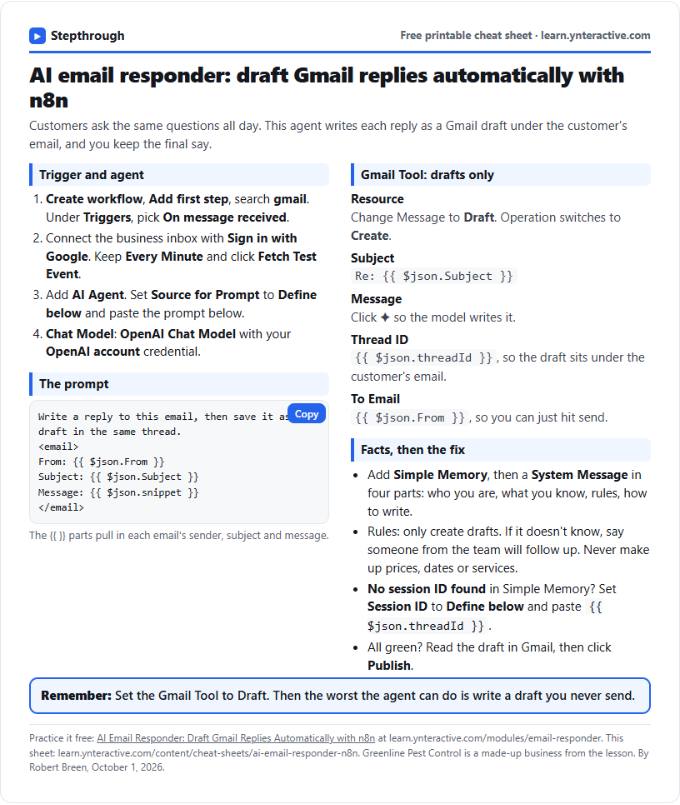 AI Email Responder in n8n Cheat Sheet
A free one-page cheat sheet: n8n watches Gmail, an AI agent reads each customer email and saves a reply as a draft in the same thread.
Lesson cheat sheet Free PDF
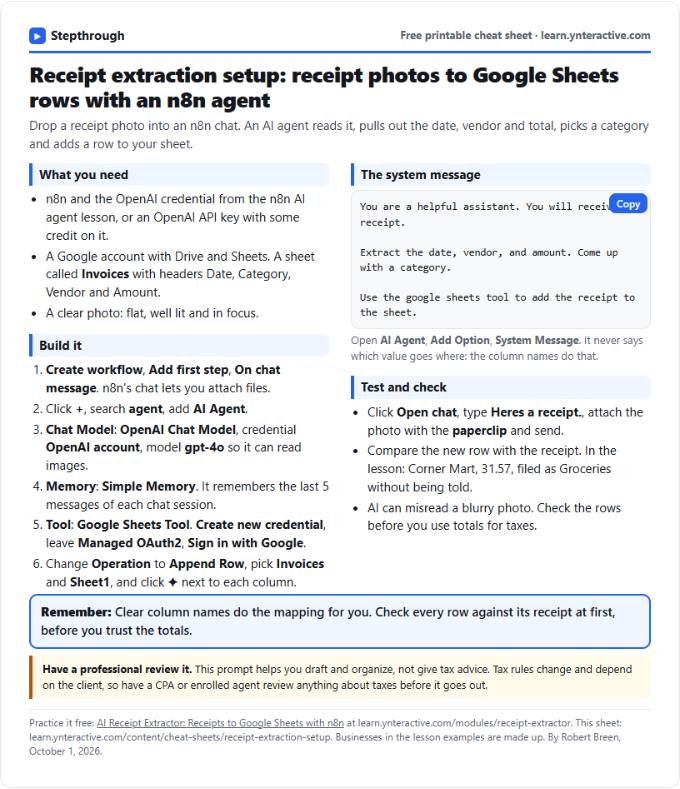 AI Receipt Extractor in n8n Cheat Sheet
A free one-page cheat sheet: attach a receipt photo in n8n chat, and an AI agent pulls the date, vendor and amount into a Google Sheets row.
Lesson cheat sheet Free PDF
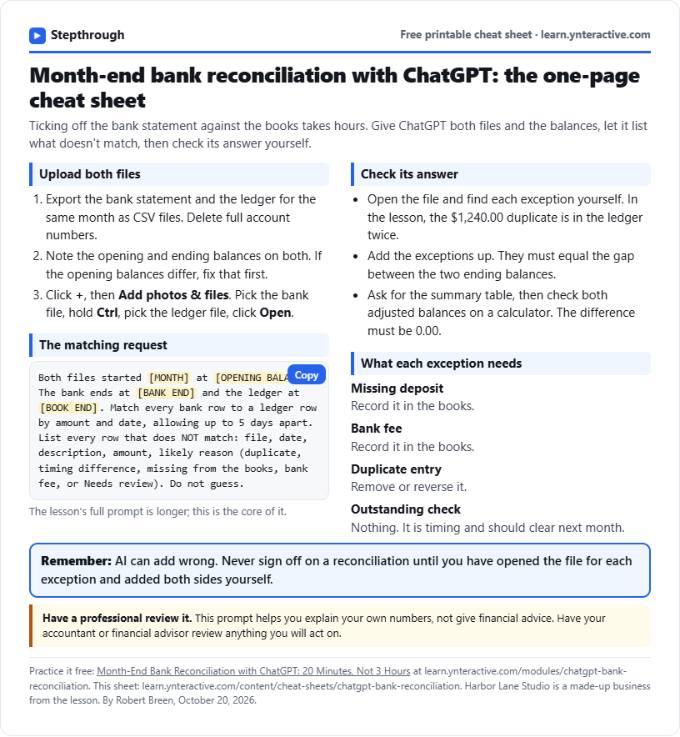 ChatGPT Bank Reconciliation Cheat Sheet
A free one-page cheat sheet: match a bank statement CSV to the ledger with ChatGPT, list the exceptions, build the summary and check the math yourself.
Lesson cheat sheet Free PDF