Why this matters
In tax season a small firm answers the same call a dozen times a week: where is my return, and what do you still need from me? At six minutes a call that is about 17 hours a season, spent reading out a status that could be on a page.
This module follows Marcus (made up), who answers the phones at Brightside Bookkeeping. He describes a client status page to Lovable: clients type a client code and last name and see a progress bar, what is missing, and who to call. It is a demo with three made-up clients; the next module shows what must change before real client data goes in.
What you’ll build
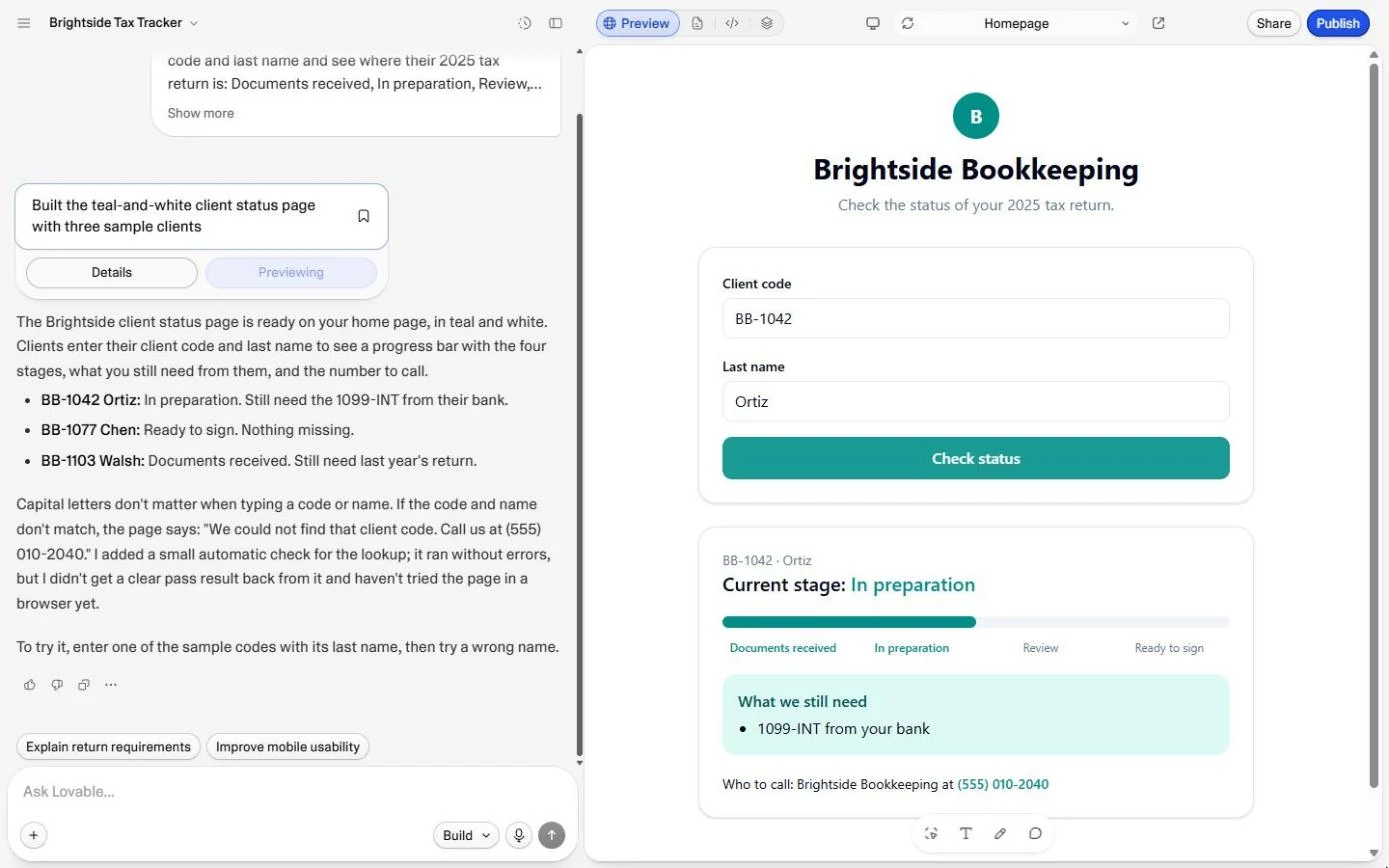
A teal client status page from one prompt: client code and last name, Check status, a four-stage progress bar, what is still needed, and the number to call.
Tested twice: BB-1042 with Ortiz shows In preparation and the missing 1099-INT; a wrong surname shows only "We could not find that client code. Call us at (555) 010-2040."
What you need
- Nothing to start the practiceThe practice is built from real Lovable screens and runs in this page.
- A Lovable account, to do it for realThe build used 1 credit; the Free plan gave 5 a day in October 2026.
Concepts
3 ideas you’ll use in the practice.
A customer portal, in its simplest form
A customer portal is a page where customers look up their own information instead of calling you: an order, a job, a return. The simplest version asks for something only that customer should know and shows one record.
Write the unhappy path into the prompt
Say exactly what should happen when nothing matches, and give the next step ("Call us at..."). Left alone, the AI picks its own wording. Then test it on purpose with a wrong name, a wrong code and a blank box.
A demo is not a portal yet
Our prompt said "no logins and no database: a demo with sample data only", so Lovable wrote the three clients into the page itself. That is fine for showing the idea to the team with made-up names. It is never fine for real clients, and module 10 shows why and what to change.
Practice
Do every step yourself in a practice copy of the real tool. It checks your work, and “Do it for me” finishes any step you get stuck on.
Do it for real
Now repeat it in your own account. Tick each step as you go.
Quick check
3 questions to check you’ve got it.
1. What should a wrong surname with a real client code show?
- That client's stage, but not the missing items
- Only the not-found message
- A list of possible matches
Show the answer
Only the not-found message. Someone who is not the client must see nothing about the client.
2. Why does the prompt spell out the not-found sentence?
- So the AI does not pick its own wording or show too much
- Because Lovable needs it to build the page
- To make the page load faster
Show the answer
So the AI does not pick its own wording or show too much. You decide what an unhappy visitor sees and what they should do next.
3. Is this demo ready for real client data?
- Yes, the scan found no issues
- No: the clients are in the page and there are no logins
- Yes, if the link is not shared
Show the answer
No: the clients are in the page and there are no logins. Anything in the page code goes to every visitor. Real data needs logins and a database with rules.
Lovable: Check Logins, Data and Cost Before You Share an App
Next: the three checks before you share anything you vibe code: who can open it, where the data lives, and what it costs.
Start module 10 →