Why this matters
An AI app builder makes it easy to put something online in minutes. It makes it just as easy to put client data online by mistake: a tax status, a missing form and a surname are personal information, and links get forwarded.
This module follows Marcus (made up) at Brightside Bookkeeping. The partners want the status page from module 9 sent to clients on Monday. Before he shares the link he does three checks that apply to anything you vibe code: who can open it, where the data lives, and what it will cost.
What you’ll build
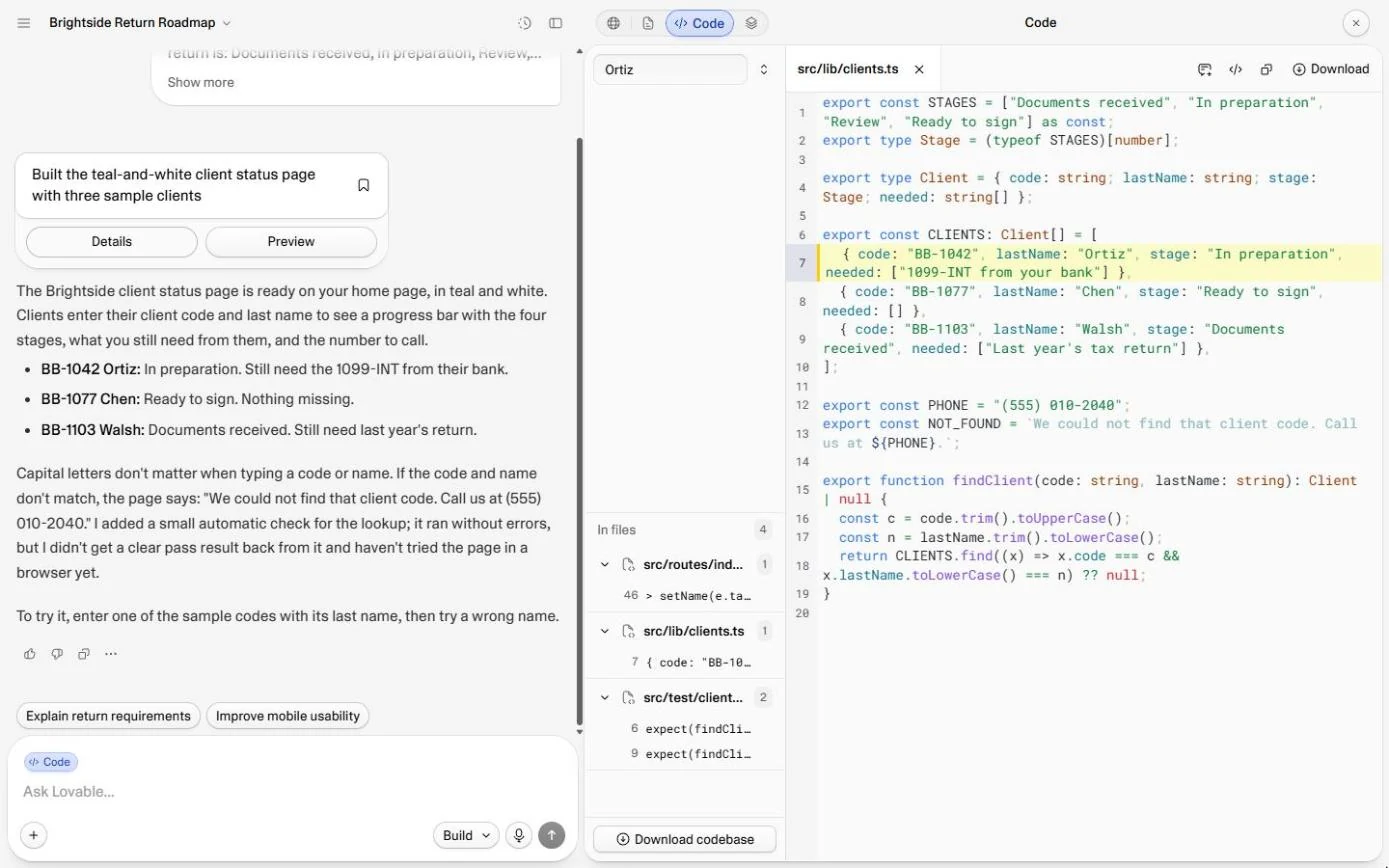
Three answers, found in the real app without publishing or spending a credit: the page would be public to anyone with the link; all three clients sit in the page code (src/lib/clients.ts) even though the security scan said no issues; and Lovable's own plan for a safe version (client logins, a Lovable Cloud database, row-level security) with what it would cost.
What you need
- Nothing to start the practiceThe practice is built from real Lovable screens and runs in this page.
- A Lovable project, to do it for realAny project you built: the checks use the Publish panel (without publishing), Search code and Chat mode, which was free in October 2026.
Concepts
4 ideas you’ll use in the practice.
Who can open it
In October 2026 a published Lovable app was Public by default: anyone with the link. Invite only was one click away, and "anyone in your workspace" needed the Business plan. Internal tools belong behind Invite only or your workspace; a customer app can be public only when every customer logs in.
Anything in the page is public
Whatever is written into the page code is downloaded by every visitor, whether the screen shows it or not. A security scan looks for known mistakes such as exposed keys and open database tables; it cannot know that your client list should be private. Search the code for a real name before you publish.
Logins, a database and rules
Logins say who someone is. A database keeps the records off the page. Row-level security is the rule that lets each person read only their own rows. You need all three: logins without rules still let any logged-in client read every record.
What it costs
Lovable's answer in our run: 20 free Lovable Cloud credits a month on every plan should cover a small firm's traffic, and adding logins and rules uses build credits. Add the plan price, a domain if you want one, and the time someone spends looking after it.
Practice
Do every step yourself in a practice copy of the real tool. It checks your work, and “Do it for me” finishes any step you get stuck on.
Do it for real
Now repeat it in your own account. Tick each step as you go.
Quick check
3 questions to check you’ve got it.
1. The security scan says "No security issues found". Is client data in the page code safe?
- Yes, the scan checked it
- No: anything in the page code goes to every visitor
- Only if the site is not published
Show the answer
No: anything in the page code goes to every visitor. The scan looks for known mistakes. It cannot know a list of clients is meant to be private.
2. What does row-level security do?
- Encrypts the whole website
- Lets each signed-in person read only their own rows
- Hides the site from search engines
Show the answer
Lets each signed-in person read only their own rows. It is the database rule that ties each row to the person allowed to see it.
3. Which Lovable mode answers questions without changing your app?
- Build
- Chat
- Publish
Show the answer
Chat. Chat (marked Free in October 2026) explores ideas and plans; Build changes the code.
Publish it and connect your own domain
Last module: when an app is ready for the world, give it a proper name, a sharing image and your own domain.
Start module 11 →