Why this matters
Small offices pay for software by the seat, often for an app where they use two features out of forty. Vibe coding changes the sum: you describe a small tool in plain English, an AI app builder writes the code, and you have a working version in a minute or two.
This module follows Priya (made up), the office manager at Northfield Accounting, 14 staff. Five pieces of shared equipment, a whiteboard nobody updates, and an asset-tracking app that would cost about $1,008 a year. She builds a sign-out board in Lovable with one prompt instead, and learns where building stops making sense.
What you’ll build
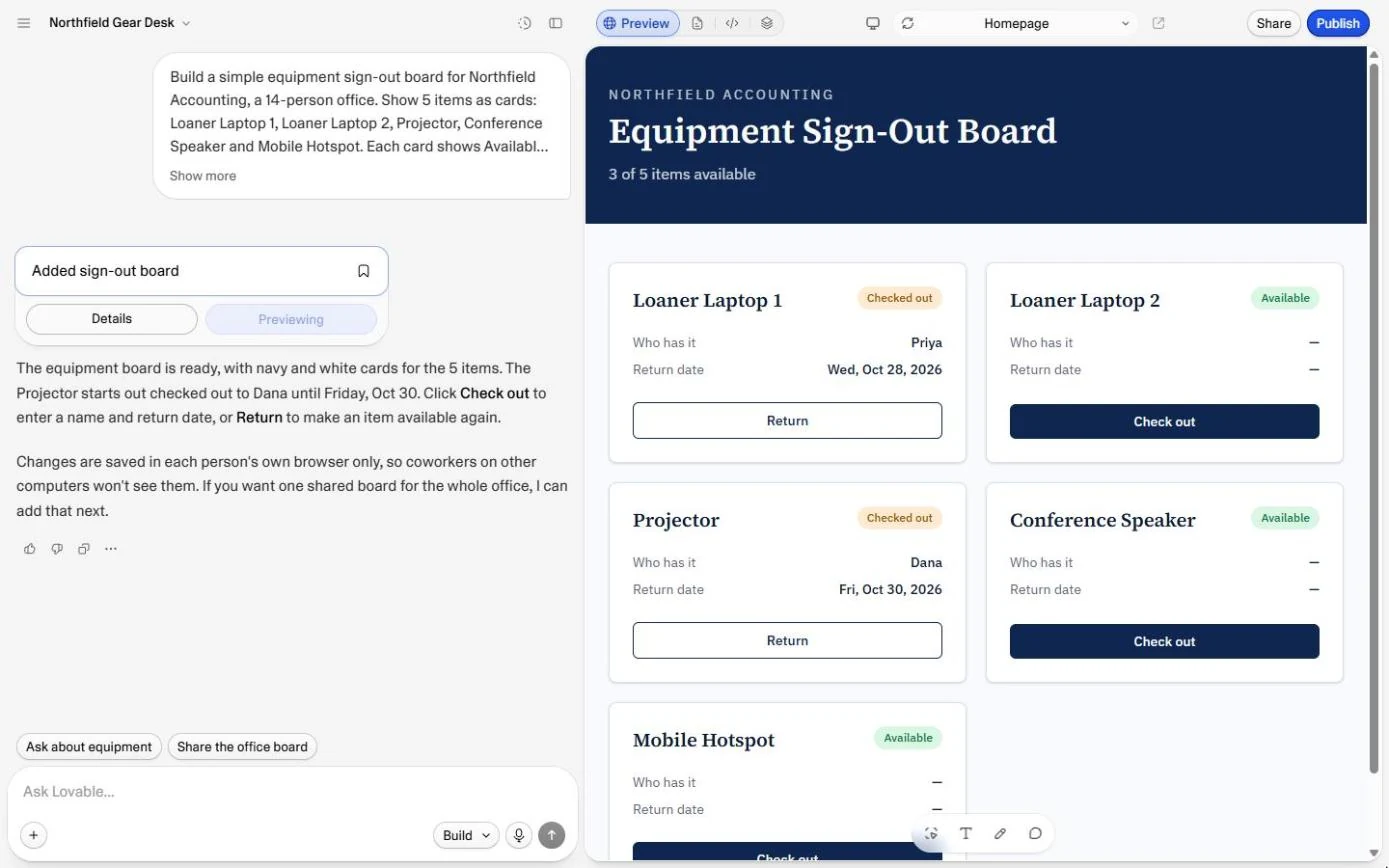
A working equipment sign-out board built from one prompt: five cards, Check out with a name and a return date, Return, and a live count of what is available.
You also open the real code behind it, see that the data sits in the browser for now, and check the cost: 1 credit.
What you need
- Nothing to start the practiceThe practice is built from real Lovable screens and runs in this page.
- A Lovable account, to do it for realThe Free plan gave 5 build credits a day in October 2026; this build used 1.
Concepts
3 ideas you’ll use in the practice.
What vibe coding is
Vibe coding means describing the software you want in plain language and letting an AI write and run the code. You judge the result by using it, then ask for changes the same way. Lovable, Replit, Bolt and v0 all work like this; Lovable is the one this course uses.
A build prompt in six parts
Who it is for, what is on the screen, what each button does, some starting data, the look, and the limits. The limits matter most at the start: "no logins and no database yet" keeps the first version small and cheap, and you add those later on purpose.
Build or buy
Build small, internal tools that fit how you work, where an off-the-shelf app is mostly features you will never use. Buy anything that holds money, payroll, health or legal data, or that must never go down: someone else then carries the security, the backups and the fixes.
Building is cheap now; looking after what you build is not free. Count the time to fix and update it, not only the minute it took to make.
Practice
Do every step yourself in a practice copy of the real tool. It checks your work, and “Do it for me” finishes any step you get stuck on.
Do it for real
Now repeat it in your own account. Tick each step as you go.
Quick check
3 questions to check you’ve got it.
1. What does "vibe coding" mean?
- Describing software in plain language and letting an AI write the code
- Copying code from the internet
- A no-code drag-and-drop form builder
Show the answer
Describing software in plain language and letting an AI write the code. You describe what you want, the AI writes and runs the code, and you change it by asking.
2. Where did our first sign-out board keep its data?
- In a shared database
- In each person's own browser
- In a Google Sheet
Show the answer
In each person's own browser. Lovable said so in its reply, and the code shows a STORAGE_KEY. Coworkers would each see their own copy.
3. Which of these should you usually buy rather than build?
- A sign-out board for shared equipment
- Payroll
- A one-page internal FAQ
Show the answer
Payroll. Payroll holds money and personal data and must always work. Let a vendor carry that risk.
Runable: Brief a One-Page Website, Approve the Plan and Budget Your Credits
Next: the same idea for a customer-facing page. Brief an AI agent for a one-page website, approve its plan and watch the credits.
Start module 2 →