Why this matters
Consultants and agencies live on intro calls, and most booking links only collect a name and a time. So the first ten minutes go to finding out what the client wants, and some calls turn out not to be a fit at all.
Yoya puts a short conversation in front of the calendar. The guest explains what they need, picks a time in the chat and confirms, and you get a meeting brief with who is coming, why and what to cover before you say hello.
Practice
Do every step yourself in a practice copy of the real tool. It checks your work, and “Do it for me” finishes any step you get stuck on.
What you’ll build
You are Priya, a made-up operations consultant. You build her booking page from Yoya's Consultant discovery call template, write her intake questions, and set her weekly hours.
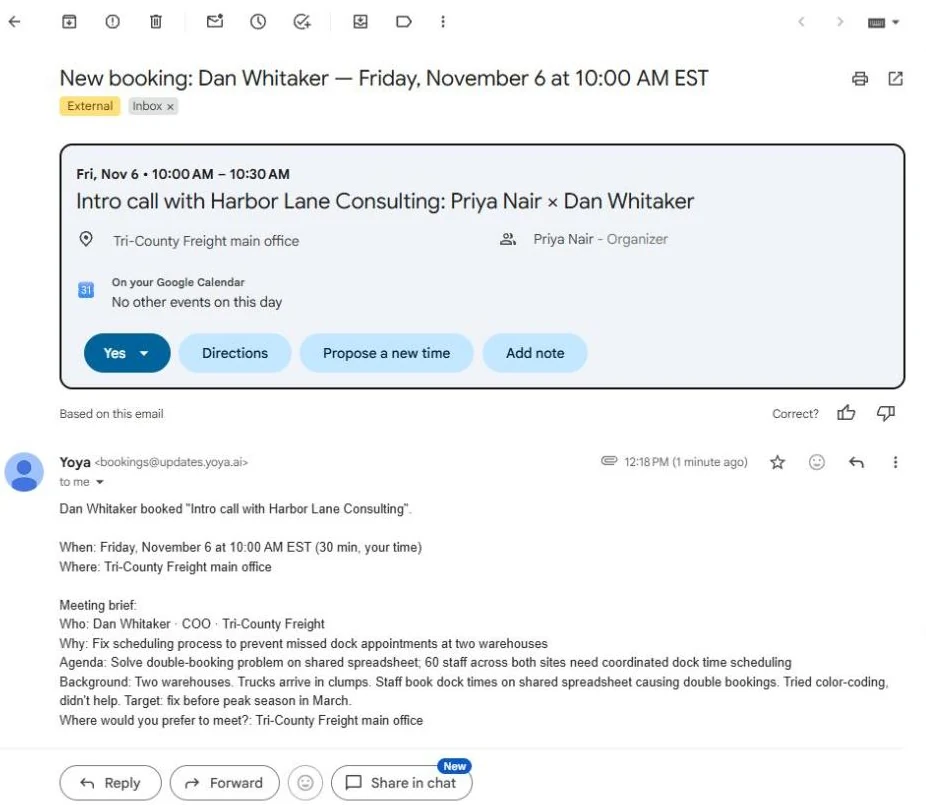
Then you book a call as a guest, a COO whose warehouses keep double-booking dock times. You read the confirmation, the calendar invitation and the brief Priya gets, and check the brief against the chat. The screens are real screenshots from my own Yoya account, captured October 2026.
What you need
- Nothing to start the practiceThe lesson is a practice copy. The people and the firms are made up.
- A Yoya account, to do it for realThe free plan has one booking link and 10 bookings a month, with a meeting brief on every booking. Custom host names need Business. Plans change; check the site.
- Your Google Calendar, for a real pageConnect it from the Google Meet option so Yoya can see when you are busy. We did not connect one for this lesson.
- Your own email address as the test guestYou need a real inbox to see the guest confirmation and calendar file. In our test, a reserved address such as name@example.com kept Continue greyed out.
Concepts
Your intake questions go in the prompt
What should Yoya find out from guests? is the box that does the work. List what you need to know before a call, and add a line on what it must never promise, such as a quote or a result.
Required guest details are different: use them for facts a guest must give before confirming, such as a phone number or a LinkedIn profile.
A brief is a summary, so check it
The brief comes by email and sits on your dashboard. In our latest run it kept the problem, the team size, what the guest had already tried and the deadline.
It is still written by AI, and the transcript keeps the whole chat. For a call that matters, read the chat as well.
Do it for real
Now repeat it in your own account. Tick each step as you go.
Quick check
3 questions to check you’ve got it.
1. Where do you tell Yoya what to ask each guest?
- What should Yoya find out from guests?
- The Description
- Required guest details
Show the answer
What should Yoya find out from guests?. That box steers the conversation. Required details are for facts a guest must give before confirming.
2. Why connect Google Calendar before you share a real link?
- So Yoya can see when you are busy
- So guests can see your calendar
- Yoya will not save the page without it
Show the answer
So Yoya can see when you are busy. Without it, Yoya warns that it may offer times you already have something booked.
3. The brief left out a detail you need. Where is it?
- In the Transcript on the booking
- Nowhere, it is gone
- Only in the guest email
Show the answer
In the Transcript on the booking. The transcript keeps the whole chat, on the booking in your dashboard.