Why this matters
Small firms record how-to videos for their clients: how to use the portal, how to read an invoice, how to book a call. The video can save hours of support, but only if clients click it. A plain title and a screenshot thumbnail get passed over.
Pikzels writes YouTube titles from one sentence about your video, turns the title you pick into thumbnails, scores each one out of 100 and tells you why. One-Click Fix acts on the tips, and Edit changes one boxed area from a plain-English request. A title and thumbnail take about five minutes instead of an hour in a design tool.
Practice
Do every step yourself in a practice copy of the real tool. It checks your work, and “Do it for me” finishes any step you get stuck on.
What you’ll build
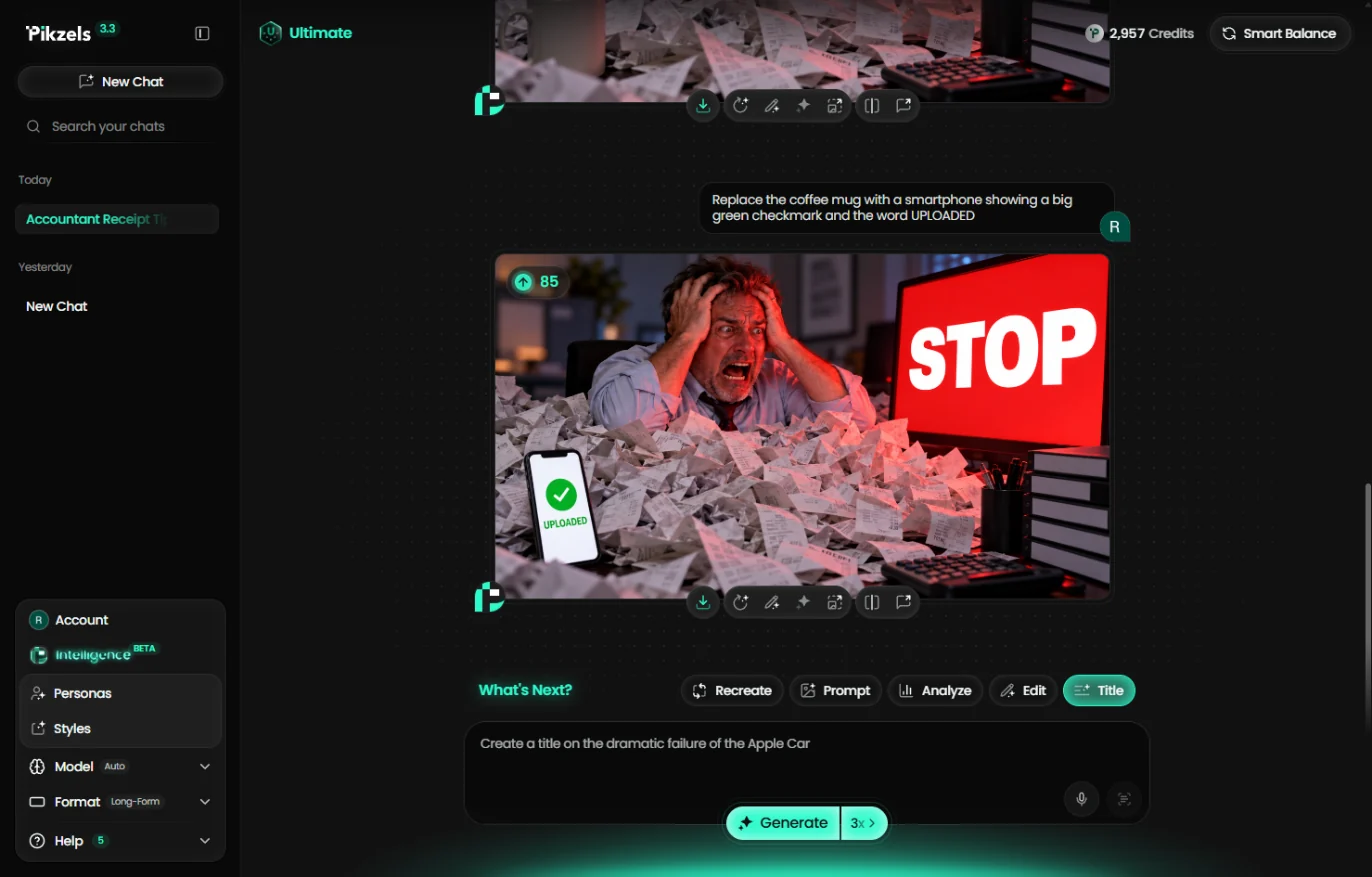
For a made-up 10-person accounting firm, you get a title and thumbnail for a how-to video that shows clients how to upload receipts and tax documents to the secure portal instead of emailing them.
You pick "Stop Emailing Receipts to Your Accountant" from three titles, generate two thumbnails, raise one from 71 to 82 with One-Click Fix, then box one corner to show the answer (a phone that says UPLOADED) for 85. The screens are real screenshots from my own Pikzels account, captured October 2026.
What you need
- Nothing to start the practiceThe lesson is a practice copy. The firm is made up.
- A Pikzels account, to do it for realpikzels.com. On the Free plan, results were locked behind a 7-day trial when we checked (October 2026). This run used 43 credits. Plans change, so check pricing first.
- One sentence about your videoWho made it, what viewers learn, and the problem it solves.
Concepts
Title first, then the thumbnail
Describe the video in one sentence in the Title workflow. Pikzels writes three titles; pick the one that talks about the viewer's problem, not about your firm.
The sparkle on a title row (Generate Thumbnails) builds two thumbnails that match it, so the picture and the words make the same promise.
Read the score, fix one thing at a time
Every thumbnail is scored out of 100, broken into Virality, Clarity, Idea, Curiosity and Emotion, each with a tip. One-Click Fix turns the tips into an edit for you.
Edit lets you box one area and describe a change, like showing the answer next to the problem. Check the image fits your brand before you post; you can ask for a calmer look in the same chat.
Do it for real
Now repeat it in your own account. Tick each step as you go.
Quick check
3 questions to check you’ve got it.
1. Which title is most likely to get a client to click?
- Stop Emailing Receipts to Your Accountant
- Upload Tax Documents to Our Client Portal
- Our Firm's Portal Video
Show the answer
Stop Emailing Receipts to Your Accountant. It talks to the viewer's own habit, not to what the firm wants.
2. What does the Pikzels thumbnail score help you do?
- See what a viewer will miss, with a tip for each part
- Publish the video
- Count your subscribers
Show the answer
See what a viewer will miss, with a tip for each part. Each part of the score comes with a tip you can act on, or let One-Click Fix act on.
3. You like the thumbnail but it only shows the problem. What do you do?
- Box one area in Edit and describe the change
- Start over with a new title
- Download it and fix it in another app
Show the answer
Box one area in Edit and describe the change. Edit changes only the boxed area and keeps everything that already works.