Why this matters
A small firm can lose a day writing each proposal, and a deal can cool while it waits. The first version is the slow part, and it is rarely where the work is won.
Propovo drafts a full proposal from a line or two. You keep the price, the dates and the final read, because in our test the AI left the price blank, and it also wrote two lines no client should see.
Practice
Do every step yourself in a practice copy of the real tool. It checks your work, and “Do it for me” finishes any step you get stuck on.
What you’ll build
You run a made-up four-person HR consulting firm quoting a handbook rewrite for a 40-person architecture firm. You brief Propovo in one line, read the outline, and fill in the fee, timeline and payment terms.
Then you fix the two lines the AI got wrong, name who signs, and preview what your client sees. The screens are real screenshots from my own Propovo trial, captured October 2026.
What you need
- Nothing to start the practiceThe lesson is a practice copy. The companies and the fee are made up.
- A Propovo trial, to do it for realThe pricing page lists a 14-day Premium trial with no card and 250 AI credits. A full draft used about 25. Check the current plans.
Concepts
A blank is better than a guess
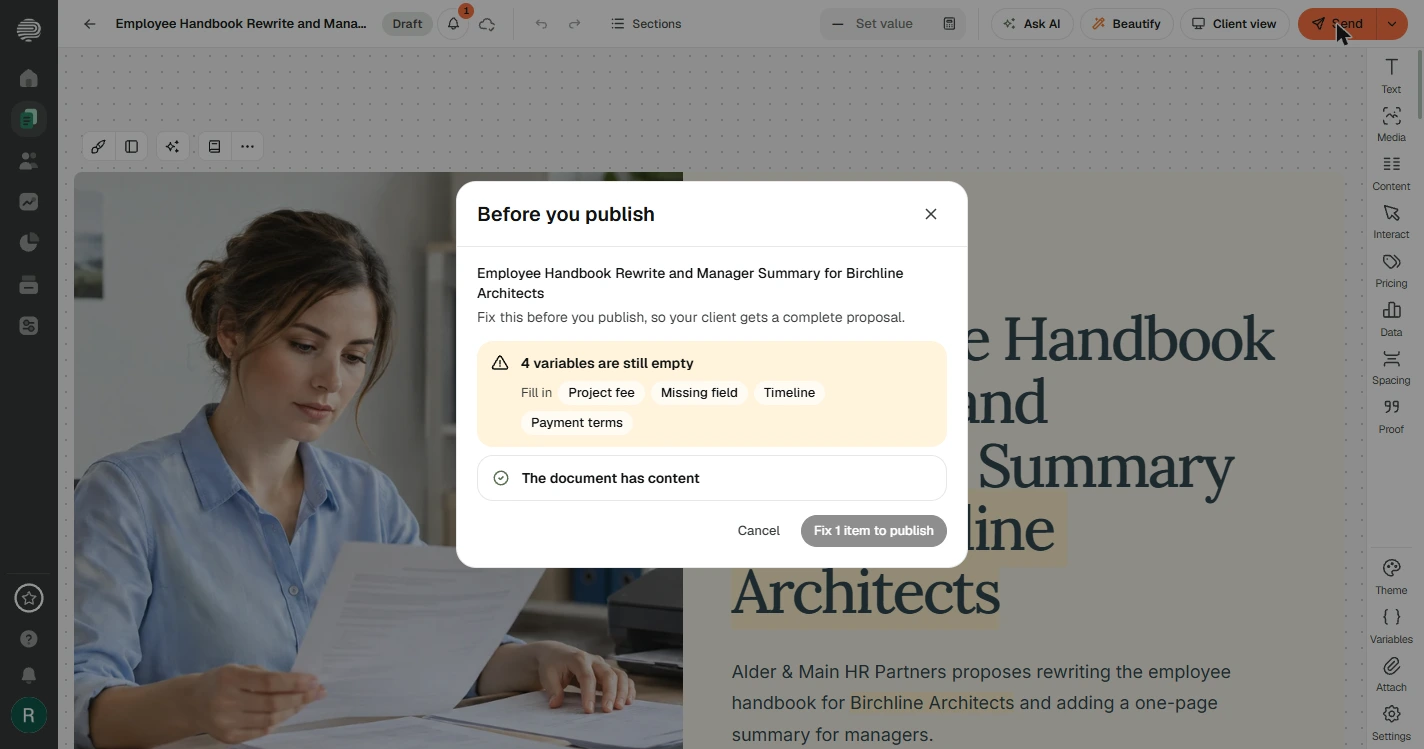
We never gave a price, so Propovo wrote {{PROJECT_FEE}}, {{TIMELINE}} and {{PAYMENT_TERMS}} instead of inventing them. Filling those in is your job, in the Variables panel, and one value fills every place it is used.
Before you publish, Propovo blocks a proposal that still has empty variables. That check is useful, and it is also the limit of what software can catch here.
The check finds blanks. You find nonsense.
Our draft said a review of the current handbook "is {{PROJECT_FEE}}-independent and to be confirmed", and it listed "Additional deliverables: {{MISSING_FIELD}}". With a fee filled in, the first line would have reached the client as nonsense.
One specific request to Ask AI fixed both lines. Your draft will have different slips, so read every line and look at every picture the AI chose.
Decide who says yes before you send
Without someone added under Who accepts, your client can only read the proposal. Add the person who decides, and choose Signs for a typed or drawn signature, or Approves for a lighter yes.
Preview client flow shows their view without sending anything. Propovo also describes tracking when a client opens a document. We stopped before publishing, so we did not test that part.
Do it for real
Now repeat it in your own account. Tick each step as you go.
Quick check
3 questions to check you’ve got it.
1. You left the price out of your brief. What did Propovo do in our test?
- It left a variable for you to fill in
- It estimated a price from the scope
- It refused to write the section
Show the answer
It left a variable for you to fill in. It wrote {{PROJECT_FEE}} instead of inventing a number, and the check blocks publishing until you fill it in.
2. Before you publish shows nothing left to fix. What should you still do?
- Read every line yourself
- Nothing, the proposal has been checked
- Run Beautify once more
Show the answer
Read every line yourself. The check looks for things like empty variables. It can not tell when a sentence makes no sense.
3. What happens if you add no one under Who accepts?
- Your client can only read the proposal
- Anyone with the link can sign
- Propovo picks the client contact
Show the answer
Your client can only read the proposal. Propovo says so on the screen. Add the person who decides, so they get the Review & accept button.